Cyber Insurance Requirements for Legacy Software
Cyber insurance requirements for legacy software, in owner language: what underwriters ask, why old systems raise premiums, and how to fix the risk for good.
 By Danilo Brizola
Cyber insurance requirements for legacy software come down to one question underwriters now ask in a dozen ways: is every system your business depends on supported, patched, protected by modern login controls, and able to prove it? For old or custom software the honest answer is often no — and that answer now has a price. Weak answers show up as premium increases, exclusions that carve your oldest system out of coverage, non-renewal notices, and, after a breach, denied claims. This guide is written for the owner, CEO, president, or COO of a mid-market company — the person who gets the renewal questionnaire forwarded from the broker with a note saying "can you look at questions 40 through 55?" By the end you'll understand what the questionnaire is really asking, why the old system keeps failing it, how to answer honestly without torpedoing your coverage, and when the right move is to stop buying insurance against a risk and start removing it.
What Underwriters Now Ask About Your Software
A decade ago, cyber insurance was a form and a check. Today it's an audit. Underwriters stopped taking a signature's word for it — many now scan your company from the outside before quoting, and the questionnaires have grown from one page to ten. The shift matters for one reason above all: the questions have moved from "do you have security?" to "prove it, per system."
Here is what the modern questionnaire asks, translated out of security vocabulary:
| What the form says | What they're really asking |
|---|---|
| Multi-factor authentication (MFA) on email, remote access, and admin accounts | When someone logs in to anything important, is a stolen password alone enough to get in? |
| Endpoint detection and response (EDR) on all workstations and servers | Is there modern monitoring software on every computer — including that old server in the back — or just antivirus from 2015? |
| Patch management with defined timelines | When a security fix is published, how many days until it's installed? Who checks? |
| End-of-life or unsupported software in production | Is anything your business runs on no longer receiving security fixes from its maker? |
| Offline, tested backups | If ransomware encrypted everything tonight, do you have copies the attacker can't reach — and have you actually practiced restoring them? |
| Remote access hardening | Can anyone reach your systems from the internet with just a password? |
| Privileged access controls | How many people hold administrator keys, and are those accounts separate from everyday ones? |
| Incident response plan | If it happens, who does what in the first hour — and have you rehearsed it? |
| Logging and monitoring | If someone broke in three weeks ago, could you tell? Could you show us? |
| Vendor and third-party risk | Do you know which outside companies can touch your systems and data? |
Insurers publish versions of this list openly — SeedPod Cyber's minimum-controls checklist for small and mid-sized businesses is a representative example, and it reports that companies who can document their answers routinely see 20–40% better pricing than peers who can't. Most of these controls are genuinely achievable for a mid-market company: your IT provider can roll out MFA, modern endpoint monitoring, and tested backups across the mainstream part of your environment in weeks.
The problem is the part of your environment that isn't mainstream. Which brings us to the questions in the middle of the form — the ones about unsupported software — where the typical mid-market company's answer lives in a gray zone, because of one or two systems everything else depends on.
Why Legacy Software Fails the Questionnaire
"Legacy" on an insurance form doesn't mean old. It means software that can't do what the questionnaire assumes all software can do. A twenty-year-old system with an active vendor shipping security fixes can pass. The custom system built in 2012 by a shop that no longer exists cannot — and it fails in three structural ways that no amount of goodwill fixes.
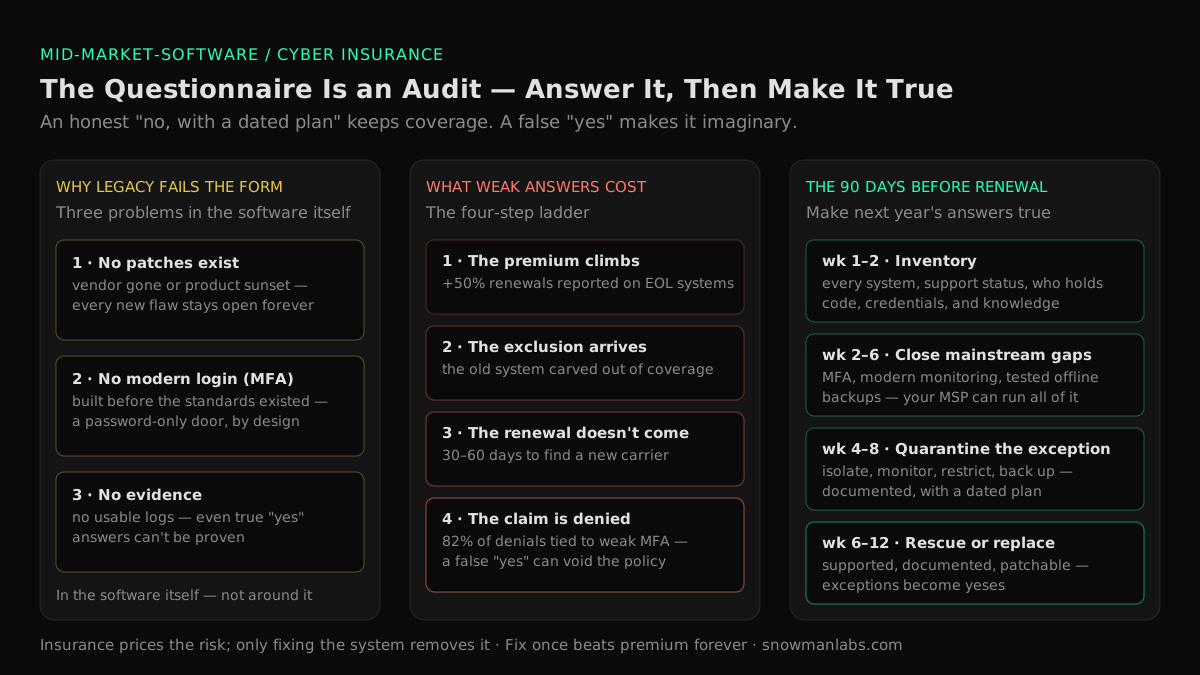
1. There are no patches to apply. Patch-management questions assume someone, somewhere, is producing security fixes. For a sunset product or a custom build whose maker is gone, no one is. Every vulnerability discovered from now on stays open forever — and this is exactly the software attackers hunt. HeroDevs' research on outdated systems finds that nearly half of the vulnerabilities in CISA's catalog of actively exploited flaws are tied to outdated, unsupported software, and that flaws in end-of-life systems are about four times more likely to be weaponized. Underwriters read the same research; it's why "do you run unsupported software?" moved from the fine print to the front page.
2. It can't do modern login security. MFA questions assume systems can be connected to a modern identity check. Software built before those standards existed often simply can't — there is no setting to enable, because the capability was never built. You can sometimes put a gateway in front of an old system, but the system itself remains a password-only door, and underwriters increasingly ask about exactly those exceptions.
3. It can't produce evidence. The newest requirement is the least visible: carriers want logs — proof of who logged in, what was patched, what the monitoring saw. Old systems often keep no usable records at all. Even where your answers are honestly "yes," a system that can't show its work increasingly counts against you.
Notice what these three problems have in common: they live in the software itself, not around it. Firewalls and monitoring wrap the building; these questions are about the locks on one specific door. That's why each renewal feels harder than the last — the surrounding security improves, and the old system stays exactly as insurable as it was in 2012.
If your version of this problem is that the system's builder is gone, our owner's guide to a software vendor going out of business covers recovering control of an orphaned system. If it's that only one veteran employee understands the system, the insurance questionnaire is quietly asking about that too — "who maintains and patches this?" with a one-name answer is a red flag underwriters recognize — and our guide to key person dependency risk in IT shows how to measure and remove it.
What It Actually Costs: The Four-Step Ladder
The consequences of failing these questions arrive on a ladder, and most owners only see the first rung.
- The premium climbs. Weak answers price directly into your renewal. MSPs report clients with unsupported systems seeing premium increases of 50% or more, and non-renewal notices on 30 days — while well-documented environments earn materially better pricing.
- The exclusion arrives. The subtler outcome: you stay covered, but an endorsement carves out "any incident arising from unsupported or end-of-life systems." Your oldest system — usually the one the business most depends on — becomes the one thing the policy doesn't cover. Owners routinely miss this until a broker or a lawyer points at the page.
- The renewal doesn't come. Carriers exit relationships they can't price. A non-renewal notice with 30–60 days to find new coverage — while carrying the same answers that made the last insurer leave — is a genuinely bad month.
- The claim gets denied. The rung that turns a bad year into an existential one. When a breach traces back to a known, unpatched vulnerability in a system you attested was managed, insurers investigate the application itself. Coalition's 2024 Cyber Claims Report found that 82% of denied claims involved organizations without properly implemented MFA across their environment. And the precedent owners should know by name: in Travelers v. International Control Services (2022), the insurer went to court after a ransomware breach arguing the MFA answers on the application were inaccurate — and the policy was rescinded entirely. Not the claim denied; the policy voided, as if it had never existed.
That last rung carries the single most important rule in this article: never shade an answer on a cyber insurance application. An optimistic "yes" doesn't transfer your risk — it converts your premium into a donation, because the misrepresentation surfaces exactly when you need the policy most, in the forensic investigation after a breach. An honest "no, and here's our plan" keeps coverage expensive. A false "yes" makes it imaginary.
How to Answer Honestly Without Losing Coverage
The good news buried in all this: underwriters don't actually expect perfection, and "no" answers don't automatically mean declination. What carriers want is evidence that you know your risk and are managing it. Three tools do most of the work:
Compensating controls, in plain English. When a system can't meet a requirement directly, insurers will often accept documented measures that reduce the same risk: the old system taken off the open internet, reachable only from inside the network by a short list of people; monitoring watching everything around it; backups of its data tested and held offline. Think of it as a documented quarantine — the system keeps working, but an attacker can't easily reach it, and you can prove that.
A dated remediation plan. The difference between "we run unsupported software" (a declination) and "we run one unsupported system, isolated as described, with a funded plan to rescue or replace it by Q2" (an underwritable risk) is the plan. Carriers have tolerated compensating controls for a renewal cycle or two — but the tolerance is shrinking, and it ends fastest when the same answers reappear year after year with no progress. A plan with dates and budget is what buys the time.
Your broker, used early. Brokers see hundreds of these applications and know which carriers still underwrite environments with a legacy exception and what documentation each one accepts. Bring them the honest picture 90 days before renewal, not the completed form the week it's due.
One deadline worth knowing as you plan: vendor support cutoffs are compressing the timeline for everyone at once. Windows 10 stopped receiving security updates in October 2025, and the last paid extension for Windows Server 2012 — the platform under a remarkable amount of mid-market custom software — ends October 13, 2026. Systems riding on those platforms flip from "aging" to "unsupported" on a date printed on a calendar, and underwriters know the date.
The 90 Days Before Renewal: An Owner's Plan
Worked backward from your renewal date, the plan fits in a quarter — and none of it requires you to be technical.
- Weeks 1–2: Inventory. One afternoon with whoever is closest to your systems: every application the business depends on, who supports it, whether it still receives security fixes, who can log in and how. This is the same five-fact possession audit we recommend for one-person systems — source code, documentation, credentials, environment, contracts — because the insurance questionnaire is, at bottom, asking whether anyone truly controls each system. You cannot answer a questionnaire about systems you haven't listed.
- Weeks 2–6: Close the mainstream gaps. MFA everywhere it can be turned on, modern monitoring on every machine, offline backups with one practiced restore, remote access behind a modern gateway. Your IT provider or MSP can execute all of this; it's the well-trodden 80% of the checklist, and it measurably moves pricing.
- Weeks 4–8: Quarantine and document the legacy exception. For the system(s) that can't comply: isolate, monitor, back up, restrict — and write it down as a formal exception with its compensating controls. This document is what your broker takes to market.
- Weeks 6–12: Decide the legacy system's future — on your timeline. Contain-and-renew is a strategy for one cycle, not five. Use the window to make the real decision our mid-market modernization guide frames for every system: leave it alone (only if it's genuinely low-risk — by this point in the audit, it isn't), rescue it, or replace it. For the fragile custom core, rescue usually comes first: recover the source code, generate real documentation, bring it under support by a team that answers the phone, and restore the ability to patch — which converts next year's questionnaire answers from exceptions into yeses. That's precisely the scope of a legacy software rescue.
Fix the System or Keep Renting the Risk
Here's the arithmetic the renewal cycle eventually forces. On one side: a premium climbing double digits yearly, an exclusion hollowing out the coverage you're climbing for, days of your team's time per renewal assembling evidence, and a residual risk the policy increasingly refuses to touch — because the system itself never changes. Insurance prices risk; it never removes it. On the other side: removing it.
Fixing the underlying system used to lose this comparison automatically, because bringing an orphaned custom system back under real support was priced like archaeology — months of specialists reading undocumented code before anyone could safely change a line. That's the input cost AI-assisted delivery collapsed. Modern tooling reads a codebase the way people read text, producing accurate first-draft documentation in days; a compact senior team directing AI coding agents then does the heavy recovery work — tests, patched dependencies, modern login in front of a system that finally supports it — with humans reviewing everything that ships. It's the model Snowman Labs runs as an official partner of Cognition, Replit, and Hud, under published operating standards: a first production milestone in 2 weeks, a 40–60% target reduction in time to market, across 400+ delivered projects rated 4.9/5 on Clutch over 32 verified reviews — the same team enterprises like Volvo, Renault, Scania, iFood, and B3 trust, working at mid-market scale through our custom software services for mid-market companies.
The practical translation: taking a system from "the exception on our insurance application" to "supported, documented, patchable, and provable" is now a weeks-long engagement — often costing less than a few years of the premium increases it prevents, before counting the breach it prevents. And unlike the premium, it's paid once.
FAQ
What do cyber insurance companies require for coverage?
The consistent core across carriers: multi-factor authentication on email, remote access, and admin accounts; modern endpoint monitoring (EDR) on workstations and servers; offline, tested backups; patching within defined timelines; no unmanaged end-of-life software; hardened remote access; an incident response plan; and, increasingly, logs that prove all of it. Requirements tighten every renewal cycle, and larger policies bring outside security scans of your company before quoting.
Can we get cyber insurance if we run unsupported or end-of-life software?
Usually yes — but not by hiding it. Carriers will generally underwrite a documented exception: the unsupported system isolated from the internet, monitored, backed up, access-restricted, and attached to a dated plan to rescue or replace it. Expect the exception to cost something in premium or carry an exclusion, and expect patience to run out if the same exception reappears renewal after renewal without progress.
Can a cyber insurance claim be denied because of outdated software?
Yes, and it's one of the most common denial patterns. If a breach traces to a known vulnerability in software you attested was patched or supported, the insurer can deny the claim — and if the application itself was inaccurate, seek to rescind the whole policy, as happened in Travelers v. International Control Services (2022). Coalition's claims data found 82% of denied claims involved improperly implemented MFA. Accurate answers are the foundation the policy stands on.
What happens if you answer a cyber insurance questionnaire incorrectly?
An innocent error discovered at renewal usually means corrected answers and adjusted pricing. An inaccuracy discovered after a breach — during the insurer's forensic investigation, which examines exactly what the application claimed — can void the claim or the entire policy as a misrepresentation. The safe rule: every answer should be one your IT provider could demonstrate with evidence, and anything uncertain gets flagged to the broker rather than rounded up to "yes."
What are compensating controls for legacy systems?
Measures that reduce a risk when the direct requirement can't be met: taking the legacy system off the open internet, allowing access only from inside the network by named people, wrapping it in monitoring, keeping tested offline backups of its data, and putting a modern login gateway in front of it where possible. Documented well, they can keep an old system insurable for a renewal cycle or two — they're a bridge to a fix, not a substitute for one.
Does modernizing legacy software lower cyber insurance premiums?
Directionally yes: documented, provable security posture is rewarded with better pricing — brokers report well-documented environments earning materially better terms — and eliminating an unsupported system removes the exception that drove surcharges and exclusions. The honest framing is broader than the premium, though: modernization converts an uninsurable, accumulating risk into a managed one, and the avoided-breach value dwarfs the premium savings.
Why did our cyber insurance premium jump if nothing changed?
Because "nothing changed" is the problem. The market reprices every year against current attack data, requirements ratchet up, and a system that was acceptable in 2022 may be an exception in 2026 — especially if the platform under it crossed an end-of-support date. Meanwhile carriers' outside scans of your company get sharper annually. Standing still on security means drifting backward in the underwriter's model, and the premium tracks the drift.
The Questionnaire Is Telling You Something
Treat the cyber insurance questionnaire as what it accidentally is: a free, annually updated audit of exactly the risks this hub keeps pointing at — the unsupported system, the vanished vendor, the one-person dependency, the software nobody can safely change. You can answer it defensively every year, paying more for coverage that quietly covers less. Or you can spend one renewal cycle making the answers true: close the mainstream gaps in weeks, quarantine and document the exception, and rescue the system that's been failing the form — so next year's questionnaire takes an afternoon and the premium curve bends the right way. The first step is the same inventory the insurer wants anyway: every system, its support status, and what it would cost you to lose it. Find out what your software really costs you →
Find your highest-value path to agentic delivery.
Map your readiness, delivery constraints, and first 90-day opportunity with the Snowman Labs AI Readiness Diagnostic.