Legacy ERP: Modernize or Replace? An Owner's Guide
Modernize or replace a legacy ERP? An owner's decision guide: what keeping it costs, honest replacement numbers, and the third path vendors never pitch.
 By Danilo BrizolaUpdated
 Replace a legacy ERP when the core system of record can no longer do its structural job — the vendor has ended support with no upgrade path, or the system genuinely can't handle your entities, volumes, or compliance requirements. Modernize when the core still records transactions reliably and the pain lives at the edges: stale reporting, systems that don't connect, customizations nobody dares touch, workarounds multiplying around it. Most mid-market ERPs that get labeled "legacy" fall into the second group — which is why the standard pitch, a full replacement quoted in seven figures, is so often the wrong-sized answer. This guide is for the owner, CEO, or CFO who has to make the legacy ERP modernize-or-replace call without a CTO to lean on. By the end you'll know how to price your status quo, sort your symptoms into the two honest categories, and see the third option the vendor checklists never present.
The Question Is Loaded Before You Ask It
A legacy ERP is any ERP your business depends on that has become hard or dangerous to change — because the version is out of support, because the people who understood the customizations are gone, or because twenty years of bolted-on logic mean nobody can predict what breaks when you touch it. Age alone doesn't make it legacy; loss of the safe ability to change does.
Before weighing advice on what to do about one, notice where the advice comes from. Search this question and the results are written by ERP vendors, their resellers, and the consultancies that implement them — SAP's own guide frames the choice as "upgrade to our current platform or replace with our current platform." The menu you're handed has two options, and both are purchases. Neither is dishonest; both are incomplete. What they leave out is that your ERP isn't one thing, and the modernize-or-replace decision isn't one decision.
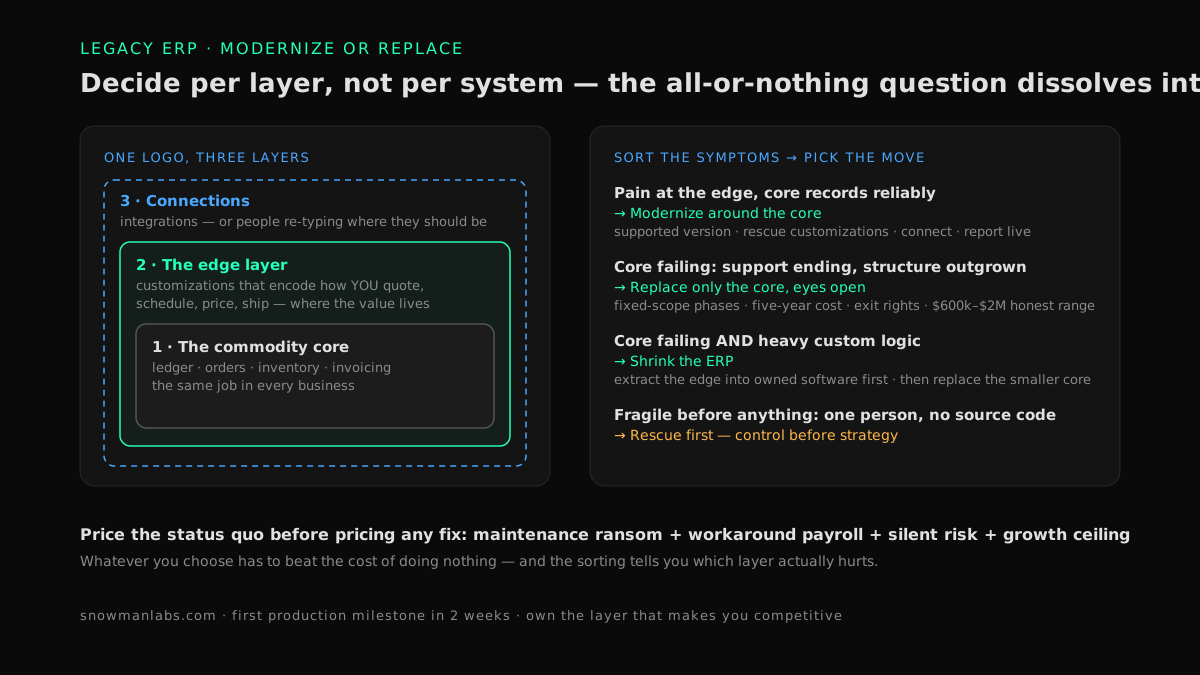
Every mid-market ERP is really three layers wearing one logo:
- The commodity core. The ledger, orders, inventory records, invoicing — the system of record. This layer works the same in every business; that's the point of an ERP.
- The layer that encodes your edge. The customizations, add-ons, and grafted-on spreadsheets that make the system match how your shop quotes, schedules, prices, and ships. This layer is why the ERP is hard to replace — and it's usually where the value lives.
- The connections. The integrations (or the people re-typing where integrations should be) between the ERP and everything else: e-commerce, warehouse, CRM, the bank.
Sort your symptoms by layer and the terrifying all-or-nothing question usually dissolves into two or three smaller decisions with different price tags. That sorting is the rest of this guide.
Price the Status Quo Before Pricing Any Fix
Whatever you decide, it has to beat the cost of doing nothing — so put a number on doing nothing first. The cost of an aging ERP hides in four places:
- The maintenance ransom. The annual support contract that rises every renewal for a product that stopped improving years ago. If this is your loudest pain, benchmark it against our owner's guide to software maintenance costs that are too high — an alive-but-extractive vendor is its own problem with its own exits.
- Workaround payroll. The re-keying, reconciling, and Excel-bridging that grew around the system. Have your CFO put loaded payroll cost on it; this number is usually the biggest of the four and the least visible on the P&L.
- Risk carried silently. An unsupported version your cyber-insurance questionnaire asks about directly. One veteran employee or one outside consultant who is the only person able to touch it. A vendor whose end-of-support clock is already running.
- The growth ceiling. The acquisition you can't integrate, the second warehouse that took a year to onboard, the product line the system can't represent. PE buyers discount messy systems at diligence — the ceiling has a price even if you never hit it operationally.
Total those roughly — an afternoon with your CFO gets you within useful range — and you have the baseline every option must beat. It also tells you which layer hurts: ransom and risk point at the core and its vendor; workarounds and ceilings usually point at the edges.
When Modernizing the ERP Is the Right Call
Modernization is the right call when the core still does its job. The signs, in owner language:
- Orders, inventory, and invoices are recorded accurately and reliably — the books close, the numbers reconcile.
- The pain is around the system: reports arrive stale, other systems connect by swivel-chair, the interface makes new hires wince, customizations are frozen because nobody understands them.
- The customizations, however crusty, encode real business logic — pricing rules, scheduling constraints, industry quirks — that no off-the-shelf module ships with.
- The vendor still supports the product, or a supported version exists that you've simply never upgraded to.
If that's your profile, replacement means paying enterprise-project prices to rebuild a working core while the actual pain — edges and connections — gets addressed last, if ever. Modernizing means fixing where it hurts, in payback order:
- Get to a supported version if you're behind on one that exists. A contained, well-understood project that clears the insurance questionnaire and the security review.
- Rescue the frozen customizations. Recover source code, document what they actually do, restore the safe ability to change them. If the shop that built them is gone or the code isn't in your hands, that's a legacy software rescue — deliberately small, control first.
- Connect what's re-typed. Modern ERPs — and most old ones — have interfaces that let other systems post to them automatically. The four honest ways to buy that are mapped in our owner's guide to systems that don't talk to each other.
- Put a reporting layer on top so questions get answered from live data instead of last month's export.
Each step is weeks-to-months, individually justified, and reversible. None requires betting the company on a cutover weekend.
When Replacing the ERP Is the Right Call
Replacement is the right call when the core itself fails the job. The honest triggers:
- Support is ending with no path. The vendor has announced end-of-life, or effectively abandoned the product, and no supported version can run your business. (If the vendor has actually vanished, start with our guide to a software vendor that went out of business — that's an emergency with its own first-72-hours checklist, not a planning exercise.)
- The structure has outgrown the core. Multi-entity consolidation by hand, revenue recognition in spreadsheets, transaction volumes or compliance regimes the platform can't represent no matter how it's configured.
- The technology is dead. It runs on hardware or an operating system nobody will support, and the people who can work on the stack are retiring faster than you can hire them.
If two or more of those are true, plan the replacement — with eyes open about what the ranking pages soft-pedal. Pemeco's implementation benchmarks put a single-site mid-market Tier II ERP implementation at $600,000 to $2,000,000 and eight months to more than a year. Panorama Consulting's independent ERP research finds most organizations exceed their implementation budget, and McKinsey's study of large IT projects measures the average overrun at 45% — while delivering 56% less value than projected. And ERP Focus's replacement guide makes the timing point most owners learn too late: because evaluation plus implementation takes years, the decision has to start years before the old system reaches end of life, not the quarter the support-termination letter arrives.
Buying rules if this is your path: fixed-scope phases instead of one big bang, reference customers your size in your industry, the five-year subscription and support cost in the comparison — and a plan for the customization layer before signing, because "we'll configure that in the new system" is where ERP budgets go to double. Whoever implements it must also leave you with exit rights — data export, contract terms, documentation — that pass the test in our owner's guide to software vendor lock-in, or you're replacing one captivity with a bigger one.
The Third Path: Shrink the ERP Instead of Betting on It
Here's the option the two-item menu leaves off, and it follows directly from the three layers: treat the core and the edge as separate decisions.
Decide the core as a commodity. Recording orders, inventory, and money is the same job in every business. If your core genuinely fails it, replace it — but replace only the core, sized and priced as the commodity it is, not as the system that runs everything. If the core still works, keep it and spend nothing there.
Own the edge. The customizations that encode how you quote, schedule, price, and ship are the layer worth owning outright — as standalone software you control, connected to the core, instead of fragile logic buried inside someone else's platform where every vendor upgrade threatens it and every year deepens the hostage relationship. Pull them out one at a time, highest pain first, each posting its results back to the ERP automatically.
Engineers call this pattern hollowing out a monolith, and it's how careful enterprises modernize systems they can't afford to break — the engineering version is our guide to modernizing legacy systems without a big-bang rewrite. You don't need the vocabulary; you need the consequence: the ERP shrinks back into the commodity core it should have stayed, and the layer that makes you competitive becomes software you own.
For twenty years this path wasn't realistic at mid-market budgets — extracting custom logic into owned systems was enterprise-priced work, so owners were rationally steered into all-or-nothing replacements. AI-assisted delivery changed that arithmetic: a small senior team directing AI coding agents builds owned, connected operational software at mid-market prices — the model behind our mid-market software practice, with a first production milestone in two weeks as the published operating standard, across 400+ delivered projects rated 4.9/5 on Clutch from 32 verified reviews. For the owner who's lived through an ERP project that ran double the budget, the two-week milestone is the point: real software in production, proving the model, before any large commitment exists to overrun.
The Decision Table: Match Your Signals to the Move
| Your signals | The right move |
|---|---|
| Core records reliably; pain is reporting, connections, frozen customizations, workarounds | Modernize around the core. Supported version, rescue the customizations, connect the systems, report from live data — in payback order. Spend nothing on replacement. |
| Support ending with no path, structure outgrown, or the stack is unhirable — and your operation fits standard modules | Replace the core, eyes open. Fixed-scope phases, references your size, five-year cost, exit rights — and a customization plan before signature. |
| Core failing and heavy custom logic that is how you compete | Shrink the ERP. Extract the differentiating layer into owned software first, then replace the smaller commodity core as a contained project. Never bundle the two into one program. |
| The system is fragile before it's anything else: one person understands it, source code missing, vendor unreachable | Rescue first. Recover control — code, documentation, safe ability to change — before any disposition decision. That's legacy software rescue, and it comes before strategy. |
| It's not an aging full ERP but entry-level accounting hitting its ceiling | Different decision, different guide: outgrown QuickBooks covers the ledger-versus-operations split for that moment. |
The First 90 Days
- Weeks 1–2: Gather five facts. Support status and end-of-life dates in writing from the vendor. The contract and its renewal terms. Whether you hold the source code of every customization. Who — by name — can safely change each part. The status-quo cost from the four categories above. Five facts, one afternoon each, no consultants required.
- Week 3: Sort by layer. With your CFO and whoever runs operations: which symptoms are core-structural, which live at the edge? An outside assessment helps here precisely because it's the rare advisor whose revenue doesn't depend on the answer being "replace everything."
- Weeks 4–6: First owned milestone at the edge. Take the worst edge pain — usually a frozen customization or a re-keying bridge — and put its owned replacement in production in about two weeks, posting to the ERP automatically. Proof at small scale before commitment at large scale.
- Weeks 7–13: Expand on evidence; decide the core on your calendar. Next extractions in payback order, each measured in dollars retired and hours returned. If the core must be replaced, schedule it at a fiscal-year boundary as its own contained project — migrating a shrunken, well-connected core instead of a twenty-year tangle. That sequencing difference is measured in hundreds of thousands of dollars.
FAQ
How long should an ERP system last?
Vendor guidance typically says 5–10 years, but the honest limit is structural, not calendar-based: an ERP lasts as long as it's supported, safely changeable, and able to represent your business structure. Plenty of 15-year-old systems are fine; a 6-year-old system nobody can safely modify is already legacy. Track support dates and your ability to change it, not its age.
How much does it cost to replace a legacy ERP system?
Independent benchmarks put a single-site mid-market implementation at roughly $600,000 to $2,000,000 over eight months to a year-plus, before the permanent subscription — and most projects exceed their budget, with McKinsey measuring average overruns at 45% on large IT projects. Compare any quote against your measured status-quo cost and against the modular alternative: core replaced separately from an owned edge.
Is it cheaper to upgrade or replace an ERP?
Upgrading is almost always cheaper when a supported version exists and your customizations survive the jump — the same research that benchmarks replacements shows upgrades saving 25% or more on cost and schedule. The trap is heavy customization: when the upgrade requires reimplementing everything custom, it costs like a replacement. That's the signal to extract the custom layer into owned software first, then upgrade or replace the smaller core.
What are the risks of keeping a legacy ERP?
Four compounding ones: rising maintenance and support costs on a product that no longer improves; security and insurability exposure once the version leaves support; key-person dependency on whoever still understands it; and a growth ceiling — acquisitions, new locations, and new lines the system can't absorb. Keeping it isn't free just because there's no invoice labeled "risk."
Can you modernize an ERP without replacing it?
Yes — and for most mid-market systems it's the higher-payback path. Get onto a supported version, recover control of the customizations, connect the systems that people currently bridge by re-typing, and report from live data. The core keeps doing the commodity job it does well while the differentiating logic moves into owned software around it.
When should we start planning an ERP replacement?
Years before the system reaches end of life — evaluation, selection, and implementation together routinely take two years or more. The practical trigger: the day the vendor announces an end-of-support date, or the day multi-entity, compliance, or volume needs stop fitting, planning starts. Waiting for the support-termination letter converts a planned project into an emergency priced accordingly.
The Decision Is Smaller Than the Quote Says
"Modernize or replace" feels enormous because the question treats a three-layer system as one bet. Split it and it shrinks: a commodity core decided on structural facts with your CFO and CPA, an edge layer worth owning because it's how you compete, and connections so every fact is entered once. Price the status quo, gather the five facts, and make the core decision on your calendar instead of a vendor's. The first step is the baseline. Our assessment walks your system estate, totals what the current setup really costs, and hands you the sorted, per-layer list — whether or not you ever hire us to act on it. Find out what your software really costs you →
Find your highest-value path to agentic delivery.
Map your readiness, delivery constraints, and first 90-day opportunity with the Snowman Labs AI Readiness Diagnostic.