Outgrown QuickBooks? An Owner's Guide to What Comes Next
Outgrown QuickBooks — or your first ERP? The real signs, what a bigger system fixes and what it won't, and the ownership path no vendor will pitch you.
 By Danilo BrizolaUpdated
 You've outgrown QuickBooks when the work around the system exceeds the work in it: critical processes living in spreadsheets, the same order typed into three screens, a month-end close that slips further every quarter, and basic questions — margin by customer, inventory by location — that the system can record but can't answer. The same test applies if you're on your first small ERP and the workarounds are back. This guide is for the owner, CEO, or CFO of a mid-market company facing that moment. It will help you read the signs correctly, because "we've outgrown QuickBooks" is actually two different problems wearing one complaint — and the standard advice, "buy a bigger ERP," fixes one of them, costs a fortune, and frequently leaves the other one exactly where it was.
The Signs You've Outgrown QuickBooks
The signs are consistent across every honest checklist — and across NetSuite's twelve, Consero's eight, and the rest of what ranks for this search. What those lists don't do is sort the signs, and the sorting is the useful part. They come in three families:
| Family | The signs | What they're telling you |
|---|---|---|
| Workaround signs | Inventory, job costing, scheduling, or pricing managed in spreadsheets bolted onto the system; the same data re-keyed between QuickBooks, the store, and the warehouse; back-office hires whose real job is moving numbers between screens | The operational work of the business has outgrown a tool that was only ever an accounting ledger |
| Visibility signs | The close takes more than a few days and slips; reports arrive stale and get rebuilt in Excel; two systems give two answers to the same question; forecasting is guesswork | Your data has outgrown the system — it can record what happened but can't tell you what's happening |
| Structural signs | A second legal entity consolidated by hand; audit prep measured in weeks; revenue recognition or multi-currency handled in spreadsheets; you've hit the user cap (QuickBooks Online tops out at 25 users on its highest plan, per Intuit's own pricing) | The accounting itself has outgrown entry-level software — this is the one family that genuinely requires a stronger ledger |
Run your own symptoms against the table before reading on. Most mid-market companies find their list is dominated by the first two families — and that changes what to buy, as the next section explains.
One Complaint, Two Different Problems
"Outgrown QuickBooks" conflates two problems that have different fixes and wildly different price tags.
Problem one: the ledger ceiling. QuickBooks is accounting software, and at a certain structural complexity — multiple entities to consolidate, audit-grade controls, formal revenue recognition, dozens of simultaneous users — it is honestly out of its depth. This is the structural-signs family, it's a real problem, and the fix really is a stronger accounting platform. Your CPA can confirm it in an afternoon by looking at your entity structure and your close.
Problem two: operational overload. Most of what drives owners to search this phrase isn't accounting at all. It's that QuickBooks — plus the spreadsheets grafted onto it — has been pressed into service as an inventory system, a job-costing system, a scheduling board, a quoting tool, and a production tracker. Those are operations problems wearing an accounting disguise. No accounting package, entry-level or enterprise, is built to run your specific operation — which is why the workarounds exist.
The distinction matters because the standard prescription treats both problems with one purchase. If your signs are structural, a ledger upgrade is a contained, well-understood project. If your signs are operational — and for most readers they mostly are — a bigger accounting suite attacks the wrong problem at the highest available price.
What the Standard Advice Skips
Search this topic and every result says the same thing: you've outgrown QuickBooks, so move up to a cloud ERP — NetSuite, Sage Intacct, Microsoft Dynamics. Before taking that advice, notice who's giving it: ERP vendors, ERP resellers, and outsourced-finance firms selling implementation and services around those exact platforms. The advice isn't wrong for the ledger ceiling. But there are three things the ranking pages consistently skip.
What it costs. Panorama Consulting's ERP research — the most-cited independent benchmark in the category — puts average ERP implementation spend around $450,000, with over half of organizations exceeding their implementation budget, most often through underestimated staffing and expanding scope. That's before the per-user subscription that runs forever and rises at renewal. McKinsey's research on large IT projects is blunter still: they run 45% over budget on average while delivering 56% less value than projected. Every owner who's lived through an ERP implementation that ran double the budget already knows this; the checklists selling the next one don't mention it.
The misfit moves with you. A general-purpose ERP covers your operation with generic modules, and your operation is not generic — the pricing rules, the scheduling constraints, the way your shop actually quotes. Force the business into the modules' shape and the spreadsheet workarounds quietly reassemble around the new system, this time at enterprise licensing prices. This is the most common quiet failure of the QuickBooks-to-ERP jump: eighteen months and half a million dollars later, the close is faster and the swivel-chair work is still there.
You'll still be renting. The move from QuickBooks to a suite is a move from a small landlord to a bigger one: per-seat pricing that scales against your growth, a roadmap you don't control, and switching costs that grow with every module you adopt. For the commodity ledger that's an acceptable trade. For the systems that encode how your business competes, it's the same own-versus-rent decision that runs through all mid-market modernization — and renting your edge has a compounding cost.
To be fair about the other direction: there are cases where a full ERP platform is the right call — manufacturing that needs bills of materials and production planning as one integrated whole, or a multi-entity distribution business whose complexity is genuinely the accounting. If that's you, buy it with eyes open: fixed-scope phases, reference customers your size, and a hard look at total five-year cost including the subscription.
The Third Path: Upgrade the Ledger, Own the Operations
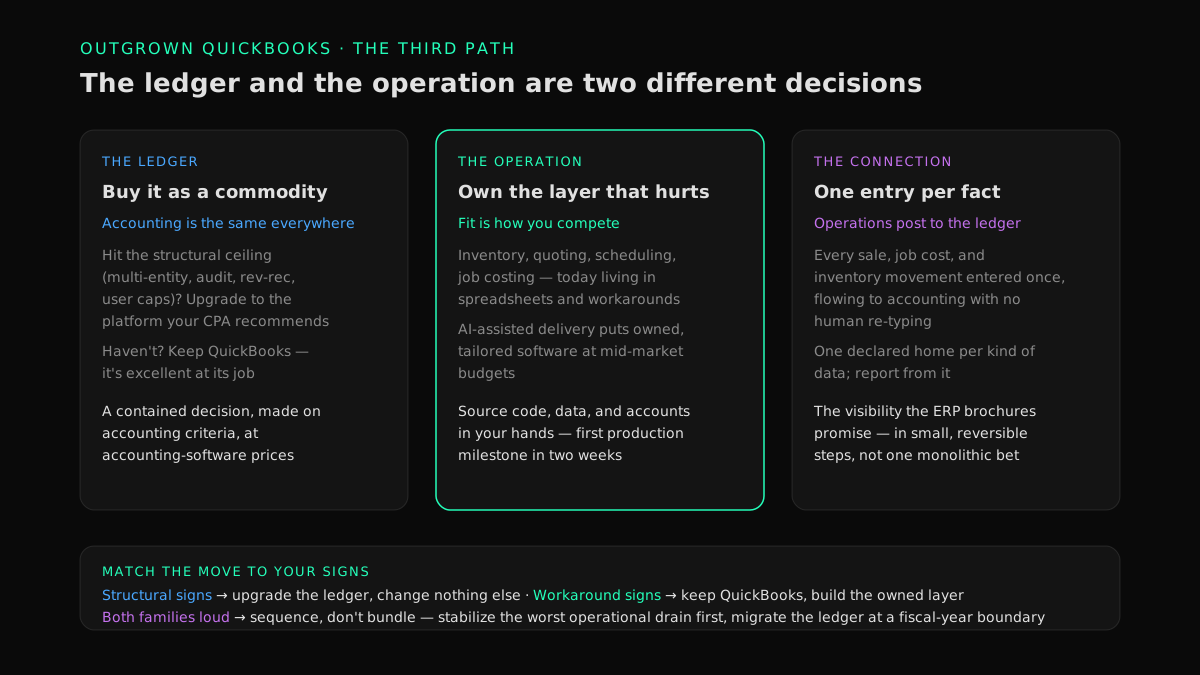
There's an option the vendor checklists never present, and it follows directly from splitting the complaint in two: treat the ledger and the operation as separate decisions.
Keep the ledger a commodity you buy. Accounting is the same in every business — that's the point of accounting. If you've hit the structural ceiling, upgrade to the mid-tier accounting platform your CPA recommends, sized to your entity structure and audit needs. If you haven't hit it, keep QuickBooks; it remains excellent at the job it was built for. Either way this is a contained decision, made on accounting criteria, at accounting-software prices.
Own the operational layer that's actually hurting. The inventory tracking, quoting, scheduling, and job costing currently living in spreadsheets and workarounds are the systems where fit is everything — they have to match how your operation works, because that fit is how you compete. For twenty years the honest advice was to rent an approximation anyway, because custom software carried seven-figure price tags. AI-assisted delivery changed that arithmetic: a small senior team directing AI coding agents now builds owned, tailored operational software at mid-market budgets — the model behind our mid-market software practice, with a first production milestone in two weeks as the published operating standard, across a track record of 400+ delivered projects rated 4.9/5 on Clutch from 32 verified reviews.
Connect the two. The owned operational systems post their results to the ledger automatically — every sale, every job cost, every inventory movement entered once and flowing to accounting without a human re-typing it. That's a solved problem with four honest options, mapped in our owner's guide to systems that don't talk to each other; the re-keying itself, and every other duplicate copy, is what our playbook to eliminate double data entry removes. Declare one home for each kind of data and report from it — the discipline our guide to a single source of truth for business data walks through — and you get the real-time visibility the ERP brochures promise, without the rip-and-replace.
The result is the same target the suite pitch paints — one entry per fact, current numbers, no swivel-chair — reached in small, sequenced, reversible steps instead of one monolithic bet, with the differentiating software owned outright: source code, data, and accounts in your hands.
A Decision Guide: Match the Move to Your Signs
| Your situation | The right move |
|---|---|
| Signs are mostly structural (multi-entity, audit, rev-rec, user caps); operations run acceptably | Upgrade the ledger, change nothing else. A contained accounting-platform migration, scoped with your CPA — not a company-wide transformation. |
| Signs are mostly workarounds and visibility; the accounting itself still closes cleanly | Keep QuickBooks; build the owned operational layer around it and connect it to the ledger. Highest payback first; the ledger question disappears from the list. |
| Both families are loud | Sequence, don't bundle. Stabilize the worst operational drain first (weeks, measured payback), then migrate the ledger at a fiscal-year boundary. Bundling both into one program is how $450k averages happen. |
| Manufacturing/distribution complexity where accounting and operations are genuinely one problem | A full ERP may be right. Buy it with fixed-scope phases, reference customers your size, and the five-year subscription cost in the comparison. |
| The old system isn't outgrown but abandoned or hostage — vendor gone, support extortionate | Different problem, different guide: start with our owner's guide to software maintenance costs that are too high. |
| It's not entry-level software at its ceiling but a full aging ERP — support clock ticking, customizations frozen | The disposition decision has its own guide: legacy ERP: modernize or replace sorts it per layer instead of as one seven-figure bet. |
The First 90 Days After "We've Outgrown It"
- Weeks 1–2: Walk the order and total the workarounds. Follow one order from "customer clicked buy" to "invoice paid." List every system and spreadsheet it touches and every human hop between them. Have your CFO put loaded payroll cost on the re-keying and reconciling, and pull the current software spend. That baseline number — usually surprising — is what any fix has to beat.
- Week 2: Split the list with your CPA. One afternoon: which symptoms are ledger-structural (entities, controls, audit, caps) and which are operational? This single sorting step is the difference between a contained purchase and a half-million-dollar program.
- Weeks 3–5: First owned milestone. Take the top operational drain — usually the spreadsheet that runs inventory, quoting, or scheduling — and put its owned replacement in production in about two weeks, posting to QuickBooks automatically. Real software, used by your team, before any large commitment: proof that beats any vendor demo.
- Weeks 5–13: Expand on evidence; decide the ledger on your calendar. Next drains in payback order, each measured in dollars retired and hours returned. If the ledger upgrade is warranted, schedule it at your fiscal-year boundary as its own clean project — migrating a tidy, connected estate instead of a tangle.
FAQ
How big is too big for QuickBooks?
There's no revenue cliff — companies run QuickBooks well past $50M when their structure is simple, and others outgrow it at $5M with multiple entities or heavy inventory. The honest limits are structural, not revenue-based: entity consolidation, audit-grade controls, revenue recognition, and the user cap (25 on QuickBooks Online's top plan). Measure against your structure and your workaround count, not your top line.
What is the next step up from QuickBooks?
The vendor answer is a mid-market cloud ERP — NetSuite, Sage Intacct, Microsoft Dynamics 365 Business Central. The complete answer is that "up" has two directions: a stronger ledger if your accounting structure has outgrown entry-level software, and owned operational software if the real problem is inventory, quoting, or scheduling living in spreadsheets. Sort your signs first; many companies only need one of the two.
When should a company switch from QuickBooks to an ERP?
When the accounting itself is the constraint: multiple entities consolidated by hand, audit or funding requirements demanding formal controls, revenue recognition beyond spreadsheets, or user limits blocking the team. If the pain is operational — workarounds, re-keying, stale numbers — an ERP is the most expensive available answer to a problem that owned operational software and integration solve for less, without touching a working ledger.
How much does it cost to move from QuickBooks to an ERP?
Independent benchmarks from Panorama Consulting put average ERP implementation spend around $450,000, with more than half of projects exceeding budget — plus a permanent per-user subscription on top. Small-scope migrations to lighter platforms can land in the tens of thousands. Whatever the quote, compare it against your measured status-quo cost and against the modular alternative: ledger upgrade priced separately from operational fixes.
Can we keep QuickBooks and still fix inventory and operations?
Yes — and for operationally-driven pain it's usually the highest-payback path. QuickBooks stays what it's good at (the books) while owned, purpose-built systems handle inventory, quoting, or scheduling and post to it automatically through its API. You skip the ledger migration entirely, sequence the operational fixes by payback, and keep every step small and reversible.
Do big companies use QuickBooks?
As the corporate general ledger, rarely — enterprise accounting needs consolidation and controls that entry-level software doesn't carry. But plenty of $50M–$100M companies run a simple structure on QuickBooks happily, and subsidiaries of larger groups use it locally. Size matters less than structure: entities, audit posture, and transaction complexity are what force the ledger decision.
Outgrown the Tool, Not the Business
"Outgrown QuickBooks" is good news badly labeled: the business got bigger than the software, which is what the software was for. The mistake is treating one complaint as one purchase. Sort the signs — ledger-structural versus operational — and the path stops being a half-million-dollar leap and becomes a sequence: a contained ledger decision made on accounting criteria, an owned operational layer built where fit is your edge, and connections so every number is entered once and current everywhere. The first step is knowing your baseline. Our assessment walks your order flow, totals what the workarounds cost, and hands you the sorted list — whether or not you ever hire us to fix it. Find out what your software really costs you →
Find your highest-value path to agentic delivery.
Map your readiness, delivery constraints, and first 90-day opportunity with the Snowman Labs AI Readiness Diagnostic.