Eliminate Double Data Entry: An Owner's Playbook
Double data entry hides in payroll, not the software budget. Find every re-keying job, price what it really costs, and eliminate it in four moves.
 By Danilo Brizola
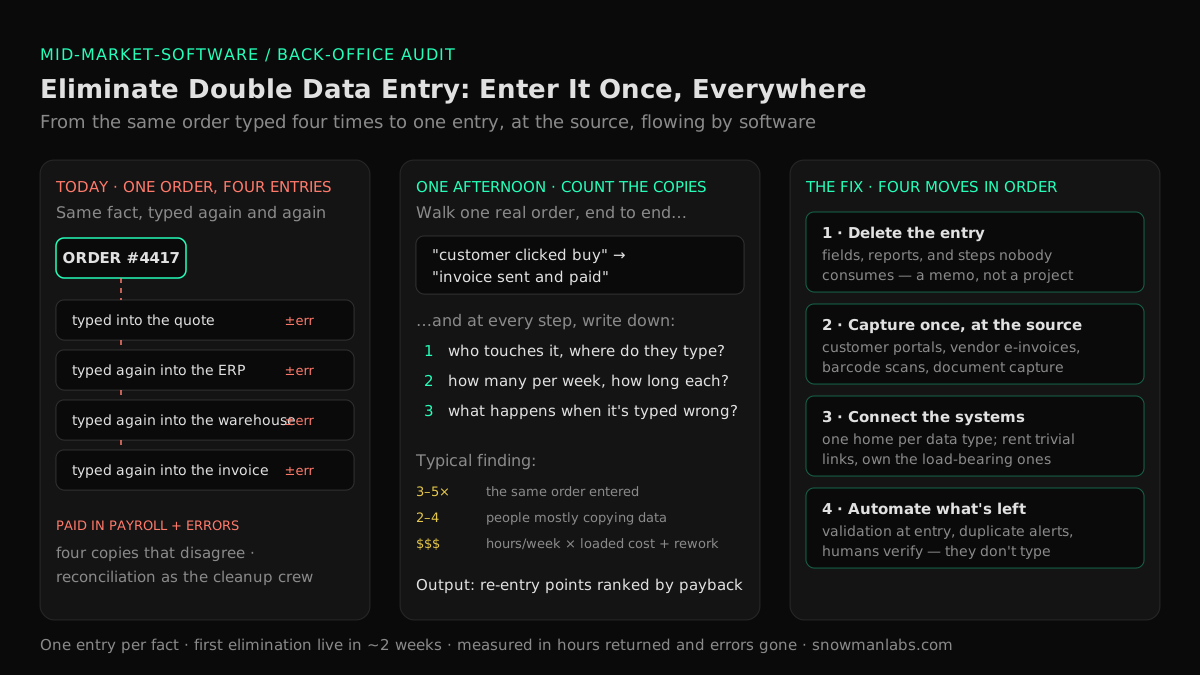
To eliminate double data entry, make one rule true everywhere: every piece of operating data is entered once, by the person or system that creates it, and everything downstream gets it by software — never by a second pair of hands. Getting there is four moves, in order: delete the entries nobody needs, capture data once at its source, connect the systems that keep forcing copies, and automate the residue. This playbook is for the owner, CEO, or COO of a mid-market company whose back office keeps growing while headcount in the warehouse and on the sales floor doesn't — because somewhere between the quote, the order, the shipment, and the invoice, people are typing the same information into screen after screen. By the end you'll know where double entry hides, what it actually costs in payroll and errors, and which of the four moves to buy first.
What Double Data Entry Is — and Where It Hides
Double data entry is the same fact — a customer, an order, a price, a delivery — being typed into more than one place by more than one effort. The textbook case is re-keying between systems: the order arrives in the online store, someone types it into the ERP, someone else types the shipment into the accounting package. But if you only look for system-to-system re-keying, you'll miss most of it. In practice it hides in five places:
- Between systems. The classic swivel-chair: read from one screen, type into another. Orders from the store into the ERP, shipments from the warehouse into accounting, customer updates from the CRM into billing.
- From paper and email into systems. Faxed POs, emailed PDFs, handwritten delivery tickets, invoices that arrive as attachments — each one typed into a system by a person whose job title doesn't say "data entry" but whose day does.
- In shadow spreadsheets. Every department that doesn't trust the system keeps its own copy: the sales forecast spreadsheet, the "real" inventory count, the pricing sheet on someone's desktop. Each is a second entry of data that already lives somewhere else — and each drifts from the original the day it's created.
- In reconciliation. Month-end matching of the warehouse count to the books, the bank feed to the invoices, the CRM pipeline to the ERP orders. Reconciliation is double entry's cleanup crew: it exists because the same fact was entered twice and the copies disagree.
- In status chasing. "Did that order ship?" answered by a person who looks it up in one system and types the answer into an email is data entry too — the slowest, most expensive kind.
If your company recognizes three or more of these, you're normal. MuleSoft's Connectivity Benchmark finds only about 27% of the applications organizations run are connected to each other — for everything else, people are the data transfer. The point of this guide is that "normal" is a choice, and an expensive one.
What Double Data Entry Really Costs
The cost never appears as a line item, which is why it survives budget review after budget review. It's paid in three currencies:
1. Payroll. Every re-keying task is a person performing, by hand, a transfer that software performs for free — what our mid-market software modernization guide calls payroll doing software's job. The tell is structural: back-office headcount that grows in lockstep with order volume. If every 30% of revenue growth requires another coordinator "to keep up with the paperwork," you are staffing a data pipeline with salaries.
2. Errors and their cleanup. Humans mis-key at remarkably stable rates. Decades of human-factors research compiled by Raymond Panko at the University of Hawaii put routine human error rates in the low single digits per action — meaning a field re-typed thousands of times a month reliably produces dozens of wrong quantities, transposed digits, and stale prices. Each entry of the same fact multiplies the chances of a bad copy, and the copies then disagree, which is what makes the damage expensive: quality management's old 1-10-100 rule holds that an error costs roughly ten times more to correct downstream than to prevent at entry, and a hundred times more when it reaches the customer as a wrong shipment, a wrong invoice, a credit memo, and an apology call. The aggregate bill is not small: Gartner estimates poor data quality costs organizations an average of $12.9 million a year, and MIT Sloan Management Review has put the total cost of bad data at 15–25% of revenue for many companies — most of it in exactly this hidden rework.
3. Decisions on numbers you only half trust. When the same customer or order lives in four places, the four copies disagree, and every report becomes an argument about whose export is right. That tax — stale answers, week-long "what's our margin by customer" hunts, an AI initiative stalled because the data is a mess — falls hardest on the owner, because you're the one deciding on those numbers.
The one-afternoon audit: count the copies
You don't need a consultant to size this. Pick your highest-volume record — usually the sales order — and walk one real instance end to end, from "customer clicked buy" (or emailed the PO) to "invoice paid." At every step, write down three things:
| Ask | What you're measuring |
|---|---|
| Who touches it, and where do they type? | Every human re-entry of data that already existed somewhere upstream |
| How many per week, how long each? | Hours per week per person — multiply by loaded cost for the payroll line |
| What happens when it's typed wrong? | The error path: who finds it, how long the fix takes, what it costs when the customer finds it first |
Most owners find the same order entered three to five times and two to four people whose week is substantially copying. Repeat the walk for one purchase and one new customer, and you have the whole picture: a ranked list of re-entry points with hours and error costs attached. That list — not a vendor's feature sheet — decides what you buy, and it's the same walk our modernization guide's one-hour cost exercise feeds. (If the walk reveals that one veteran is the human bridge holding all of it together, you've also found a key person dependency — a risk worth handling on its own track.)
Four Moves to Eliminate Double Data Entry
The moves are ordered by cost and by how often they're skipped. Most vendors will sell you move three or four on day one; the money is usually in starting at one.
Move 1 — Delete the entry
The cheapest data entry is the one that stops existing. Before automating or connecting anything, put every re-entry point from your audit through one question: what decision or obligation actually consumes this? Companies reliably find fields filled in because a form has always had them, reports assembled monthly that nobody has opened since the manager who wanted them left, approval steps that re-enter data purely to log that someone looked. Deleting those isn't a software project — it's a memo. It's also the move that makes every later move cheaper, because you only pay to automate what survives.
Move 2 — Capture once, at the source
For the entries that remain, push the first entry as far upstream as it can go — to the person or device that creates the fact, so everyone after them reads instead of types:
- Customers enter their own orders through a portal or structured order form instead of emailing PDFs your staff re-types. (Your biggest customers may be asking for this anyway.)
- Vendors submit invoices electronically instead of mailing documents your AP clerk transcribes.
- The warehouse scans instead of writing — a barcode scan at receiving is one entry, made by the person holding the box, at the moment the fact becomes true.
- The paper that refuses to die gets captured, not typed. Modern document capture — OCR with AI-assisted extraction — reads the PDFs and scans that still arrive and turns them into records a person verifies rather than creates. Verification is a five-second glance; transcription is a two-minute task with an error rate.
Capture-at-source is chronically underrated because it's unglamorous. It is also where the error math changes most: the person closest to the fact is the person most likely to enter it right, and every downstream copy they prevent is a copy that can't be wrong.
Move 3 — Connect the systems
Now — and only now — connect the systems that still force copies, so data entered once flows to everything downstream automatically, with one declared home per data type. This is its own purchase with its own trade-offs (rented connectors vs. an owned integration layer vs. a middleware hub vs. a reporting warehouse), and we've mapped that decision — what each option costs, fixes, and breaks, and how to buy it without a CTO — in the owner's guide to systems that don't talk to each other. The short version for sequencing purposes: rank the connections by the payback your audit measured, rent the trivial ones, and own the load-bearing ones — a build that AI-assisted delivery has moved from "enterprise budget" to mid-market reach, which is the model behind our business systems integration service.
Move 4 — Automate what's left, with guardrails
After deleting, capturing at source, and connecting, a residue of genuinely manual entry remains — exceptions, corrections, the odd judgment call. Two guardrails keep it from quietly regrowing into a department:
- Validate at the point of entry. Dropdowns instead of free text, enforced formats, and duplicate detection that warns before a second "ACME Corp (Chicago)" is born. Preventing a bad or duplicate record at entry is the cheap end of the 1-10-100 rule.
- Automate the repeatable exceptions. When the same "exception" gets handled by hand every week, it's not an exception — it's an unbuilt feature. Rules and AI-assisted workflows can create the record, route the approval, and leave a human confirming rather than typing.
The honest limit: automation with no human anywhere is the wrong target for a mid-market back office. The right target is one entry, made once, verified by software — with people redeployed to the work that needs judgment: chasing the deal, calling the unhappy customer, negotiating the renewal.
What Not to Do
Three responses feel natural and make the problem permanent:
- Don't hire another coordinator. Adding heads to a re-keying process scales the cost and the error rate together — and it converts a fixable software gap into a permanent payroll line. The moment "we need another person in the back office to keep up" is uttered is exactly the moment to run the audit instead. (Harvard Business Review pegged the cost of the hidden data-correction economy at $3 trillion a year in the US alone — nearly all of it paid in salaries for exactly this kind of work.)
- Don't buy another tool to "fix" it. A new tool with its own database is, by default, one more place the same customer gets typed. Unless a purchase removes an entry point, it adds one — the same overlap dynamic that inflates the software line in our SaaS spend playbook. Fewer entry points beat better entry screens.
- Don't launch the everything-at-once replacement project. "Replace all of it with one suite and the problem disappears" is the highest-risk answer on the board, and it isn't even true — suites still coexist with the store, the bank, the carriers, and the customers' systems, so capture and connection work remains. Keep working systems; remove the copies between them.
The Sequence: First Result in Two Weeks
Double data entry is removed the same way it accumulated — one point at a time, except on purpose:
- Week 1: the audit. One afternoon, three record walks (order, purchase, new customer). Output: every re-entry point, with hours per week, loaded cost, and error rework attached, ranked by payback.
- Weeks 2–3: the first elimination, live. Take the top of the list and remove it — a deleted step, a capture form, a document-capture flow, or the single highest-payback connection. Our published operating standard is a first production milestone in two weeks, and this category is where it's easiest to hit, because nothing gets replaced: the systems stay, one manual bridge goes.
- Week 4 and monthly: measure in dollars. The job the fix replaced was measurable, so the result is: hours returned at loaded cost, error rework gone, reconciliation days shaved. Reported against the audit's baseline — no story points, no jargon.
- Quarterly: next item on the list, on evidence. Each measured win funds and justifies the next. You're never more than one finished, verifiable step from pausing — the honest answer for any owner carrying scar tissue from a past software project that promised everything and shipped late.
This is the standard our mid-market practice is built around — 400+ delivered projects, a 4.9/5 Clutch rating across 32 verified reviews, from the same team enterprises like Volvo, Renault, Scania, iFood, and B3 trust — applied at mid-market scale and priced against the payroll it returns.
FAQ
What is double data entry?
It's the same fact — a customer, an order, a price — being entered by hand into more than one place: re-typed between systems, transcribed from emails and PDFs, copied into departmental spreadsheets, or re-matched at month-end reconciliation. Each additional entry adds labor, adds a chance of error, and creates one more copy that can disagree with the original.
Why is double data entry a problem?
Three reasons: it's paid for in salaries (people performing transfers software does for free), it manufactures errors (human error rates are stable, so every extra entry multiplies wrong quantities and stale prices), and it corrodes trust in your numbers, because the copies disagree and every report becomes an argument. Gartner puts the average organizational cost of poor data quality at $12.9 million a year.
How do you eliminate duplicate data entry between two systems?
First confirm the entry deserves to exist at all, and that the data couldn't be captured further upstream (by the customer, the vendor, or a scan). If a connection is genuinely the fix, you have four honest options — rented connectors, an owned integration through the systems' APIs, a middleware hub, or a reporting warehouse — and the right one depends on how load-bearing the link is. Our guide to systems that don't talk to each other maps that purchase in owner's terms.
How much does manual data entry cost a business?
Price it locally: hours per week spent re-keying and reconciling × loaded hourly cost, plus the error path (rework, credit memos, wrong shipments). At mid-market scale this is routinely several full-time salaries per year before counting errors. Industry-level estimates point the same direction — MIT Sloan research puts the cost of bad data at 15–25% of revenue for many companies.
What is a single source of truth?
One declared home system per kind of data: customers live in the CRM, inventory in the warehouse system, prices in the ERP — and every other system reads from the home instead of keeping its own version. It's the design rule that makes "enter once" possible; without it, two systems end up overwriting each other's copies of the truth.
Can automation completely replace manual data entry?
It can eliminate the re-entry — the copies — and modern document capture can turn most of the remaining first entries into a verify-and-confirm step rather than typing. A residue of judgment calls and exceptions stays human, and should. The practical target isn't zero people touching data; it's zero facts entered twice.
Do we need to replace our software to stop double data entry?
Almost never. Double entry lives between systems, and the fixes — deleting steps, capturing at the source, connecting what you already run — all leave working systems in place. Replacement is a per-system decision made on a system's own merits, not the entry fee for getting your data entered once.
Enter It Once, Everywhere
Double data entry is the most invisible line on your P&L: payroll doing software's job, errors doing quiet damage, and reports you argue with instead of act on. The exit is not a heroic platform migration — it's an afternoon audit that counts the copies, then four moves in order: delete, capture once, connect, automate. First result live in about two weeks, measured in hours returned and errors gone. The audit costs you an afternoon; if you'd rather have the dollar figure and the ranked plan built for you, start with an assessment. Find out what your software really costs you →
Find your highest-value path to agentic delivery.
Map your readiness, delivery constraints, and first 90-day opportunity with the Snowman Labs AI Readiness Diagnostic.