How to Reduce SaaS Spend: An Owner's Playbook
Reduce SaaS spend without an IT department: a six-step owner's playbook to audit every subscription, cut unused seats, control renewals, and own what fits.
 By Danilo BrizolaUpdated
 To reduce SaaS spend, you need three things — none of which requires an IT department: a complete list of every subscription the company actually pays for, real usage numbers for each one, and a calendar of renewal dates so decisions get made before contracts roll over instead of after. That's the whole method. It matters because the waste is large and well documented: license data from Zylo's SaaS Management Index shows 46% of purchased SaaS licenses go unused in a typical month, and 85% of SaaS spending happens outside IT's visibility — bought department by department, expensed, and forgotten. This playbook is written for the owner, CEO, CFO, or COO of a mid-market company who signs those checks. By the end you'll have a six-step sequence you can run with your CFO in a quarter, a short list of what not to cut, and a way to keep the bill down permanently without hiring anyone to manage it.
Why the SaaS Bill Keeps Growing
SaaS sprawl is what happens when a company accumulates more software subscriptions than anyone can see, use, or govern — dozens of overlapping tools, each renewing automatically, each raising its price a little every year. BetterCloud's State of SaaS research puts the average company at 106 SaaS applications; Zylo's index finds even companies with fewer than 500 employees run about 150 on average. Almost no owner believes those numbers until they pull their own list.
Nobody plans this. Sprawl is the sum of individually reasonable decisions:
- Departments buy their own tools. Sales gets a CRM add-on, operations gets a scheduling app, marketing gets three analytics tools — each purchase small enough to go on a card, none passing a central desk. That's how 85% of the spend ends up invisible to whoever is supposed to be watching it.
- Per-seat pricing scales with headcount, not value. Every hire silently raises the software bill, whether or not the new person uses half the tools they're given seats for.
- Auto-renewal does the vendor's selling for them. Contracts roll over by default, often with a built-in price increase, and the cancellation window quietly passes 60 or 90 days before the renewal date anyone remembers.
- Nothing ever gets turned off. Tools outlive the project, the champion, or the employee who bought them. Canceling takes effort and an owner; renewing takes nothing.
The result is a software line on the P&L that grows faster than revenue — and, less visibly, an operation scattered across tools that don't share data. That second cost is the subject of our broader guide to mid-market software modernization; this article attacks the first one, because it's the fastest to fix.
The Four Kinds of SaaS Waste
Before the playbook, know what you're hunting. Nearly all SaaS waste falls into four buckets:
- Seats nobody uses. Licenses for former employees, full seats for people who log in twice a year, and the 46% of licenses Zylo finds sitting idle in a given month. This is the largest bucket at most companies.
- Tools that duplicate each other. Two or three products doing the same job in different departments — three survey tools, two e-signature tools, a project tracker per team. Often a suite you already pay for (Microsoft 365, Google Workspace) includes the capability outright.
- Plans bigger than the need. Enterprise tiers bought for one feature, premium seats for people who only ever view, usage allowances sized for a peak that never came.
- Zombie subscriptions. Tools nobody has opened in a year that keep renewing because they're small enough not to trigger scrutiny — $200 a month here, $500 there, forever.
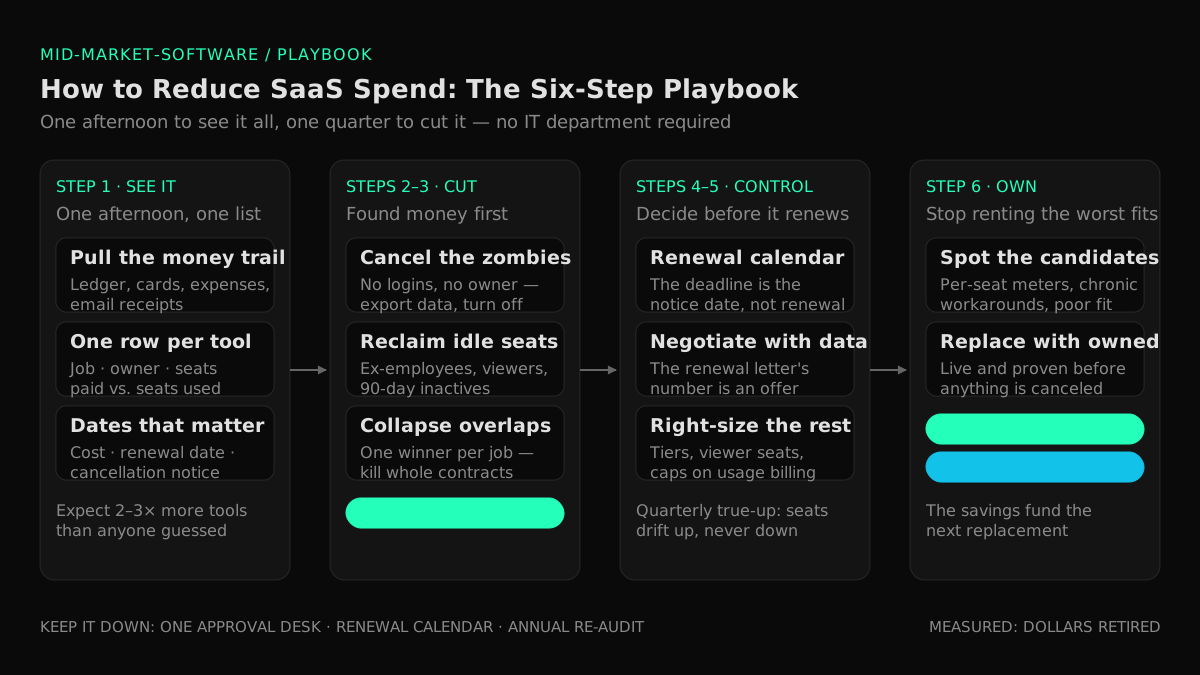
Each bucket has a different fix, which is why the playbook below runs in a deliberate order: see everything first, cut the free wins, then take on the structural moves.
The Six-Step Playbook to Reduce SaaS Spend
Step 1 — Build the complete list in one afternoon
You can't cut what you can't see, and at mid-market scale you don't need software to see it — you need your CFO and one afternoon. Pull twelve months of data from four sources: the general ledger (everything coded to software, dues, or subscriptions), corporate card statements, expense reimbursements (this is where shadow purchases hide), and a quick email-receipt search for "invoice" and "subscription" across finance inboxes. Then ask every department head one question: "what tools does your team pay for or use?"
Put the result in a spreadsheet with one row per tool and eight columns: name · what job it does · who owns it · seats paid · seats actually used · annual cost · renewal date · cancellation notice period. The "seats actually used" column comes from the tool's own admin page (nearly every SaaS product shows last-login data) or, failing that, from asking the owner. Expect the list to be two to three times longer than anyone guessed — organizations routinely underestimate both their SaaS spend and their app count by that margin.
This spreadsheet is the asset. Every remaining step reads from it.
Step 2 — Cut what nobody uses
Start with the waste that requires no negotiation and no replacement:
- Cancel the zombies. Any tool with no logins in 90+ days and no owner willing to claim it in a week gets canceled. Export the data first; then turn it off.
- Reclaim ex-employee seats. Cross-check every paid seat against the current employee roster. Make license recovery a standing item in your offboarding checklist so this bucket never refills.
- Downgrade the idle. Users who haven't logged in for a quarter don't need a paid seat; most tools let you deactivate and reassign rather than buy new.
This step is pure found money — typically the first double-digit percentage off the bill — and it builds the organizational muscle for the harder cuts that follow.
Step 3 — Collapse the overlaps
Sort the spreadsheet by "what job it does" and look for jobs that appear more than once. For each overlap, pick one winner — usually the tool the team already lives in, not the one with the best feature list — migrate the data, and cancel the whole losing contract. Killing an entire contract beats trimming seats: it removes the renewal, the price-increase letter, and the admin overhead along with the license fee.
Check your suites before buying or keeping anything standalone: video calls, e-signatures, forms, basic project tracking, and file storage are often already included in the office suite you pay for. And keep a one-sentence rule for the future: no new tool gets bought if an existing tool already does the job at a passing grade.
Step 4 — Take control of renewals
Auto-renewal is where vendors make their easiest money, so this step converts renewals from something that happens to you into a decision you make:
- Build the renewal calendar. From the spreadsheet, put every renewal date minus its notice period on your CFO's calendar. The date that matters is the last day you can still cancel or renegotiate — often 30 to 90 days before the renewal itself.
- Open negotiations 60–90 days out on every material contract. Come with your usage data: real seat utilization is leverage vendors don't expect a mid-market buyer to have. Ask for the lower-tier plan they didn't mention, flag a competitor's quote, and make multi-year commitments only on tools you're certain about — in exchange for a real discount and a price-increase cap.
- Never accept the renewal letter's number. A price increase in an auto-renewal notice is an opening offer, not a bill.
The same discipline applies to the biggest software contract most mid-market companies hold — the annual maintenance bill on the legacy system that runs the business. When that one rises every year for a product that never improves, you're past renewal tactics; our owner's guide to software maintenance costs that are too high benchmarks what's normal and maps the four ways out.
Step 5 — Right-size seats, tiers, and billing
For everything that survives steps 2–4, match what you pay to what you use. Move occasional users to viewer or free seats where the tool offers them. Drop premium tiers bought for a single feature nobody adopted. Set usage-based plans (common in AI tools) with caps and alerts so the bill can't surprise you. Then put a quarterly 30-minute "true-up" on the calendar — seats drift up between checks, never down.
Step 6 — Replace the worst fits with software you own
Steps 1–5 optimize the rent. The last step asks a different question: which of these subscriptions should you stop renting at all? This is the option the SaaS-management industry never puts on the table — every guide ranking for this topic ends by selling you one more subscription to manage the others. The candidates announce themselves in your spreadsheet:
- A per-seat meter running on your whole workforce for a core daily workflow — the one line that automatically grows every time the company does.
- Two or three tools plus a human reconciling them — payroll doing software's job because no rented tool matches how your operation actually works.
- Workarounds everywhere: the spreadsheet beside the tool, the exports, the "we don't use that module, we do it our way" — poor fit you pay for twice, in subscription and in labor.
- A vendor whose roadmap is the ceiling on how well the tool will ever fit you, with pricing that treats you as captive.
For those systems, the build-versus-rent math changed. AI-assisted delivery — a small senior team directing AI coding agents — cut the cost of custom software to the point where owning frequently beats the compounding cost of per-seat rent plus poor fit plus manual workarounds. That's the model Snowman Labs runs, with published operating standards: a first production milestone in 2 weeks, a 40–60% target reduction in time to market, and 400+ delivered projects rated 4.9/5 across 32 verified Clutch reviews. The full owner-side case for when owning beats renting — how to sort commodity from edge and run the five-year math — is in our build vs buy decision guide, and our SaaS consolidation service exists precisely for this play — sequenced so nothing gets canceled until its replacement is live and proven, with exits timed to renewal dates so you never pay double for long.
What Not to Cut
Cost-cutting that damages the operation isn't savings. Four things stay off the block:
- The commodity winners. Accounting, payroll, email, document storage: mature products with high real usage that solve the whole problem. Consolidate around them; don't replace them.
- The tool your team actually lives in. High utilization is the signal of value. Switching a heavily-used tool to save 15% invites migration cost, retraining, and productivity loss that eats the savings.
- Security and backup. Cutting here converts a monthly line item into tail risk — exactly the trade a cyber-insurance underwriter will price against you later.
- The connections between systems. Sometimes what looks like an overlapping tool is actually the glue moving data between two systems. Cutting it puts a human back in the loop — the most expensive integration technology there is. If your real problem is systems that don't talk (industry research finds only about 27% of applications are connected to each other), the fix is business systems integration, not another cancellation — our owner's guide to systems that don't talk to each other walks through the options.
Keeping the Bill Down Without Hiring Anyone
The audit is a project; keeping the bill down is a habit. Three light-weight rules hold the line at mid-market scale:
- One approval desk. Every new subscription — any size, any department, any card — passes one designated approver against the spreadsheet: does an existing tool already do this job? This single rule stops sprawl at the source.
- The renewal calendar is a standing CFO artifact. Every renewal decision happens at notice-deadline minus 30 days, with usage data on the table. No contract rolls over unexamined.
- Re-run the audit once a year. Half a day, same four data sources, same spreadsheet. Sprawl regrows quietly; the annual pass keeps the list honest.
Do you need a SaaS management platform to do this? At enterprise scale — hundreds of applications across dozens of business units — the discovery and monitoring automation can be worth it. At typical mid-market scale, a maintained spreadsheet, a renewal calendar, and the one-approver rule deliver most of the benefit at none of the cost. Remember what a SaaS management platform is: one more subscription, sold to manage the others. And if the stack has outgrown a self-run audit entirely — a roll-up on three ERPs, structural duplicates nobody has bandwidth to collapse — the next step is buying help, not buying software: our owner's guide to software consolidation consulting covers what an engagement includes, what it costs, and the conflicts of interest to screen for.
FAQ
How can a company reduce SaaS spend?
Six moves, in order: build a complete inventory of every subscription from finance data; cancel unused seats and zombie tools; consolidate overlapping tools onto one winner per job; take control of renewal dates and negotiate before notice deadlines; right-size plans and seat tiers to actual usage; and replace the worst-fitting core tools with software you own. The first two steps alone typically produce visible savings within a month.
What is SaaS sprawl?
SaaS sprawl is the uncontrolled accumulation of software subscriptions across a company — bought department by department, overlapping in function, renewing automatically, with no single person able to see the full list or the full cost. It's the natural result of per-seat pricing, easy credit-card purchasing, and auto-renewal defaults operating for years without a central approval rule.
How many SaaS apps does the average company use?
BetterCloud's State of SaaS research puts the average at 106 applications per company, and Zylo's index finds even companies with fewer than 500 employees run about 150 on average. Most owners guess a fraction of their real number before running an inventory — spend and app counts are routinely underestimated by two to three times.
How much SaaS spend is wasted?
Zylo's license data shows 46% of purchased SaaS licenses go unused in a typical month, and roughly half of licenses overall sit idle — meaning something like a third or more of a typical SaaS bill buys nothing. Unused seats, overlapping tools, oversized plans, and forgotten subscriptions are the four buckets where that waste hides.
Do I need a SaaS management platform to cut software costs?
Not at mid-market scale. A spreadsheet built from your general ledger and card statements, a renewal calendar with notice-period deadlines, and a one-approver rule for new purchases deliver most of what the platforms automate. The platforms earn their keep at enterprise scale — hundreds of apps, dozens of business units — and they are themselves subscriptions, so apply the same scrutiny to them as to everything else.
When does replacing SaaS with custom software make sense?
When a rented tool runs a core workflow badly: a per-seat meter on your whole workforce, chronic workarounds and spreadsheets beside the tool, or several subscriptions plus manual reconciliation doing one job. AI-assisted delivery moved the break-even — owning now frequently beats compounding rent for poor-fit core systems — but commodity functions like accounting, payroll, and email should stay bought. Sequence any replacement so the subscription is canceled only after the owned system is live and proven.
What should you check before canceling a SaaS subscription?
Four things: export your data (and confirm you can actually get it out in a usable format); check nothing else depends on the tool, especially integrations quietly moving data between systems; confirm the cancellation notice period so the contract doesn't auto-renew while you deliberate; and name the tool that will absorb the job, even if that tool is "nothing, on purpose."
Run the Audit, Then Decide What to Own
Reducing SaaS spend is the rare cost program that needs no new hires, no new software, and no leap of faith: one afternoon to see the whole list, one quarter to run the six steps, three standing rules to keep the bill down. And the audit usually pays twice — first in subscriptions retired, then in what the spreadsheet reveals about the bigger question: which parts of your operation you should stop renting altogether. That's a modernization decision, and it deserves real numbers. Our custom software services for mid-market companies start exactly there — with an assessment that puts a dollar figure on what your current software really costs you. Find out what your software really costs you →
Find your highest-value path to agentic delivery.
Map your readiness, delivery constraints, and first 90-day opportunity with the Snowman Labs AI Readiness Diagnostic.