Build vs Buy Software: An Owner's Decision Guide
Build vs buy software, decided the owner's way: sort commodity from edge, compare full costs on both sides, and see how AI moved the break-even point.
 By Danilo BrizolaUpdated
 The build vs buy software decision comes down to one question, and it isn't about technology: is this function generic to every business, or is it how your business wins? Buy the generic — accounting, payroll, email — because mature products solve those completely and no build will beat them. Own the software that encodes your edge — pricing, scheduling, dispatch, quoting, the customer portal — because forcing those into a rented tool's shape costs you the very thing that makes you better than competitors. For twenty years that second half was theoretical for most mid-market companies, because custom software carried enterprise price tags. AI-assisted delivery moved the break-even, and the answer that was right in 2019 is frequently wrong now. This guide is written for the owner, CEO, CFO, or COO who signs the checks — no CTO required. By the end you'll be able to sort your systems into buy, own, and leave-alone, run the cost comparison honestly, and de-risk whichever answer you land on.
The Decision in One Rule: Commodity or Edge
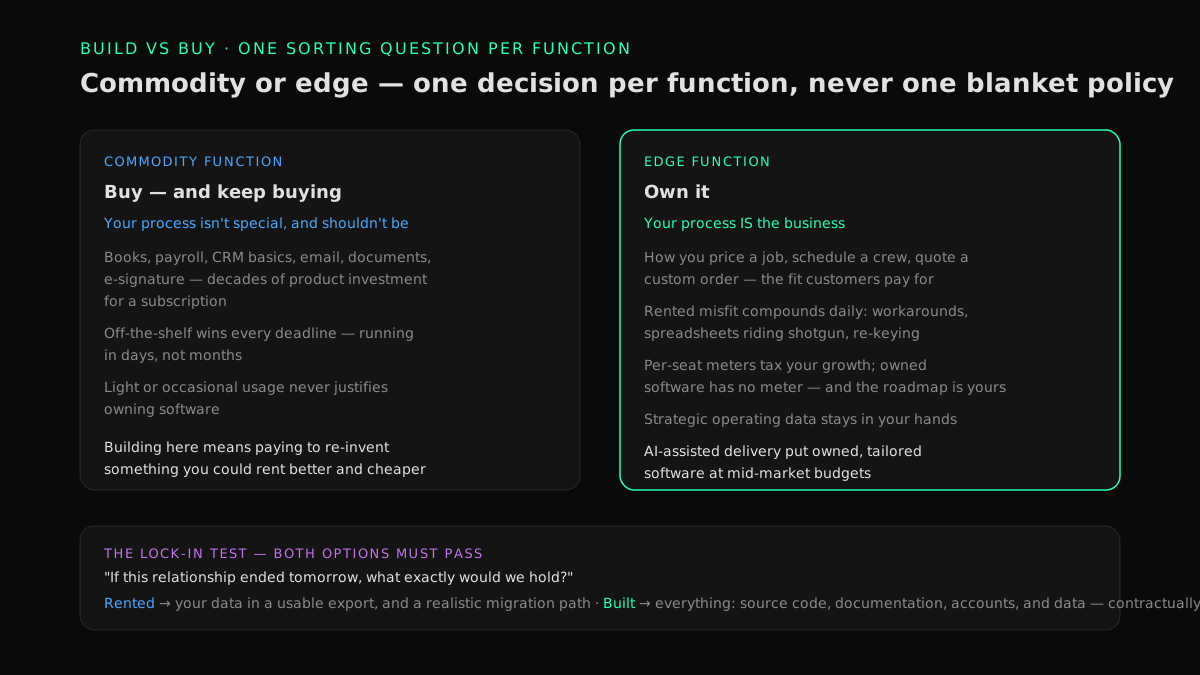
A build vs buy decision framework doesn't need twelve criteria. It needs one sorting question applied per function, honestly:
- Commodity functions are the ones where your process isn't special and shouldn't be. Every business closes books, runs payroll, sends email, stores documents, signs contracts. The market has spent decades perfecting products for these jobs. Building here means paying to re-invent something you could rent better and cheaper. Buy — and keep buying.
- Edge functions are the ones where your process is the business. How you price a job, schedule a crew, route a truck, quote a custom order, plan a production run, or serve your biggest customer — these have to match how your operation actually works, because that fit is what customers pay for. A generic tool forces your edge into its shape, and the misfit compounds daily in workarounds, spreadsheets, and lost deals. Own.
Gartner formalizes a version of this as the pace-layered application strategy — systems of record, systems of differentiation, systems of innovation, each managed differently. You don't need the vocabulary; you need the discipline it encodes: one decision per function, not one blanket policy. Companies that get this wrong don't fail at analysis — they fail at sorting. They rent their edge and occasionally, expensively, try to build a commodity.
Why the Old Advice Was "Always Buy" — and What Changed
Ten years ago, telling a $60M distributor to commission custom software was usually bad advice, and the reasons were sound.
Building was priced for enterprises. Custom development meant many skilled engineers for a long time — the median U.S. software developer earns about $130,000 a year before loading, and meaningful systems took teams of them, for quarters. The rational mid-market answer to almost every software need was a subscription, even when the fit was poor.
Big software projects earned their reputation. McKinsey's research on large IT projects found they run 45% over budget on average while delivering 56% less value than projected. Most owners don't need the citation — they have their own 2021 story. The scar tissue is earned.
But "always buy" quietly accumulated its own bill. Companies with fewer than 500 employees now run about 150 SaaS applications on average, and organizations actively use only about half of the licenses they pay for. Per-seat pricing means the meter runs faster as you grow. Renewal prices ratchet up annually. And where the rented tool doesn't fit, people fill the gap — re-keying, reconciling, working around — which is payroll doing software's job.
What changed is the input cost of building. A compact team of senior engineers directing AI coding agents — software that writes and tests code under human review — now does the repetitive construction work in parallel while the senior people own the design and answer for what ships. This is the model Snowman Labs runs as an official partner of Cognition, Replit, and Hud, with published operating standards: a first production milestone in 2 weeks, a 40–60% target reduction in time to market, across 400+ delivered projects rated 4.9/5 on Clutch from 32 verified reviews. The practical consequence for an owner: the break-even between renting and owning moved. Systems where the honest old advice was "just keep paying the subscription" now clear the bar for owning — especially once you count the full cost of the status quo, which the next sections do.
Note what did not change: the McKinsey failure pattern indicts large, long, big-bang projects. AI didn't make big bets safe; it made small bets cheap. The de-risking section below is about keeping it that way.
What "Build" Means When You Have No Engineers
Almost every build vs buy article assumes an in-house engineering team weighing whether to write the software themselves. If you're a mid-market owner whose IT function keeps laptops running, that version of "build" was never on your menu. Your real menu has three options:
- Buy off-the-shelf. Rent a finished product. Right for commodities; fastest to deploy; zero ownership at the end.
- Buy and extend. Rent a platform that covers most of the need and pay to configure or extend the last mile. Works when the gap is small and the platform is genuinely open; goes wrong when "configuration" becomes a shadow custom build priced at consulting rates, owned by nobody, on a platform you can't leave.
- Partner-build and own. A firm builds the system for you — and everything lands in your hands: source code, accounts, documentation, data. You own the asset without employing the builders, the same way you own your building without employing the architects.
The third option is what "build" actually means at mid-market scale, and it changes the risk conversation: you are not becoming a software company or betting on your ability to manage engineers. You're commissioning an asset — and the protections that make that safe are contractual and checkable by a non-technical buyer, which is exactly what the buyer's checklist in our modernization guide covers: assessment before contract, ownership of everything from day one, a production milestone in weeks, results in dollars, named senior humans accountable, and the right to stop quarterly.
When to Buy — and Keep Buying
Buy when the function meets most of these criteria:
- The market category is mature. Accounting, payroll, CRM basics, email, document storage, e-signature. Decades of product investment you get for a subscription.
- Your process is standard — or should be. If the honest answer is "our invoicing isn't special," don't own software to be special at it. When the system hitting its ceiling is the accounting core itself, the answer is usually a stronger ledger product, not a custom one — our owner's guide to outgrowing QuickBooks sorts that decision.
- You need it running in days. Off-the-shelf wins every deadline.
- Usage is light or occasional. A tool used by three people once a month should never be built.
One warning: buying well is an active discipline, not a default. Most mid-market SaaS estates are bloated with overlapping tools, idle seats, and auto-renewals nobody reviews — which is why "buy the commodities" should usually be accompanied by consolidating them. Our owner's playbook to reduce SaaS spend is the six-step version of that discipline.
When to Own
Own when the function meets most of these:
- It encodes how you compete. Customers choose you partly because of how this process works. Renting it means your edge is shaped by a vendor's roadmap and available to every competitor with a credit card.
- The misfit generates workarounds. Spreadsheets riding shotgun on the tool, exports massaged by hand, a person whose actual job is compensating for the software. Each workaround is the rented tool failing an audit it will never pass — and the re-keying they create has a payroll cost you can count, as our playbook to eliminate double data entry shows.
- Per-seat pricing scales against you. When headcount growth or transaction growth directly raises the software bill, the meter is taxing your growth. Owned software has no meter.
- You keep asking the vendor for changes that never come. Your feature request competes with ten thousand other customers'. On owned software, the roadmap is yours.
- The data in it is strategic. If this system holds the operating data your future reporting and AI plans depend on, owning it means never negotiating for access to your own information.
The Full-Cost Comparison Most Analyses Miss
The classic mistake is comparing a subscription invoice to a build quote. Both numbers are wrong — each side has costs the invoice never shows. Put the real columns side by side, per system, over five years:
| Renting: the full cost | Owning: the full cost |
|---|---|
| Subscription fees — at projected seats and volume, not today's | Build cost — the partner's quote for a scoped first version |
| Renewal escalation (price rises at every renewal are the norm, not the exception) | Running cost — hosting and monitoring, typically a small fraction of an equivalent subscription |
| Payroll doing workarounds: re-keying, reconciling, compensating for misfit | Evolution — the system changes as the business does; budget for it deliberately |
| Integration gaps — connectors, middleware, or the humans standing in for them | Operating accountability — someone answers when it breaks (your partner, under contract, or eventually your own hire) |
| Exit cost you're deferring: data extraction, retraining, the switch you'll eventually make anyway | Exit cost ≈ zero: source, data, and accounts are already yours |
Three honest notes on reading the table. First, maintenance on the owning side is real and permanent — software is never "done," and any builder who quotes as if it were is disqualifying themselves; owning cheaply is a myth, owning predictably is the goal. Second, the renting side compounds — seats, volume, and renewal escalations grow the bill every year, and its aging-system cousin grows fastest of all: the rising annual bill for a system that never improves, which our guide to software maintenance costs that are too high calls the maintenance ransom. Third, year one flatters renting; year five usually doesn't. Run the comparison over five years at projected size, or don't run it at all.
The Middle Paths
Build vs buy is a spectrum with two useful stops in the middle:
- Rent while you build. Where a subscription covers most of the need today, keep renting short-term while the owned replacement is built and proven — then exit at renewal. Nothing gets canceled until its replacement is live; the savings fund the next step. This sequencing is the core of our SaaS consolidation approach.
- Connect instead of replacing. Sometimes the pain isn't any single tool — it's that the tools don't share data, and people bridge the gaps by hand. The highest-payback move is often integration, not construction: make the systems you already have talk to each other and retire the overlap. Our owner's guide to systems that don't talk to each other maps that decision, including when connecting beats both building and buying.
The Lock-In Test Both Options Must Pass
Whichever way you decide, apply one test before signing anything: "If this relationship ended tomorrow, what exactly would we hold?" This is the short form of a bigger discipline — measuring what saying no to a vendor would cost you, system by system — that our owner's guide to software vendor lock-in turns into a one-afternoon audit and a set of loosening moves.
For a rented tool, the honest answer should include your data in a usable export format and a realistic migration path. For a partner-built system, the answer must be everything — source code, documentation, accounts, and data, in your hands from day one, contractually. A firm that builds "custom" software but keeps the source hasn't sold you an asset; it has sold you a subscription with extra steps, and you've traded one landlord for another. The failure mode lands on owners, not IT departments: the vendor gets acquired, sunsets the product, or simply disappears — and the company can't patch, change, or leave the system its operations run on. Our owner's guide to a software vendor going out of business covers what that looks like from the inside, and why source code in your hands is the difference between an inconvenience and a crisis.
De-Risking the Decision Without a CTO
The build vs buy literature assumes someone technical will supervise the answer. Here's the sequence that protects an owner who doesn't have that person:
- Baseline before deciding. Total the real cost of the status quo per system — subscription and maintenance spend, the payroll cost of workarounds, renewal escalation. This one exercise kills most bad decisions in both directions, and it's the first deliverable of our software assessment.
- Sort commodity from edge with the one-rule test above. Expect a short "own" list — three to five systems, not thirty.
- Demand a two-week production milestone. Whoever proposes to build must put working software in front of your team in about two weeks — real proof under your roof before any large commitment. A partner who can't work that way is telling you the bet will be big.
- Keep every step small enough to stop. Quarterly exits, no multi-year lock-in, results reported in dollars against the baseline. The structural answer to the failed-project scar isn't better luck — it's never placing a bet whose loss you couldn't shrug off.
- Verify ownership on day one, not at handover. Repository access, account credentials, documentation — checkable by a non-technical person in an afternoon.
This is the model our custom software practice for mid-market companies is built around, precisely because the typical buyer has a P&L and no engineering department. And this sequence de-risks one decision — the standing version, with decision rights, the four written artifacts, and an annual rhythm your leadership team can run, is our owner's guide to mid-market IT strategy without a CTO.
Build vs Buy: The Decision Table
| Signal pattern | Right move |
|---|---|
| Mature product category, standard process, light usage | Buy — and consolidate to fewer, better-used subscriptions |
| Platform covers ~90% of the need, gap is small, platform is genuinely open | Buy and extend — with the lock-in test applied to the extensions |
| Encodes your edge; workarounds multiplying; per-seat meter taxing growth; vendor roadmap ignores you | Partner-build and own — smallest valuable version first, two-week milestone, everything in your hands |
| Tools individually fine, collectively disconnected; humans bridging the gaps | Connect, don't replace — integration first, then retire the overlap |
| Works fine, low risk, off the growth path | Leave it alone — spend nothing here |
FAQ
Is it cheaper to build or buy software?
In year one, buying is almost always cheaper — a subscription starts at hundreds per month while a meaningful custom build starts in the tens of thousands. Over five years the answer frequently reverses for poorly-fitting tools: per-seat fees compound with growth, renewal prices ratchet, and workaround payroll accumulates, while an owned system's costs are front-loaded and then flatten. Run the comparison per system, over five years, at projected size, with all the hidden costs on both sides counted. For the actual dollar ranges on the owning side — by project size, with the running costs quotes hide — see our guide to how much custom software development costs.
When should you build software instead of buying it?
Build — more precisely, commission and own — when the function encodes how your business competes, when misfit with rented tools generates persistent workarounds, when per-seat pricing scales against your growth, or when the vendor's roadmap ignores needs you keep paying for. Buy when the category is mature and your process is genuinely standard: accounting, payroll, email, document storage.
What are the disadvantages of custom software?
The honest ones: a higher upfront cost than a subscription, a permanent maintenance obligation (software is never "done"), and dependence on whoever builds it — which is why source code, documentation, and accounts must be contractually yours from day one. The historical disadvantage — enterprise-scale price tags — is the one AI-assisted delivery has substantially reduced; the other three are managed with structure, not eliminated.
Does AI change the build vs buy decision?
Yes, in one specific way: it cut the labor cost of construction, which moved the break-even point between renting and owning. Systems where the right 2019 answer was "keep the subscription" now often clear the bar for owning. What AI did not change: big-bang projects still fail, maintenance still costs money, and commodity products are still unbeatable at their own game. AI made small bets cheap — it did not make large bets safe.
What is a build vs buy analysis?
It's a per-system comparison of the full five-year cost and strategic fit of renting versus owning a piece of software — including the costs invoices don't show: workaround payroll, renewal escalation, and integration gaps on the renting side; maintenance and evolution on the owning side. A one-page version per system beats a forty-page version for the whole company.
Can a company with no IT department own custom software?
Yes — owned doesn't mean self-operated. The builder should be willing to run and evolve the system under the same measured, quarterly terms as the build, and the non-negotiable is that ownership stays with you: source code, accounts, documentation, and data in your hands, so you can change operators without changing systems. That's owning with help, as opposed to renting from a new landlord.
How long does custom software take to build?
The old assumption — quarters before anything works — is the pattern that earned custom software its reputation. The current standard to demand: a first working piece in production in about two weeks, a genuinely useful first version in one to three months, then evolution in small steps. If a proposal's first working software arrives in month six, the bet is too big; shrink the scope or change the partner.
The Decision You Can Now Make
Sort each significant system with one question — commodity or edge. Buy the commodities and consolidate them ruthlessly. Own the systems that encode how you win, now that the economics finally allow it — through a partner-build with everything in your hands, proven in two-week steps, measured in dollars, and small enough to stop at any quarter. The companies that get this wrong pick a side of the build vs buy debate; the companies that get it right stop treating it as one decision.
The comparison starts with a number most owners have never totaled: what the current setup really costs. Find out what your software really costs you →
Find your highest-value path to agentic delivery.
Map your readiness, delivery constraints, and first 90-day opportunity with the Snowman Labs AI Readiness Diagnostic.