AI for Mid-Size Business Operations: An Owner's Guide
AI for mid-size business operations, minus the hype: where AI pays now, the data prerequisite vendors skip, honest costs, and a 90-day way to start.
 By Danilo Brizola
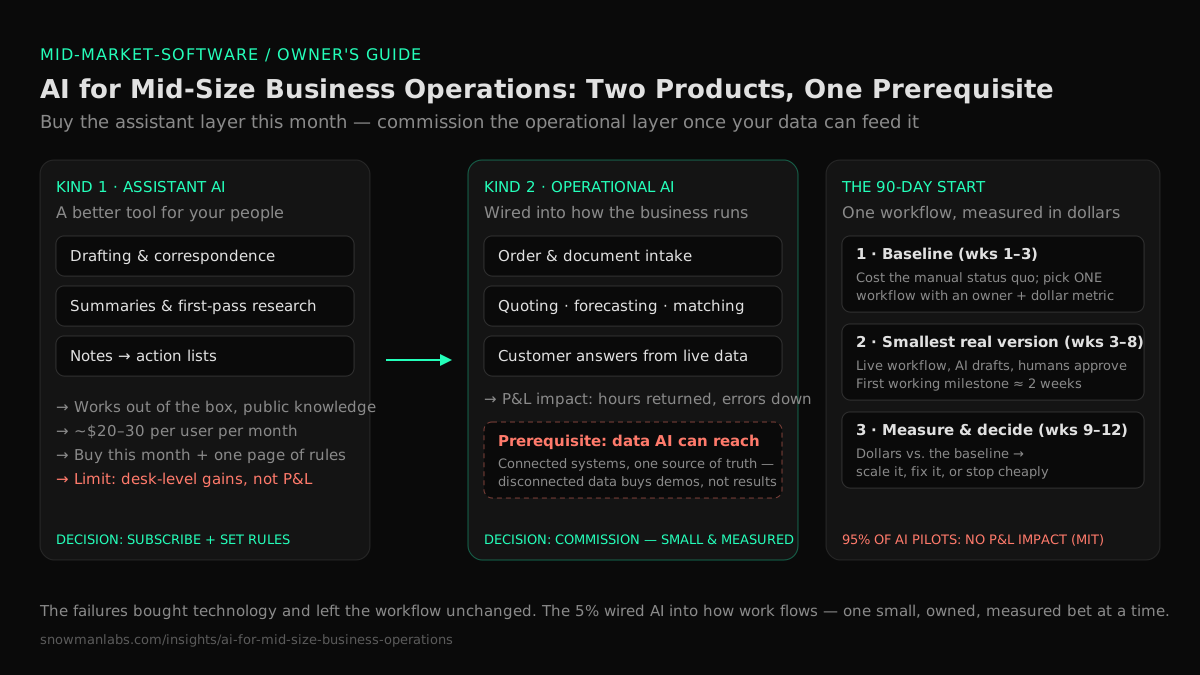
AI for mid-size business operations pays off in two places, and only two: giving your people a capable assistant for the reading-and-writing parts of their jobs, and building AI into the systems that run your operation — quoting, scheduling, forecasting, document intake, customer service. The first is cheap and you can start this month. The second is where the P&L impact lives, and it has a prerequisite most vendors skip past: AI runs on your operating data, and if that data is scattered across disconnected tools and spreadsheets, no product demo will survive contact with your business. This guide is written for the owner, CEO, CFO, or COO of a $20M–$500M company with no CTO — the person the board asks "what are we doing about AI?" while every vendor in the inbox promises magic. By the end you'll know which uses actually work now, what they cost, what has to be true before they work, and a 90-day way to start that doesn't bet the company.
The Pressure Is Real. Most of the Magic Isn't.
Two numbers frame the honest state of AI in business. Adoption is nearly universal: in McKinsey's State of AI survey, 88% of organizations say they now use AI in at least one business function. Results are not: an MIT report on the state of AI in business found that about 95% of corporate generative-AI pilots produced no measurable P&L impact, even though more than 80% of organizations had piloted the tools. McKinsey's own numbers rhyme: roughly two-thirds of adopters haven't scaled AI beyond experiments, and only about 6% qualify as high performers who can attribute real earnings impact to it.
Read those numbers the way you'd read any operations report: almost everyone bought something; almost nobody changed a number that matters. And the reason, per the MIT researchers, was not that the AI models are weak. Pilots fail because the tools never get connected to the way work actually flows through the company — they sit next to the operation instead of inside it.
That failure pattern should sound familiar. It's the same one behind every shelfware subscription and every ERP module nobody uses: technology bought, workflow unchanged. Which is good news, in a way — it means the AI problem is a known problem, the kind an owner can manage with discipline, not a mystery requiring a research lab.
The Two Kinds of AI Value — and Why Vendors Blur Them
Almost everything sold as "AI for business" is one of two different products, with different costs, different prerequisites, and different payoffs. Sorting them is the single most clarifying thing an owner can do.
1. Assistant AI: a better tool for your people. General-purpose AI assistants — the chat tools everyone has now tried — are genuinely good at the reading-and-writing layer of office work: drafting and answering routine correspondence, summarizing long documents, cleaning up proposals, doing first-pass research, turning meeting notes into action lists. This value is real, immediate, and cheap: business plans for the major assistants run around $20–$30 per user per month at published list prices — Microsoft 365 Copilot, for example, lists at $30. The honest limit: these are personal productivity gains. They make individuals faster at tasks; they don't change how an order moves from your customer's email to your warehouse. The MIT finding above draws exactly this line — individual productivity tools succeed at the desk level and stall at the operational level, because they don't know your systems, your data, or your process.
2. Operational AI: intelligence built into how the business runs. This is AI wired into the systems that operate the company: reading inbound orders and entering them without re-keying, drafting quotes from your actual pricing history, forecasting demand from your actual sales data, flagging the invoices that won't reconcile, answering routine customer questions from your real order status. This is where AI shows up on a P&L — headcount hours returned, errors caught, quotes out the door in minutes instead of days. And it's precisely the kind that cannot be bought as a $30 seat, because it has to be connected to your data and your workflow to exist at all.
Vendors blur these two constantly — assistant-grade products marketed with operational-grade promises. The one-question filter: "Does this work out of the box on public knowledge, or does it need to be connected to our systems and data?" The first kind you can buy this week and should. The second kind is an integration project wearing an AI badge — worth doing, often the most valuable thing you can do, but only with the prerequisite the next section covers.
Five Operational Uses That Work Now
Concrete beats abstract. These five uses are delivering results in mid-market operations today — not futurism, no robots. What each one needs before it works is listed honestly, because the precondition is the part vendor decks omit.
| Use case | What it does | What must be true first | Payback signal |
|---|---|---|---|
| Document and order intake | Reads inbound POs, invoices, and forms from email or PDF and enters them into your systems — no re-keying | A system of record to enter into, and a human review step | Back-office hours returned; entry errors down |
| Customer service drafting and deflection | Answers routine "where's my order / what's my balance" questions; drafts responses for the rest | Order and account data reachable in one place — not five | Response time in minutes; staff freed for the hard cases |
| Quoting and pricing assist | Drafts quotes from your pricing history and win/loss record for a human to approve | Pricing history in a queryable system, not in the estimator's head | Quote turnaround from days to hours; win rate visible |
| Forecasting and inventory | Projects demand from your actual sales history; flags stockout and overstock risk | Two-plus years of clean sales data in one place | Carrying cost down; fewer emergency orders |
| Back-office reconciliation | Matches invoices to POs to receipts; flags only the exceptions | The three documents in systems that can be connected | Days-to-close down; one person reviewing exceptions, not stacks |
Notice what the middle column keeps saying: data in a reachable, trustworthy place. That's not a coincidence — it's the whole game.
The Prerequisite Nobody Sells: Data AI Can Actually Reach
Every operational AI use above reads from your operating data. If your company runs on systems that don't talk to each other — ERP, CRM, warehouse, e-commerce, connected by people re-typing between screens — then AI has nothing coherent to read. If every important report is an argument because there's no single source of truth for your business data, AI will faithfully learn from numbers your own team doesn't trust. And if critical workflows live in load-bearing spreadsheets, the AI can't see them at all.
This is why so many mid-market AI initiatives produce a demo and then quietly die. The demo ran on clean sample data; the business runs on thirty disconnected silos. As our mid-market software modernization guide puts it: getting your systems connected and your data in one place isn't the boring alternative to an AI strategy — it's the prerequisite for one.
The practical consequence for sequencing: if your systems are disconnected, the first "AI project" is a plumbing project. That's not a detour from the AI roadmap; for most mid-market companies it is the first leg of the roadmap — and unlike a speculative pilot, connecting systems and killing re-keying pays for itself even before any AI runs on top.
One more data reality owners should know about: AI is already in your building, unmanaged. Employees paste customer lists, contracts, and financials into personal AI accounts because the tools are useful and nobody set rules. That's a data-exposure problem, not a reason to ban anything — the fix is the same inventory-and-rules discipline covered in our owner's guide to shadow IT: sanction good tools on business accounts, state plainly what may never be pasted into unapproved ones, and route new AI purchases through one approval path.
What AI Actually Costs a Mid-Size Business
Three spending tiers, in honest ranges:
- Assistant AI: roughly $250–$400 per user per year at list prices for business plans — a rounding error against payroll for the office roles that use it daily. The real cost is the hour of management attention it takes to set usage rules and the expectation that people actually learn the tools.
- A first operational AI use case: typically tens of thousands of dollars, not hundreds. The range is wide because the AI is rarely the expensive part — the integration to your systems and the state of your data are. A company with connected systems and clean data buys weeks of work; a company where the data has to be untangled first is paying for the plumbing project it needed anyway.
- AI built into owned software: the same economics as custom software generally — which AI-assisted delivery has pushed down substantially. Our guide to what custom software development actually costs gives the current ranges and the questions that keep a quote honest.
Whatever the quote, insist on the comparison that makes it meaningful: against the status quo, not against zero. The baseline is what the manual process costs today — the loaded payroll hours of re-keying, chasing, and reconciling; the error rate; the working capital tied up in guess-based ordering. Most owners have never totaled that number. Every AI decision gets easier once someone does.
Buying AI Without a CTO: The Six-Question Filter
The D-in-the-room problem — no technical advisor to say what's real — is solvable with questions a non-technical buyer can ask and verify. Put these six to any AI vendor or builder:
- "What data does this need, and where does that data live in our company today?" If the seller can't answer the second half, they're selling the demo, not the deployment.
- "What happens to our data — is it used to train anyone else's models, and who can see it?" Get it in writing. Business-tier AI products routinely commit to not training on customer data; a vendor that won't match that in contract is disqualified.
- "What number on our P&L moves, and by when?" Hours returned, days-to-close, quote turnaround, carrying cost. A vendor selling "transformation" without a number is selling the board slide, not the result.
- "Where does a human review the output?" In every use above, AI drafts and a person approves — that's what makes errors survivable. A pitch with no review step is a pitch to let software sign your name.
- "What's the smallest version that proves this in 90 days?" Big-bang AI programs fail the same way big-bang ERP projects do. Small bets, measured, then scaled.
- "If we stop, what do we keep?" The lock-in test from our build-vs-buy guide applies with full force to AI: your data comes back in usable form, and anything built on your dime — integrations, workflows, prompts, code — is yours, in your hands. AI vendors are young companies; assume some won't exist in five years and contract accordingly.
A 90-Day Way to Start
The pattern that works is the same one that de-risks every software decision at mid-market scale: baseline, one small bet, measure in dollars, then decide.
- Weeks 1–3: Baseline and pick one workflow. Inventory where your operating data actually lives and how connected it is. Total the status-quo cost of the two or three most manual workflows in the company. Pick one — with a named owner, data AI can reach, a low-risk boundary (internal process, human review), and a dollar-denominated result you'll accept as proof. This assessment-first step is exactly what our software and AI readiness assessment produces: a map of your systems and data, the manual-work costs in dollars, and a ranked list of candidate AI projects with payback estimates.
- Weeks 3–8: Run the smallest real version. Not a slideware pilot — the actual workflow, with real documents and real orders, AI drafting and your people approving. Demand the standard we publish for our own delivery work: a first working milestone in production in about two weeks. A partner who needs a quarter before you see anything working is building the kind of bet the MIT failure statistics are made of.
- Weeks 9–12: Measure against the baseline and decide. Hours returned, errors caught, turnaround time — in dollars, against the number from step 1. Then one of three honest outcomes: scale it to the next workflow, fix what the measurement exposed, or stop — having spent weeks and tens of thousands, not years and millions.
- Then: compound. Each connected system and each proven workflow makes the next AI use cheaper, because the plumbing and the data discipline accumulate. This is how "do something with AI" turns from board-meeting anxiety into a ranked queue of projects with payback estimates.
On who does the work: this is the delivery model Snowman Labs runs — a compact senior team directing AI coding agents, as an official partner of Cognition, Replit, and Hud, with published operating standards across 400+ delivered projects rated 4.9/5 on Clutch from 32 verified reviews. It's the same model behind our custom software practice for mid-market companies: senior humans accountable by name, everything owned by you, every step small enough to stop.
FAQ
How can a mid-size business start using AI?
Start in two lanes at once. Lane one: roll out an assistant-AI business plan to office roles this month, with written rules about what data may and may not go into it. Lane two: baseline your most manual workflow, check whether the data it needs is reachable, and run one small operational AI project against a dollar metric in 90 days. Skip the enterprise-style "AI strategy program" — at mid-market scale, one measured result beats a roadmap deck.
How much does AI cost for a mid-size business?
Assistant AI costs roughly $250–$400 per user per year at published list prices. A first operational AI use case typically lands in the tens of thousands of dollars, driven mostly by integration and data readiness rather than the AI itself. AI built into owned custom software follows custom-software economics, which AI-assisted delivery has pushed down substantially. Compare every quote against the loaded cost of the manual status quo, not against zero.
Does my business actually need AI?
Your business needs what AI does, where it applies: fewer payroll hours spent on re-keying and reconciling, faster quotes, fewer stockouts, routine customer questions answered in minutes. If none of those move your P&L, you don't need AI — you need whatever does. The useful question isn't "do we need AI?" but "which of our three most manual workflows would we pay to shrink?" — and then whether AI is the cheapest way to shrink it.
Will AI replace my employees?
In mid-market operations today, AI replaces tasks, not roles — the re-keying, drafting, matching, and looking-up inside jobs. The realistic outcome is the back office handling growth without new hires and skilled people spending their hours on exceptions and customers instead of data entry. Every working deployment described above keeps a human approving the output — that review step is what makes errors survivable, and cutting it to save a salary is how AI horror stories get written.
Do I need a data scientist or an AI team?
No. Mid-market companies don't win AI by hiring researchers; they win it the way they win construction projects — by commissioning specialists and owning the result. What you do need in-house is an accountable owner per workflow and the discipline to demand measurable results. The build-vs-own logic is the same as for any software: rent the commodity tools, own what encodes your edge, and apply the lock-in test to both.
Why do most business AI projects fail?
The MIT research points at integration, not technology: tools were piloted next to the operation instead of wired into it, so nothing about how work flows actually changed. In mid-market terms, the three killers are disconnected data (the AI has nothing trustworthy to read), no named owner with a dollar metric (nobody's number moves), and big-bang scope (a year of spend before the first result). All three are choices, which means all three are avoidable.
Is ChatGPT enough for my business?
For the personal-productivity layer — drafting, summarizing, research — yes, a general assistant on a business plan captures most of that value cheaply, and you should take it. It cannot run your operations: it doesn't know your orders, your pricing, or your systems, and pasting company data into unmanaged personal accounts to compensate creates the exposure problem covered in our shadow IT guide. Operational value requires AI connected to your data — which is a project, not a subscription.
The Decision You Can Now Make
Split every AI pitch into the two products it might be. Buy the assistant layer this month — it's cheap, the rules take an hour to write, and the gains are real if modest. Treat the operational layer as what it is: the highest-payback software project available to most mid-size companies, gated by one prerequisite — data your systems can actually serve — and de-risked the same way as any owned software: one workflow, a named owner, a two-week first milestone, results in dollars, small enough to stop. The companies stuck in the 95% bought technology. The companies in the 5% changed how work flows — starting with knowing what their current setup actually costs.
That number is where to start. Find out what your software really costs you →
Find your highest-value path to agentic delivery.
Map your readiness, delivery constraints, and first 90-day opportunity with the Snowman Labs AI Readiness Diagnostic.