Running Your Business on Spreadsheets? An Owner's Guide
Running your business on spreadsheets? Sort the workbooks into three roles, price the load-bearing ones, and exit to software you own — a guide for owners.
 By Danilo Brizola
Running your business on spreadsheets is normal, rational — and, past a certain size, one of the most expensive and fragile ways to operate a company. The important distinction is one most "ditch Excel" articles skip: spreadsheets do three different jobs in a business, and only one of them is a problem. Used as calculators and scratchpads, they're the best tool ever made. Used as shadow copies of data that lives in your real systems, they quietly corrupt your numbers. Used as the system itself — the workbook that schedules production, prices quotes, or tracks every order — they are unversioned, untested, one-person software carrying your operation with none of software's protections. This guide is for the owner, CEO, president, or COO of a $20M–$500M company who suspects the second and third kind are everywhere. By the end you'll know how to find every load-bearing spreadsheet in one afternoon, what each one really costs in payroll, errors, and risk, and the four exit moves — ending in software you own, not another subscription.
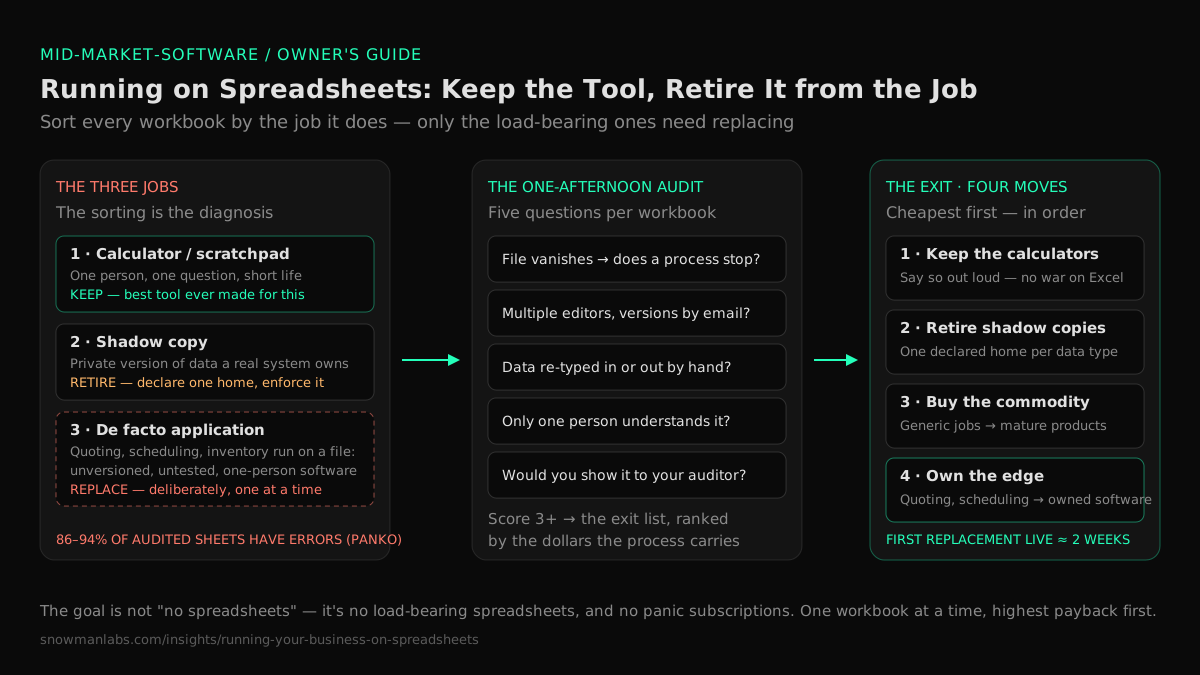
The Three Jobs Spreadsheets Do — Only One Is a Problem
Before deciding anything, sort every spreadsheet in your company into one of three roles. The sorting is the diagnosis.
| Role | What it looks like | Verdict |
|---|---|---|
| Calculator / scratchpad | One person, one question, short life: a pricing what-if, a quick analysis, a one-off list | Keep. This is what spreadsheets are for. No tool beats them, and replacing them is money wasted |
| Shadow copy | A department's private version of data that already lives in a real system: the "real" inventory count, the sales forecast rebuilt from CRM exports, the pricing sheet on a desktop | Retire. Every copy is another version of the truth, aging and drifting from the moment it's saved |
| De facto application | A workbook a business process runs on: the scheduling board, the quoting model, the order tracker, the commission calculator everyone waits on at month-end | Replace — deliberately. This is unmanaged software carrying your operation, and it's the subject of this guide |
The third role is the one that matters, and it hides in plain sight because it never looks like a decision. Nobody chose a spreadsheet as the company's production scheduling system; a capable employee built a workbook to solve Tuesday's problem, it worked, and ten years later a $150M operation stops when that file breaks. The trade press calls this layer part of shadow IT, and it's the piece that never dies — our owner's guide to shadow IT risks and governance maps the whole unmanaged layer, spreadsheets included. This guide goes deep on the spreadsheet piece specifically, because it's the piece most likely to be load-bearing.
Why Every Growing Business Ends Up Here
Owners sometimes read the state of their systems as a personal failure. It isn't — it's the predictable result of spreadsheets being genuinely excellent at the start.
A spreadsheet costs nothing extra, everyone already knows how to use one, and it bends to any process instantly — no vendor, no project, no waiting for IT. When the company was $8M and the "system" was one person who knew everything, a workbook was honestly the right call, and the person who built it was solving a real problem faster than any alternative. That's why every spreadsheet-run process you have was, at the moment of its creation, a good decision.
The trouble is that spreadsheets don't announce when they cross the line. There's no alarm when the pricing scratchpad becomes the pricing system, when the fourth person gets a copy, or when the workbook's author becomes the only living human who understands the tab labeled DO NOT TOUCH v3. The tool that was perfect for a one-person question is now doing a job software categories exist for — multi-user, permissioned, audited, backed-up, connected to your other systems — and doing that job with none of those properties. Growth turned a good decision into an unexamined one. The fix isn't shame; it's an audit and a sequence.
What the Load-Bearing Spreadsheet Really Costs
The costs split into four families — and unlike a SaaS renewal, none of them arrives as an invoice.
Errors you can't see, at rates you wouldn't accept
Decades of field audits, best known from Raymond Panko's research on spreadsheet errors, consistently find errors in 86–94% of operational spreadsheets — not because people are careless, but because humans make small mistakes in a low single-digit percentage of complex steps, and a workbook faithfully preserves every one, forever, invisibly. The European Spreadsheet Risks Interest Group keeps a running public archive of what that means in practice, and the entries are not small companies being sloppy: a single cut-and-paste error in a bidding spreadsheet cost the power company TransAlta $24 million in mispriced contracts, and Public Health England lost nearly 16,000 positive COVID-19 test results because a file quietly hit Excel's row limit and truncated without warning. Your quoting workbook is smaller than a national testing pipeline — but it prices real contracts with the same silent failure modes. If a formula in it has been wrong for two years, what did that cost? The honest answer for most owners: nobody knows, and nothing in the tool would ever have told you.
The one-person system, in file form
Every serious workbook has an author, and the author is the only person who really knows how it works — which macros are fragile, why column Q must never be sorted, what the hidden tab does. That's a key person dependency with all the same exposure as the veteran who's the only one who understands the old server, except worse: the workbook has no source code repository, no documentation, and no vendor to call. When the author retires, resigns, or is out for surgery, the business discovers it's been running a critical process on a black box with one former keyholder.
Payroll doing software's job
A load-bearing spreadsheet doesn't connect to anything, so people become the plumbing around it: exporting from the ERP to feed the workbook, re-keying the workbook's outputs back into the systems, reconciling the copies when they disagree, and emailing versions around to collect edits one inbox at a time. That's the re-keying economy our playbook for eliminating double data entry prices in payroll terms, and the reporting-side version of it is why answers arrive stale — the twin problem our owner's guide to a single source of truth exists to fix. The aggregate bill for operating on scattered, conflicting data is not a rounding error: Gartner puts the average cost of poor-quality data at $12.9 million per organization per year — and mid-market companies feel their proportional share of it in mispriced quotes, wrong shipments, and week-old numbers.
The ceiling — and the AI question
Spreadsheets cap out exactly where a growing business needs headroom: they handle one careful editor well and many concurrent users badly, they slow and break as data volume grows, they have no audit trail when your insurer or your largest customer asks who changed what, and they can't serve a customer portal, a barcode scanner, or a second warehouse. And when the board asks about AI, the load-bearing spreadsheet is the quiet reason the honest answer is "not yet": AI initiatives run on your operating data, and if the operation's real logic lives in forty workbooks, there is nothing structured for AI to run on. What our mid-market software modernization guide says about the whole estate applies doubly to the spreadsheet layer: getting it into real systems isn't the boring alternative to an AI strategy — it's the prerequisite for one.
The One-Afternoon Spreadsheet Audit
You don't need consultants to find the load-bearing workbooks. Ask each department head for the spreadsheets their team "couldn't work without," then put every candidate through five questions:
- If this file vanished tonight, does a business process stop tomorrow? If yes, it's load-bearing — an application, not a document.
- Do two or more people edit it, or does it move by email? Multi-user editing and versions-by-email are where silent overwrites and
FINAL_v7_REALchaos live. - Does data get typed into it from another system, or from it into another system? Every yes is a human data pipeline you're paying salaries to operate.
- Does exactly one person understand how it works? Name them. That's a bus-factor risk sitting in a file share.
- Would you be comfortable showing it to your auditor, your insurer, or your biggest customer as "the system"? If the honest answer is no, you already know it's the wrong container for the process.
Score each workbook: questions answered "yes" (or "no" on question five) count one point each. Anything scoring three or more goes on the exit list, ranked by the dollar size of the process it carries. Most mid-market companies find five to fifteen genuinely load-bearing spreadsheets — and the top three usually carry quoting, scheduling, or inventory, which is to say: revenue.
While you're at it, note the signs that recur across every "have you outgrown spreadsheets" checklist the software vendors publish — hours lost to version-hunting, meetings that open by debating whose numbers are right, reports assembled by hand every month, one person as the reporting bottleneck. They're real signals; each maps to one of the three roles above. What the vendor checklists get wrong is the conclusion, which is always the same regardless of your situation: buy our product. The sorting above gives you the honest version — some spreadsheets you keep, some you retire with discipline, and only the load-bearing few justify real software.
The Exit: Four Moves, in Order
The goal is not "no spreadsheets." The goal is no load-bearing spreadsheets — and no new subscriptions bought in a panic. Four moves, cheapest first:
- Keep the calculators — and say so out loud. Announce the policy: spreadsheets stay the official tool for analysis, what-ifs, and one-off questions. This matters because a "war on Excel" fails instantly; people defend the tool because the tool is genuinely good. You're not banning spreadsheets — you're retiring them from jobs they were never built for.
- Retire the shadow copies. Every workbook that duplicates data living in a real system dies by declaration, not by project: name the system that owns each data type, fix the report or access gap that made people keep private copies, and enforce the rule that numbers not from the declared source don't enter the meeting. The full method — declared homes, a one-page data dictionary, one governed report — is in our single source of truth guide. Cost: leadership will, not money.
- Buy the commodity. Where a load-bearing workbook is doing a generic job that mature products solve completely — expense tracking, time-off requests, basic project boards — buy the boring standard tool and move on. No build beats the category leaders at commodity work, and pretending otherwise burns credibility for move four. If the workbook straining hardest is the one doing your accounting's job — multi-entity consolidations in Excel, revenue recognized by hand — that's a ledger problem with its own decision path, covered in our guide to outgrowing QuickBooks.
- Own the edge. The spreadsheets carrying how your business actually competes — the quoting model with your pricing logic, the scheduling board that encodes twenty years of operational judgment, the production planner — deserve better than a generic tool's shape, because their fit is your edge. This is where the build vs buy decision lands on owning: custom software that does exactly what the workbook did, correctly, multi-user, permissioned, audited, and connected to your other systems. The workbook's author, far from being displaced, is the project's most valuable person — the business logic in their head and their formulas is the specification. AI-assisted delivery is what moved this from a seven-figure fantasy to a mid-market line item; it's the model our custom software practice for mid-market companies runs — a small senior team directing AI coding agents, with a first production milestone in about 2 weeks as the published operating standard.
One warning on sequence: resist the reflex to solve the spreadsheet problem by buying one big system to "replace them all." The workbooks grew where your real systems didn't fit; a giant suite bought to absorb them will fit differently, not better, and the spreadsheets will grow back in its new gaps — this time alongside a bigger subscription. Exit one load-bearing workbook at a time, highest dollar value first, and let the results fund the next one.
The First 90 Days
The same small-steps rhythm every move in this hub follows:
- Weeks 1–2: Audit and rank. Run the one-afternoon audit, score the workbooks, and put a monthly dollar figure on the top three: hours of feeding and re-keying at loaded cost, error rework, and the risk they carry (the one-person dependency, the insurance answer you'd rather not give). This inventory is the core of what our assessment produces, spreadsheet layer included.
- Weeks 2–4: Declare, retire, and pick the first target. Announce the keep-the-calculators policy, start the shadow-copy retirement, and pick the smallest load-bearing workbook with a real dollar figure — not the scariest one — as the first replacement.
- Weeks 4–6: First replacement in production. Working software your team actually uses, in about two weeks, doing what the workbook did — with the author involved as the domain expert and the old file kept read-only as a safety net. Proof under your roof before any larger commitment.
- Weeks 6–13: Expand on evidence. Take the next workbook on the ranked list. Each step reports dollars retired, hours returned, and risk removed against the audit baseline. If the numbers don't hold, stop — you've spent weeks, not years.
FAQ
Is it OK to run a business on Excel?
For analysis, one-off questions, and scratchpad work — yes, indefinitely; no tool is better. As the system a business process runs on, it stops being OK roughly when a second regular editor, a re-keying step, or a real dollar consequence appears. At that point the workbook is unmanaged software: no audit trail, no permissions, no testing, and error rates that field audits put in the high eighty percents of operational spreadsheets.
How do I know if my business has outgrown spreadsheets?
Five tells: a process stops if a particular file vanishes; versions travel by email and people debate which is current; data is re-typed into or out of the workbook from other systems; only one person understands how it works; and you wouldn't show it to an auditor or insurer as "the system." Three or more, and that workbook has crossed from document to load-bearing application.
What are the real risks of running a business on spreadsheets?
Four families: silent errors (audits consistently find mistakes in the overwhelming majority of operational spreadsheets — a single cut-and-paste error cost TransAlta $24M); key-person dependency on the workbook's author; payroll spent feeding and reconciling it by hand; and a hard ceiling on growth — no concurrency, no audit trail, no connections, and nothing structured for AI initiatives to run on.
Why do businesses keep using spreadsheets even when they hurt?
Because the alternative historically looked worse: enterprise software projects priced in seven figures with a documented record of running over budget, versus a free tool everyone already knows. That was a rational trade for years. What changed is the cost side — AI-assisted delivery lets a small senior team build owned, exactly-fitting replacements at mid-market budgets, which removes the main justification for living with the risk.
What should we replace spreadsheets with?
It depends on the role, not the tool. Shadow copies get retired by declaring which system owns the data — no purchase needed. Commodity jobs (expenses, time off, task boards) get mature off-the-shelf products. The workbooks encoding how you compete — quoting, scheduling, planning — are the ones worth replacing with custom software you own, because their exact fit is the point and per-seat generic tools can't reproduce it.
How much does it cost to replace a spreadsheet with real software?
A focused replacement of one load-bearing workbook is typically a project in the tens of thousands with AI-assisted delivery — not the seven-figure figure owners remember from old ERP quotes. The honest comparison is against the workbook's full running cost: the payroll hours feeding it, the error rework, and the risk it concentrates. Audit first; the ranking usually shows the first replacement paying for itself within the year.
Can't AI just fix our spreadsheets?
AI can help find errors in a workbook, but it can't give a spreadsheet the properties it lacks — concurrency, permissions, audit trails, connections to your other systems. More importantly, the causality runs the other way: AI initiatives need structured, trustworthy operating data, and a business whose logic lives in forty workbooks doesn't have any to offer. Moving the load-bearing processes into real systems is what makes AI useful later.
Keep the Tool, Retire It from the Job
Spreadsheets aren't the villain — the miscasting is. The same tool that's unbeatable as a calculator is indefensible as your quoting system, and the exit is neither a war on Excel nor one giant replacement project. Sort every workbook into its role; keep the calculators proudly; retire the shadow copies by declaration; buy the boring commodity tools; and replace the few load-bearing workbooks that carry your edge with software you own — one at a time, highest payback first, each step proven in production in weeks. The audit takes one afternoon and tells you exactly how big the problem is in dollars. The next step turns that list into a ranked plan. Find out what your software really costs you →
Find your highest-value path to agentic delivery.
Map your readiness, delivery constraints, and first 90-day opportunity with the Snowman Labs AI Readiness Diagnostic.