Systems That Don't Talk to Each Other: The Owner's Fix
Systems that don't talk to each other force people to be the integration layer. Four ways to connect them, what each costs, and how to buy without a CTO.
 By Danilo BrizolaUpdated
 Systems that don't talk to each other are the default condition of mid-market software: the ERP, the CRM, the warehouse system, the online store, and the accounting package each work fine alone — so people carry the data between them, re-typing orders, reconciling counts in Excel, emailing PDFs from one department to the next. If that describes your company, it isn't a sign of bad decisions; it's the industry norm. MuleSoft's Connectivity Benchmark finds that only about 27% of the applications organizations run are connected to each other. This guide is for the owner, CEO, president, or COO who signs the payroll that does the carrying. By the end you'll know why your systems ended up disconnected, what the manual bridging really costs, the four ways to connect systems — with what each one costs, fixes, and breaks — and how to buy the right one without a CTO on staff.
Why Your Systems Don't Talk to Each Other
The short answer: because nobody bought them as a set, and no vendor is paid to make them cooperate. Four forces produce the disconnection, and every mid-market company has felt most of them:
- The systems arrived one at a time, over years. The ERP came first, the CRM when sales grew, the warehouse scanner system with the second location, the online store during COVID. Each purchase solved its own problem. Nobody was ever asked to make the whole set work together, so it doesn't.
- Vendors have no incentive to connect. Every software vendor wants to be your center of gravity. Their integration story is usually "buy more of our suite" — connecting to a competitor's product is, at best, an afterthought sold as an add-on.
- The core system predates the modern ways of connecting. Many mid-market companies run on an ERP or a custom system from an era before software routinely exposed an API — the standardized doorway that lets one program read from and write to another. No doorway, no conversation. (If the system is also undocumented or the vendor is gone, that's a different, deeper problem — a legacy software rescue — and it comes before integration.)
- Nobody owns the gaps. Sales owns the CRM, operations owns the warehouse system, finance owns accounting. The spaces between systems belong to no department — so they get staffed informally, by whoever re-types the data, and the cost never appears on any budget line.
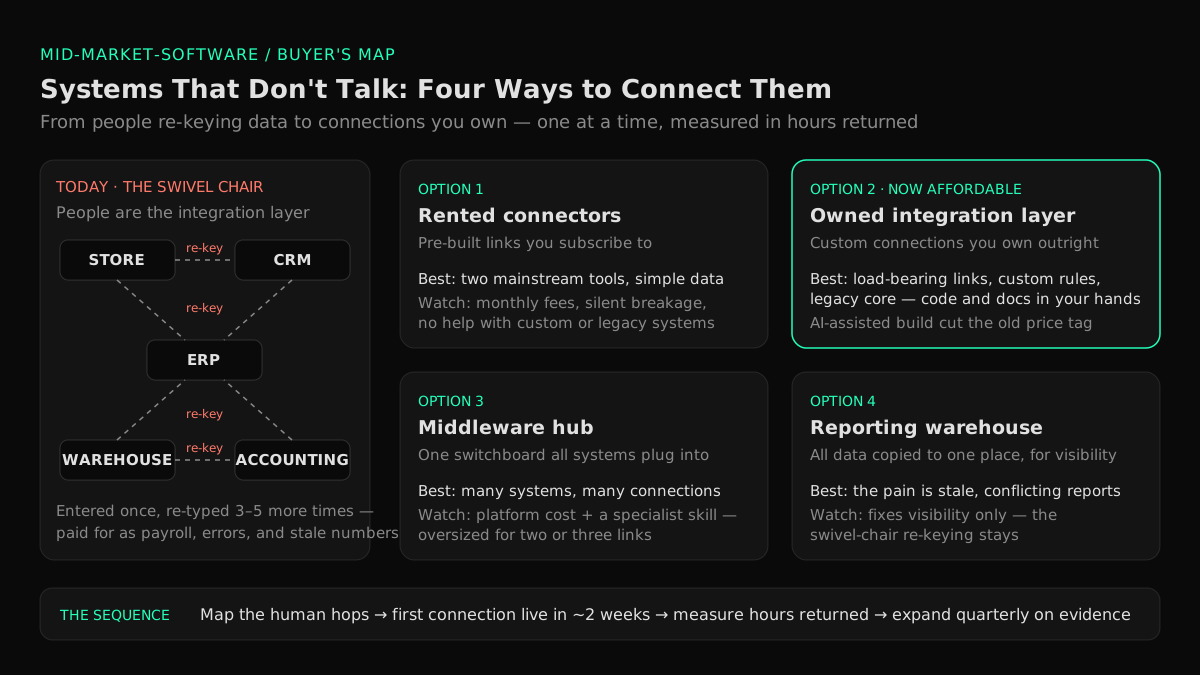
The result has a name in the trade — swivel-chair integration: a person swivels from one screen to the other, reading from the first and typing into the second. The term is twenty years old. The practice is alive on your invoice-processing desk right now.
What the Swivel-Chair Really Costs
Disconnected systems bill you in four ways, and only the first one is visible on the P&L — as payroll, filed under the wrong explanation.
1. People doing software's job. Every re-keying task — orders from the store into the ERP, shipments from the warehouse into accounting — is a human performing a data transfer that software performs for free. Count the people whose job is substantially copying data between screens, multiply by loaded cost, and you have the first number. At mid-market scale it is routinely several full-time salaries, and it grows with order volume — headcount rising in lockstep with revenue, exactly what software was supposed to prevent. Our mid-market software modernization guide calls this "payroll doing software's job," and it's usually the largest drain an owner can measure. (Connecting systems is one of four ways to remove that work — our playbook to eliminate double data entry covers the full ladder, including the copies that never touch two systems: paper, email, and shadow spreadsheets.)
2. Errors and their cleanup. Humans mis-key. A transposed quantity, a stale price, an order entered twice — each error costs little to make and a lot to find, and the finding also happens by hand: the month-end reconciliation marathon, the "why doesn't the warehouse count match the books" hunt, the credit memo and the apology call.
3. Decisions made on stale, conflicting numbers. When the same customer, product, or order lives in four systems, the systems disagree — and every report becomes an argument about whose export is right. Basic questions (margin by customer, inventory by location) take days and arrive describing last month, so pricing, purchasing, and hiring calls run on numbers you only half trust. Fixing that view problem is its own decision, with its own cheaper options — our owner's guide to a single source of truth for business data maps them.
4. The growth ceiling. Disconnection is why the new location took nine months to onboard, why the acquisition still runs its own ERP two years later, and why your biggest customer's request for order tracking got answered with a shared inbox (our owner's guide to B2B customer portals covers answering that request — and why the portal depends on these same connections). (When the complaint sharpens into "the core system itself is too small for us," that's a different decision — our owner's guide to outgrowing QuickBooks sorts it out.) Each is a growth opportunity priced in manual work you can't hire fast enough to cover.
A 30-minute exercise before you buy anything: walk one order through your company, from "customer clicked buy" (or emailed the PO) to "invoice sent and paid." Write down every system it touches and every point where a person moves the data by hand. Most owners find four to six systems and three to five human hops — and that walk turns the vague complaint ("our systems don't talk") into a ranked list of connections worth paying for.
What "Fixed" Looks Like
The target state is simple to say: every piece of operating data is entered once, in one system, and flows to the others automatically. The order placed in the store appears in the ERP without a human touching it; the shipment confirmed in the warehouse updates the invoice; the customer's new address, changed once, is correct everywhere. Each kind of data has one home system that holds the truth, and the others read from it instead of keeping their own version.
Notice what the target is not: it is not "one giant system that does everything." Companies running well on connected specialized systems are common; survivors of rip-out-everything mega-projects are rarer than the vendors selling them suggest. Which brings us to the options.
Four Ways to Connect Systems — a Buyer's Map
There are four honest ways to make systems talk (plus one the vendors will push). Which one fits depends on how many systems you run, where the pain is, and whether you want to rent the fix or own it.
| Option | What it is | Best when | Watch out for |
|---|---|---|---|
| Rented connectors (built-in integrations, Zapier-style automation tools) | Pre-built links you subscribe to, configured without programmers | Two mainstream SaaS tools, simple data, low volume | Monthly fees per connection; breaks silently when a vendor changes something; can't handle your custom system or complex rules |
| Owned integration layer (custom connections through APIs) | Purpose-built links between your specific systems — software you own, tailored to your rules | A custom or legacy core, complex business rules, or connections you'll depend on for years | Used to be the expensive option (that changed — see below); demand ownership of code and documentation |
| Middleware hub (integration platform) | A central switchboard all systems connect to once, instead of to each other | Many systems (roughly six or more) needing many interconnections | A real platform cost plus a skill your company must rent or hire; oversized for two or three connections |
| Reporting warehouse (data consolidated for visibility only) | All systems copy their data to one place you report from; operations stay as they are | The pain is mostly stale or conflicting reports, not manual re-keying | Fixes visibility, not the swivel-chair — orders still get re-typed |
And the fifth option — the one every suite vendor's salesperson will recommend: replace everything with our platform. Sometimes consolidation onto a suite genuinely is right, typically when the systems being replaced are commodity tools with no custom fit (our SaaS-spend playbook covers when consolidating subscriptions makes sense). But as the fix for disconnection specifically, rip-and-replace is the highest-risk move on the board: McKinsey's research on large IT projects found they run 45% over budget on average while delivering 56% less value than projected. Integrating what already works is almost always cheaper, faster, and reversible; replacing the estate to avoid connecting it is neither.
The economics just changed on the "owned" option
For twenty years the ranking was fixed: rented connectors were cheap but shallow, custom integration was right but expensive. That second part is what AI-assisted delivery changed. The costly ingredient in custom integration was always skilled engineering hours — and a small senior team directing AI coding agents now builds and tests those connections in a fraction of them. The practical consequence: the connections your business will depend on for the next decade — the ones tangled up with your custom systems and your specific rules — are now affordable to own outright, with the code and documentation in your hands, immune to any vendor's price increase or product sunset. This is the model behind our business systems integration service, and it's why the honest recommendation at mid-market scale has shifted: rent the trivial connections, own the load-bearing ones.
Before Any Connection Works: Four Preconditions
Integration projects don't usually fail in the plumbing; they fail in the data and the ownership. Four things have to be true, whichever option you buy — and every one is checkable by a non-technical owner:
- The data has to match before the systems can. If "Acme Corp," "ACME Corporation," and "Acme (Chicago)" are three records across three systems, connecting the systems just moves the mess faster. Deduplicating customers, products, and codes — deciding what things are called — is unglamorous and unavoidable, and vendor guides (NetSuite's ERP-CRM integration overview, for one) consistently rank data mismatches as the top reason integrations fail.
- Every kind of data needs one declared home. Customers live in the CRM; inventory lives in the warehouse system; prices live in the ERP. One home per data type, everything else reads from it. Skip this and you get the two-way-sync nightmare: two systems overwriting each other's versions of the truth.
- Someone must be told when a connection breaks. Connections fail — a vendor changes something, a network hiccups. The difference between a non-event and three weeks of orders silently not flowing is monitoring: automatic alerts to a named person when data stops moving. A proposal without monitoring isn't finished.
- Every connection needs an owner with a name. Not a department — a person who gets the alerts and owns the fix. The whole problem started because the gaps between systems belonged to nobody; don't rebuild that condition in the plumbing.
The Sequence: One Connection at a Time
The failure pattern in integration is the same as in every software category: the eighteen-month "digital transformation" that connects everything at once, in theory. The pattern that works is the same one we apply to all mid-market modernization: small, fast, verifiable steps, each justified by the measured result of the last.
- Map and rank (week 1). Run the order walk from earlier — plus its cousins: procure-to-pay, hire-to-start. List every human hop, estimate hours per week and error cost, and rank the connections by payback. The top of the list is almost always obvious in hindsight: the store-to-ERP order feed, the warehouse-to-accounting reconciliation.
- Build the first connection (about two weeks). Take the single highest-payback link and put it in production — one connection, one data flow, monitored, documented. Our published operating standard is a first production milestone in two weeks, and integration is where it's easiest to hit, because nothing gets rebuilt: the existing systems stay exactly as they are.
- Measure in hours and dollars (week 4 and every month after). The re-keying job the connection replaced was measurable, so the result is too: hours returned per week at loaded cost, error rework eliminated, days shaved off the close — reported against the baseline from the map. No story points, no jargon. Dollars.
- Expand on evidence, quarterly. The next connection on the list, then the next; each quarter, the measured results decide whether to continue, accelerate, or stop. You're never more than one small, finished step from pausing — the structural answer for every owner carrying scar tissue from a software project that went sideways.
This sequencing is also the only sane path to the AI capabilities every mid-market board is now asking about: AI runs on connected, trustworthy operating data, and a company whose systems don't talk cannot feed one. Connect the systems first; the AI conversation gets real immediately after.
Buying Integration Without a CTO
You don't need a technical hire to buy this well — you need to demand six things, in the contract, every one verifiable by a non-technical owner:
- The map before the money. Any partner who quotes a price before walking your order flow and ranking the connections by payback is selling hours, not outcomes. The map should be legible to you and worth keeping even if you never hire them.
- You own the connections. Code, documentation, and the accounts they run under — yours from day one, contractually. The test question: "if we parted ways tomorrow, could another firm take this over next week?" Anything but an unqualified yes means you're building a new dependency, not removing one.
- Monitoring and alerts included. Ask who gets notified when data stops flowing, and how fast. "We'll know within the hour" is an answer; "the users will notice" is not.
- A production result in weeks. One real connection, live, replacing real manual work — before any large commitment. Working software is the only progress report that can't be faked.
- Results reported in dollars against the baseline. Hours returned, errors eliminated, close accelerated — measured, monthly, against the map's estimates.
- Named senior accountability. AI agents doing the construction is what makes owning affordable; senior engineers reviewing every line and answering for what ships is what makes it safe. Ask who, by name.
These are the same demands we recommend for any modernization purchase, and they are the standards our own mid-market practice is built to meet — backed by 400+ delivered projects and a 4.9/5 Clutch rating across 32 verified reviews, from the same team enterprises like Volvo, Renault, Scania, iFood, and B3 trust.
FAQ
Why don't my business systems talk to each other?
Because they were bought separately, over years, from vendors with no incentive to connect to each other — and often around a core system built before modern connection standards existed. The gaps between systems belong to no department, so they get filled by people re-typing data instead of by software. It's the norm, not an anomaly: research consistently finds most business applications aren't connected to anything.
What is swivel-chair integration?
It's the industry's name for using people as the connection between systems: an employee reads from one screen and types into another — orders from the online store into the ERP, shipments from the warehouse into accounting. It works, which is why it persists, but it scales with headcount, introduces errors, and hides its full cost in payroll.
How do you connect two systems that don't integrate?
Four honest options: rent a pre-built connector (fast and cheap for mainstream tools with simple needs); build an owned connection through the systems' APIs (right for load-bearing links and custom systems); route everything through a middleware hub (worth it when many systems need many interconnections); or consolidate data into a reporting warehouse (when the pain is visibility, not re-keying). Rank your connections by payback first — the right option follows from the problem.
How much does it cost to integrate business systems?
A rented connector runs from tens to a few hundred dollars a month. An owned custom connection is a project priced in the low tens of thousands — a figure AI-assisted delivery has pushed down substantially — and middleware platforms add a real platform and specialist cost on top, which is why they suit companies with many systems. The honest comparison is always against the status quo: the loaded payroll cost of the re-keying the connection eliminates, which at mid-market scale is commonly a multiple of the build cost, every year.
Do we have to replace our ERP to fix this?
Almost never — and "replace everything" is the highest-risk answer to disconnection, with large IT projects running 45% over budget on average in McKinsey's research. Integration exists precisely so working systems can stay: connect the ERP to the systems around it, declare one home per data type, and replace nothing until a specific system fails on its own merits. Replacement is a per-system decision, not the entry fee for connected operations.
What is middleware in plain terms?
A central switchboard for data: instead of every system connecting directly to every other system — which multiplies fast — each system connects once, to the hub, and the hub routes data wherever it needs to go. It earns its cost when you have many systems with many interconnections; for two or three important connections, it's an extra platform and an extra skill you don't need yet.
How long does a systems integration project take?
Sequenced properly, the first connection should be live in production in about two weeks, replacing one measurable piece of manual work. A meaningful first phase — the map plus the top three or four connections — fits in a quarter. Programs pitched as connecting everything in one long project before anything goes live carry the same risk profile as any big-bang software project: avoid them.
Stop Being the Integration Layer
Systems that don't talk to each other tax you four ways — payroll doing data transfer, errors and rework, decisions on stale numbers, and growth priced in manual work. The fix is not a heroic replacement project; it's a ranked list of connections, bought one at a time, each live in weeks and measured in hours returned — with the load-bearing ones owned outright now that AI-assisted delivery has made owning affordable. The first step costs thirty minutes: walk one order through your company and count the human hops. The second step is an assessment that turns that walk into a dollar figure and a ranked plan. Find out what your software really costs you →
Find your highest-value path to agentic delivery.
Map your readiness, delivery constraints, and first 90-day opportunity with the Snowman Labs AI Readiness Diagnostic.