Software Maintenance Costs Too High? An Owner's Guide
Software maintenance costs too high? What's normal (15–25% a year), the five signs you're paying a ransom, and four ways out — written for owners.
 By Danilo BrizolaUpdated
 If your software maintenance costs feel too high, here is the test: annual support and maintenance normally runs about 15–25% of what the software cost up front — and the bill should buy you something visible in return. If yours rises every year for a system that hasn't improved since you signed, you're not overpaying for maintenance. You're paying a ransom: the price of depending on software you can't fix, change, or leave. This guide is written for the owner, CEO, CFO, or COO who signs that invoice at a mid-market company — no IT department required. By the end you'll know what a fair maintenance bill looks like, the five signs yours has turned into a ransom, and the four ways out — from a better negotiation to owning your escape — with the honest trade-offs of each.
What Software Maintenance Should Cost: The Benchmarks
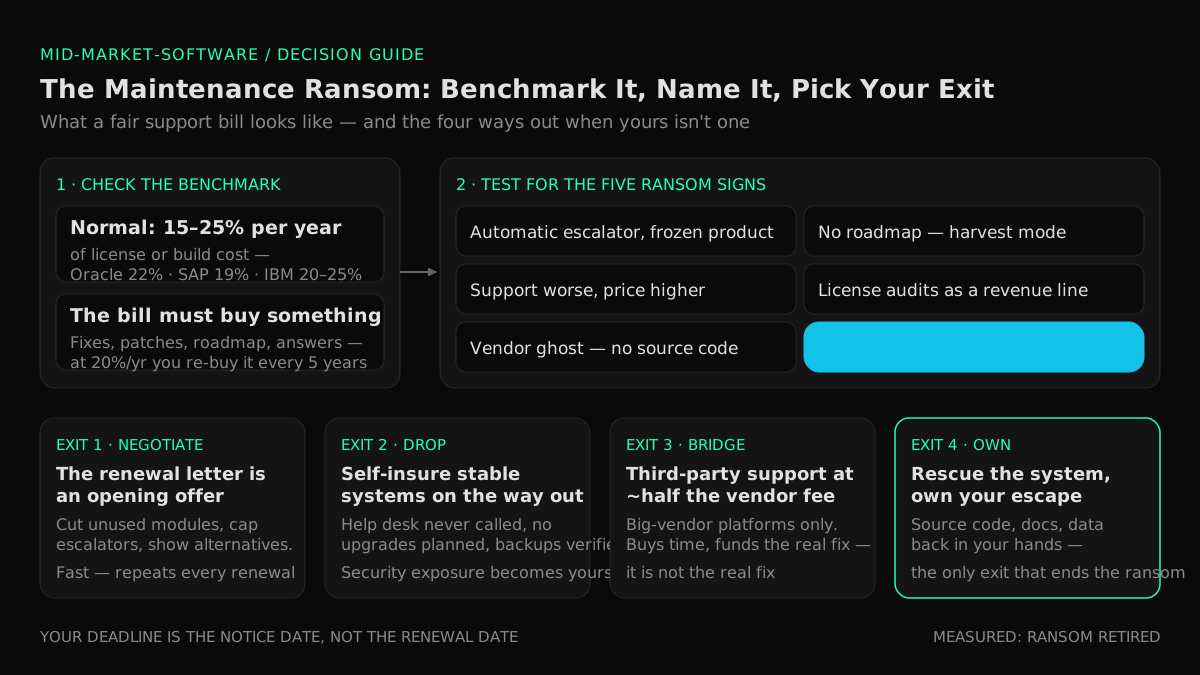
A fair software maintenance contract costs roughly 15–25% of the software's original price per year, and buys real things: bug fixes, security patches, updates, and someone answering the phone. The reference points:
| What you're maintaining | Typical annual cost | What that means |
|---|---|---|
| Packaged vendor software (ERP, industry systems) | 18–22% of the net license fee per year — Oracle charges 22%, SAP about 19%, IBM 20–25% | At 20% a year, you re-buy the software every five years |
| Custom-built software | The industry standard lands in the same 15–25% band, applied to the original build cost | A $200k system should cost roughly $30–50k/year to keep healthy — including small improvements |
| Either one, over a decade | — | Most owners pay more in maintenance than they ever paid up front. The bill deserves the same scrutiny as the purchase did |
Two things make these percentages fair or unfair. First, what the base is: sourcing advisors like Avasant note that maintenance percentages have crept up from 15–18% a few years ago to 20% or more, and vendors calculate them on list price rather than the discounted price you actually paid — on a $500,000 deal, a 5-point difference compounds to $125,000 over five years. Second, what you get: 20% a year for a product with a real roadmap, regular releases, and responsive support can be honest money. The same 20% for a product that last shipped an improvement in 2019 is something else entirely.
Five Signs You're Paying a Maintenance Ransom
A maintenance ransom is a support bill you keep paying not because of what it buys, but because of what the vendor could take away. It has tell-tale signs — check your own contracts against these five:
- The escalator is automatic and the product is frozen. The renewal comes in at +7%, +10%, +15% every year — far past inflation — while the system itself hasn't visibly changed in years. You're funding the vendor's margin, not your software's health.
- There is no roadmap. Ask your vendor what's shipping in the next twelve months. If the answer is vague, recycled, or "continued stability improvements," the product is in harvest mode: they're monetizing your inability to leave, not investing in your outcome.
- Support got worse while the price got higher. Tickets take weeks, the people who knew your setup are gone, and every real request becomes a paid "professional services" engagement on top of the maintenance you already pay.
- Audits and true-ups arrived. When a vendor's growth stalls, enforcement becomes a revenue line: license audits, surprise user-count reviews, back-charges for modules you didn't know were metered. A vendor auditing you is telling you where their revenue now comes from.
- The vendor is a ghost. The most extreme version, and common in the mid-market: the small shop that built your custom system dissolved, or the product was sold and sunset — yet an invoice still arrives from whoever inherited the contract, for "support" that amounts to keeping the lights on. Often you don't even hold the source code.
Why can they do this? Because of what sourcing analysts politely call the balance of power: replacing the system that runs your operation is a project, and vendors price your reluctance. Every year you pay without pushing back confirms the price. The way out is not indignation — it's reducing, step by step, how much they hold.
What the Invoice Doesn't Show
The maintenance line is usually the smaller part of what an aging system actually costs. Around it sit the costs that never appear on any invoice: the back-office payroll spent re-keying and reconciling around the system's gaps, the one veteran employee who is the only person who understands it, the cyber-insurance questionnaire that gets harder to answer every year the platform goes unpatched, and the growth the system quietly blocks. We map all four of these drains, with a one-hour exercise to put dollar figures on them, in our guide to mid-market software modernization — the point here is simply this: when you weigh the options below, weigh them against the full cost of the status quo, not just the support contract. A ransom that looks tolerable next to its own invoice usually looks very different next to the whole bill.
Put Your Real Number Together in One Afternoon
You cannot negotiate — or leave — from a position of vagueness. One afternoon with your CFO produces the asset every option below depends on. For each significant system, pull:
- The contract economics: current annual fee, the escalator history (pull five years of invoices — the compounding will surprise you), what the percentage is calculated on, and which modules you pay for versus which your team actually uses.
- The exit terms: renewal date, cancellation notice period (often 60–90 days before renewal — that date, not the renewal date, is your real deadline), and any reinstatement penalty for lapsed support.
- The dependency facts: do you hold the source code and current documentation? Could anyone besides the incumbent vendor safely change the system? Is there one person — inside or outside the company — whose departure would strand it? (That last question is its own category of exposure — our owner's guide to key person dependency risk in IT covers how to measure and remove it.)
- The workaround payroll: the loaded cost of the people whose job is substantially compensating for what the system can't do.
If you've already run our six-step playbook to reduce SaaS spend, this is the same discipline pointed at the other half of the software bill — the contracts too big and too old to live on a corporate card. The output is one sheet per system: what it truly costs, what the vendor truly holds, and when your next decision window opens.
The Four Ways Out
There is no single answer to a maintenance bill that's too high — there are four, and the right one depends on how much the vendor holds and how much the system matters. In rough order of effort:
Option 1 — Negotiate like the customer you are
Most owners never seriously negotiate maintenance, and vendors count on it. With your afternoon-of-data in hand:
- Treat the renewal letter as an opening offer. An automatic increase is a request, not a bill — decline it in writing before the notice deadline and make the vendor defend the number.
- Cut the base before arguing the rate. Cancel maintenance on modules and seats you don't use — Avasant's first practical recommendation — and insist the percentage applies to what you actually paid, not list price.
- Trade certainty for a cap. If the system is staying, a multi-year commitment is worth real money to the vendor; sell it only in exchange for a hard cap on increases and written service commitments.
- Make the alternative visible. A vendor who believes you have no options prices accordingly. The credible mention of third-party support or a funded replacement plan (Options 3 and 4) changes the tone of every renewal that follows.
Negotiation is the fastest option and the least durable: it trims the ransom without ending the dependency. Expect to repeat it at every renewal.
Option 2 — Drop support you don't actually use
For a stable, slow-changing system where you rarely call the help desk and never plan to upgrade, self-insuring is a legitimate move: cancel maintenance and bank the fee. Do it with eyes open. You lose the upgrade path (re-instating support later usually means paying back-maintenance), you lose priority when you do need help, and an unpatched system's security exposure becomes entirely yours — a real consideration when cyber-insurance underwriters are asking about unsupported software. Reserve this for systems that are frozen on purpose, backed up, and on their way out anyway.
Option 3 — Bridge with third-party support
For big-vendor platforms (Oracle, SAP, IBM, Microsoft and similar), an entire industry exists to break the maintenance monopoly: independent third-party support firms deliver break-fix support, tax and regulatory updates, and security patching for roughly half the vendor's annual fee, per Gartner's assessment of the market. It's a real lever — and an honest one only if you understand what it is: a bridge. You get support cheaper; you do not get new versions, and you have not reduced your dependency on the system itself. Third-party support buys time and funds the real fix. It is not the real fix.
Option 4 — Rescue the system and own your escape
The only option that ends the ransom rather than discounting it: take back what makes you hostage. In practice that's a legacy software rescue — a deliberately small engagement that recovers control of the system: source code in your hands, documentation a new team could work from, the ability to make changes safely, and your data extractable on demand. Rescue first, ambition later: once you hold those things, every other decision — keep it and maintain it affordably, modernize it in steps, or replace it with software you own — gets made on your timeline, at competitive prices, by any partner you choose. The per-system decision guide in our modernization pillar covers how to choose; if your company has a CIO and an in-house engineering team, the engineering-side version of this playbook is our guide to reducing legacy application maintenance cost.
Why Owning the Escape Got Affordable
The reason ransoms got paid for twenty years is that the escape was priced out of reach: rebuilding or seriously modernizing a business-critical system was a seven-figure enterprise project. That's the input cost AI-assisted delivery actually changed. A compact team of senior engineers directing AI coding agents — software that writes and tests code under human review — now does the heavy construction work at a pace and price that fits mid-market budgets. It's the model Snowman Labs runs as an official partner of Cognition, Replit, and Hud, with published operating standards: a first production milestone in 2 weeks, a 40–60% target reduction in time to market, across 400+ delivered projects rated 4.9/5 on Clutch over 32 verified reviews. Our custom software services for mid-market companies apply that model on the owner's side of the market — which means the comparison worth running is no longer "ransom versus seven figures." It's ransom-forever versus a measured, step-by-step exit you own at the end.
Which Way Out? Deciding Per System
Run each system on your sheet through the signals:
| What the sheet says | Your move |
|---|---|
| Fair percentage, real roadmap, support you use | Stay — and still negotiate the escalator. A good vendor relationship is worth keeping; an automatic increase still isn't. |
| Rising fee, frozen product, but the system must stay for now | Negotiate hard (Option 1), with third-party support (Option 3) as visible leverage — and start the rescue conversation in parallel. |
| Stable system, help desk never called, retirement in sight | Drop support (Option 2), with backups verified and the security exposure consciously accepted. |
| Big-vendor platform, huge fee, replacement years away | Bridge with third-party support (Option 3) and put the savings into the modernization fund. |
| Vendor ghost, no source code, one-person knowledge, audit letters | Rescue now (Option 4). Every month of delay raises the price of the exit and deepens the hostage position. |
One rule across all five rows: never let a decision be made by an auto-renewal. The notice deadline on each contract is the moment of leverage; put every one of them on your CFO's calendar this week.
FAQ
How much should software maintenance cost per year?
Roughly 15–25% of the software's original cost per year is the industry norm — big vendors charge 18–22% of the license fee (Oracle 22%, SAP about 19%, IBM 20–25%), and custom software planning guides use the same band against the original build cost. Materially above that range, or inside it for a product receiving no investment, means the bill deserves a challenge.
Why do software maintenance fees increase every year?
Partly costs, mostly leverage. Contracts ship with automatic escalators calculated on list price, and vendors know that replacing an operational system is a project most customers keep deferring — so the price of staying rises to just below the perceived pain of leaving. Analysts have tracked standard maintenance percentages creeping from 15–18% to 20% and more, alongside more aggressive license audits. None of it is negotiable until you make it negotiable.
Can I stop paying annual software maintenance fees?
Yes — it's your contract, and for stable systems where you rarely use support and never plan to upgrade, self-insuring can be rational. The trade-offs: reinstating support later typically means paying the lapsed years, upgrades are off the table, and security patching becomes your problem, which matters to cyber-insurance underwriters. Cancel deliberately, before the notice deadline, with backups verified — not by accident, and not on a system you can't afford to have fail.
What is third-party software support?
Independent firms that support major vendors' software — Oracle, SAP, IBM, Microsoft and others — in place of the vendor itself, typically for about half the vendor's annual maintenance fee, covering break-fix, tax and regulatory updates, and security patching. Gartner tracks it as an established market. The catch: no new versions and no reduction in your dependency on the system — treat it as a bridge that funds the permanent fix, not as the fix.
Is it cheaper to keep paying maintenance or replace the software?
In any single year, paying is almost always cheaper — which is exactly how ransoms persist. Compared honestly, the status-quo side must include the escalating fee plus the workaround payroll, the risk of an unsupported failure, and the growth the system blocks; the replacement side got dramatically cheaper as AI-assisted delivery cut build costs. For systems with rising fees and a frozen product, the crossover typically arrives within a few years — run the numbers per system rather than assuming either answer.
What should a software maintenance contract include?
Four things worth checking before you sign or renew: a defined scope (what counts as support versus billable "professional services"), a cap on annual increases with the percentage applied to your actual price rather than list, service commitments with response times, and exit protections — your data extractable in usable formats, and for custom work, source code and documentation in your hands. That last clause is the difference between a supplier and a captor.
What can I do if the vendor that built our software went out of business?
Stop paying anyone who can't actually support the system, then move fast to recover control: locate the source code (check contracts, escrow arrangements, old handover drives), get the system documented well enough that a new team could safely change it, and verify backups and data extraction. That's precisely what a legacy software rescue engagement does in a matter of weeks — and it should happen before the system next fails, not after.
Stop Paying for Nothing
A maintenance bill that rises every year for software that never improves is not a cost of doing business — it's a decision being made for you, one auto-renewal at a time. The exit is not a leap: one afternoon to get the real numbers, one negotiation run properly, a bridge where it buys time, and a rescue where the vendor holds too much. Each step funds the next, and at the end you own the system your business runs on — instead of renting your own operation back from whoever holds it today. The first step is knowing your number. Find out what your software really costs you →
Find your highest-value path to agentic delivery.
Map your readiness, delivery constraints, and first 90-day opportunity with the Snowman Labs AI Readiness Diagnostic.