Software Vendor Went Out of Business? An Owner's Guide
Your software vendor went out of business — what happens to the system, your data, and your license, the 72-hour checklist, and the way back to control.
 By Danilo BrizolaUpdated
 When a software vendor goes out of business, what happens next depends on three things: where the software runs (their servers or yours), what your contract says, and what you physically hold — data, source code, credentials. Get those three answers and you know whether you're facing a deadline measured in weeks, a slow freeze measured in years, or a problem that's already quietly two years old. This guide is written for the owner, CEO, president, or COO of a mid-market company whose operation depends on software built or sold by a company that no longer answers — the sunset product, the dissolved dev shop, the vendor whose emails started bouncing. By the end you'll know what to secure in the first 72 hours, what your legal position actually is in plain English, and how businesses in exactly this spot get back to full control in weeks rather than rebuilding from zero.
The Three Ways a Vendor's Failure Reaches You
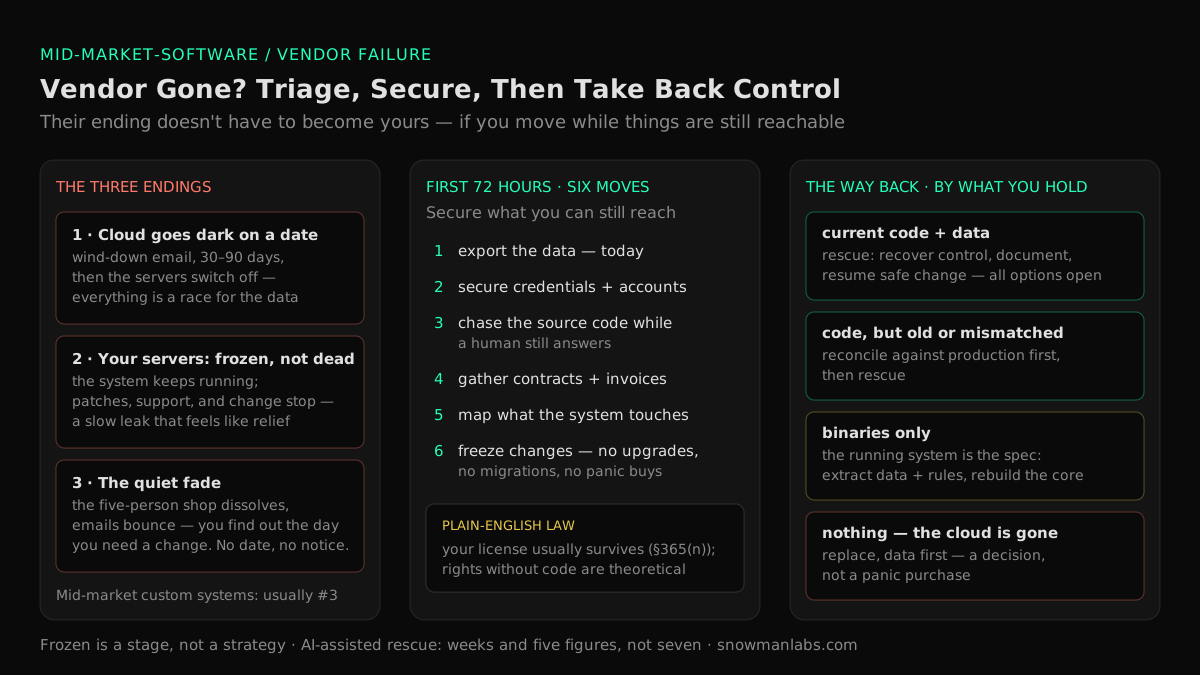
A software company's death arrives at your desk in one of three forms, and the form dictates your timeline.
1. The announced shutdown, cloud edition. The product runs on the vendor's servers and you pay a subscription. A wind-down email names a date — often 30 to 90 days out — after which the servers go dark and the software ceases to exist for you. Everything in this scenario is a race against that date, and the only thing worth racing for is your data.
2. The announced shutdown, your-servers edition. The software is installed on your infrastructure — an on-premise product, or custom software a development shop built for you. Nothing stops working the day the vendor dies. What stops is everything else: patches, fixes, support, and any hope of change. The system is frozen, not dead — which feels like a relief and is actually a slow leak. More on that below.
3. The quiet fade. The most common version in the mid-market, and the one no ranking checklist prepares you for. There's no bankruptcy filing and no announcement, because the "vendor" was a five-person shop, a two-partner firm, or one talented contractor with an LLC. Invoices stop arriving, then support emails bounce, and the failure has no date — you discover it retroactively, the day you need a change and realize nobody has touched the system in two years. If a version of this is your situation — the system still nominally has one aging maintainer left — start with our guide to key person dependency risk in IT, because you still have the thing this article's other readers have lost: someone to ask.
One important non-member of this list: the vendor that's alive but treating you as a captive — support fees rising every year for a product that never improves. That's a different problem with different (and better) exit options, mapped in our guide to software maintenance costs that are too high. This article is about the vendor that's gone or going.
The First 72 Hours: Secure What You Can Still Reach
Speed matters more than strategy in the first days — as InformationWeek's guidance to IT leaders puts it, waiting to see what happens is a recipe for disaster, because whatever goodwill, staff, and infrastructure the vendor still has is evaporating by the week. Six moves, in order:
- Export your data — today. Every report, every table, every format the system will give you: CSV exports, database backups, PDF archives if that's all there is. For cloud products this has a hard deadline you don't control. Store it in accounts your company owns.
- Secure the credentials and accounts. Admin passwords, server logins, the domain name, the hosting account, any third-party service registered under the vendor's email address. Move what you can into a company-controlled password vault, and change credentials the vendor's former staff may still hold.
- Chase the source code — now, while a human still answers. For custom-built software, this is the single most valuable asset in play. Ask directly for a current copy of the code delivered into a company-controlled account. A wind-down team or a former principal who's still reachable will often simply hand it over; six months later there may be no one left to ask. Check your contract for a source code escrow clause while you're at it — companies forget they negotiated one.
- Gather the paper. The signed contract, license agreement, invoices, and any service-level terms. Your legal rights (next section), a possible insurance claim, and your negotiating position with a wind-down trustee all live in these documents.
- Map what the system touches. Which processes depend on it, what it integrates with, where it physically runs, what scheduled jobs it performs. Write it down while the people who know are focused on it.
- Freeze changes. No upgrades, no server migrations, no "while we're at it" cleanups. An unsupported system that works is an asset; an unsupported system that someone broke mid-crisis is a catastrophe. That freeze includes purchases: the panic-signed replacement contract, bought in a week under pressure, is how one bad vendor outcome becomes two.
Your Legal Position, in Plain English
What you're legally entitled to depends almost entirely on which kind of arrangement you had — and U.S. law is more protective than most owners assume, with one enormous practical catch.
If it's a subscription to a cloud product, your rights largely end when their servers do. What survives is your claim to your data — most SaaS agreements grant data-return or export rights, which is why the 72-hour export matters more than anything a lawyer can do later.
If you hold a license and the software runs on your systems, you're in far stronger shape. A perpetual license generally survives the vendor's death, and even in formal bankruptcy, Section 365(n) of the U.S. Bankruptcy Code lets a licensee keep using licensed software even if the bankruptcy trustee rejects the contract — Congress specifically decided that a vendor's failure shouldn't strip customers of technology their businesses run on.
If a shop built custom software for you, the question is what the contract says about ownership. Many well-drafted development agreements assign the code to you as a work made for hire — in which case the code is yours and always was; the crisis is possession, not rights. Many badly-drafted ones don't, which is a conversation for your attorney (and this section is orientation, not legal advice — a few hundred dollars of counsel review is worth it here).
Now the catch: the right to keep using software is not the ability to keep it alive. Section 365(n) preserves your license, not the vendor's support obligations — nobody can compel a dead company to fix bugs. Rights without source code, documentation, and someone able to work on the system are theoretical. Which is exactly the gap source code escrow exists to fill: a neutral third party holds the vendor's code and releases it to you if the vendor fails. Done properly — with verification that the deposited code actually builds and runs, not just that files exist — escrow typically costs a low-four-figure amount per year, which is cheap insurance for a system the business runs on. If you're reading this before your vendor fails, add it to the contract at the next renewal. If you're reading it after: check whether an escrow already exists, and trigger the release conditions.
What Doing Nothing Costs: Life with a Frozen System
The your-servers scenarios come with a tempting non-decision: the system still works, so change nothing and hope. Understand what that choice buys you, because the meter runs whether or not anyone reads it:
- Security patches stopped the day the vendor did. Every vulnerability discovered from now on stays open forever. Unsupported software is a standing entry point, and end-of-life software is consistently linked to costlier breaches and failed compliance audits — a frozen system doesn't just carry risk, it accumulates it.
- Outsiders now price that risk. Cyber-insurance questionnaires ask whether all critical software is supported and patched; "our core system's vendor dissolved in 2024" is an answer that raises premiums or voids options — our owner's guide to cyber insurance requirements for legacy software maps exactly how that ladder plays out and what underwriters accept instead. Larger customers' security reviews ask the same questions. And if a sale or investment is in your future, due diligence teams treat abandoned software as a valuation discount waiting to be applied.
- The system can no longer follow the business. New location, new product line, new integration, a customer's portal requirement — every change request now has the same answer. The operation starts bending around the software, in exactly the pattern our mid-market modernization guide prices out as the growth ceiling.
- The exits narrow every year. The people who remember the system retire or scatter, the platform it runs on ages toward its own end-of-life, and the eventual recovery gets more expensive each budget cycle you defer it. Doing nothing is the only option with a strictly worsening price.
Frozen is survivable as a stage — it's where the 72-hour checklist deliberately leaves you. It fails as a strategy.
Rescue, Replace, or Retire: Decide by What You Hold
Once the assets are secured and the panic has passed, the system's future comes down to an honest inventory of what actually made it into your hands. Four situations, four realistic paths:
| What you hold | Your realistic path |
|---|---|
| Current source code + your data | The strongest position. A legacy software rescue — recover full control, document, and resume safe changes — is straightforward, and every option (keep, modernize, replace) stays open on your timeline. |
| Source code, but old or mismatched | Rescuable, with a reconciliation step first: verify what the code you have actually corresponds to in production before trusting changes to it. Slower than the first row, far cheaper than the last. |
| Binaries only — no source | The running system becomes the specification. The path is recovering the critical parts: extracting the data and business rules it encodes and rebuilding the fragile core deliberately, while the frozen original keeps the lights on. |
| Nothing — the cloud product is gone | Replacement, data first. The exported data is the bridge; the decision of what replaces the tool — another subscription or software you own — deserves the build-vs-buy analysis rather than a panic purchase. |
One warning that belongs in every row: resist the reflexive full rewrite. "The vendor's gone, so let's just rebuild everything from scratch" turns a control problem into the largest, riskiest project category in software — the big-bang replacement — usually while the frozen system was still capable of running the business during a calmer, staged transition. Rescue control first. Decide ambitions second.
Why Rescue Stopped Being a Seven-Figure Project
Here's the part of this situation that has genuinely changed in the last few years. The traditional reason abandoned systems stayed abandoned was that recovery was priced like archaeology: months of expensive specialists reading undocumented code by hand before anyone could safely change a line. AI-assisted delivery collapsed exactly that cost. Modern tooling reads a codebase the way people read text — generating accurate first-draft documentation of what a system contains, how its parts connect, and where the risky corners are, in days instead of months (the engineering-side version of this practice is our guide to legacy system documentation with AI). A compact senior team directing AI coding agents then does the heavy recovery work — building the safety net of tests, restoring the ability to change the system without fear — in a fraction of the traditional hours, with humans reviewing everything that ships.
That's the model Snowman Labs runs as an official partner of Cognition, Replit, and Hud, under published operating standards: a first production milestone in 2 weeks, a 40–60% target reduction in time to market, across 400+ delivered projects rated 4.9/5 on Clutch over 32 verified reviews — the same team enterprises like Volvo, Renault, Scania, iFood, and B3 trust, working at mid-market scale through our custom software services for mid-market companies. The practical translation for an owner staring at an orphaned system: taking it from "the vendor vanished" to "documented, controlled, and safely changeable by a team that answers the phone" is now a weeks-long engagement — and it ends the risk instead of renting you a new version of it.
Vendor-Proofing: Never Be in This Position Again
Whatever path the current crisis takes, the exit ramp should include making the next vendor failure a non-event. Five protections, all checkable by a non-technical owner:
- Your data leaves on a schedule. Automated exports of critical data into company-controlled storage — tested once a year by actually opening the files, not assumed.
- The contract plans for the vendor's death. Data-return rights in a usable format, a wind-down notice period, and — for any system the business depends on — source code escrow with build verification. Negotiate these at signing or renewal, when you have leverage.
- Custom code is yours from day one. Any development firm you hire delivers source code, documentation, and account ownership into your hands continuously — not at the end, not on request. If a partner resists this, they're planning to be your next lock-in.
- A ten-minute annual health check per critical vendor. Are releases still shipping? Has support response degraded? Key names leaving? A vendor's decline is usually visible a year before its death to anyone who looks.
- A possession audit, yearly. For every critical system: do we hold the code, the docs, the credentials, the knowledge of where it runs, and a contract that says so? It's the same five-fact audit we recommend for one-person systems — vendor death and key-person loss are the same risk wearing different faces, and one afternoon a year covers both.
FAQ
What happens to my software license if the vendor goes out of business?
A perpetual license to software running on your own systems generally survives the vendor's failure, and U.S. bankruptcy law (Section 365(n)) specifically protects a licensee's right to keep using the software even if the estate rejects the contract. A subscription to a cloud product, by contrast, effectively ends when the vendor's servers do. Either way, the license question matters less in practice than possession: data, source code, and credentials in your hands.
Can we keep using the software after the company shuts down?
If it runs on your infrastructure — yes, usually both legally and technically; nothing switches off. What ends is support, patches, and change: the system is frozen. That's workable as a transition stage while you regain control, and dangerous as a permanent plan, because security exposure, insurance problems, and business-change requests all accumulate against a system nobody can safely touch.
What happens to our data if a SaaS provider goes out of business?
In an orderly wind-down, vendors typically announce an export window before servers go offline — often a few weeks — and most contracts grant data-return rights. In a disorderly collapse the window can be days. Treat any credible sign of vendor failure as the trigger to export everything immediately into company-controlled storage; data you hold is a bridge to any replacement, and data you don't is usually gone.
What is source code escrow, and is it worth it for a company our size?
Escrow means a neutral third party holds the vendor's source code and releases it to you if defined triggers occur — bankruptcy, abandonment, end of support. It typically costs a low four-figure amount per year; the meaningful option is verification, where the escrow agent confirms the deposited code actually builds. For a system your business genuinely depends on, that price is trivially worth it — and for custom-built software an even better answer is owning the code outright from day one.
The vendor is gone and we don't have the source code. Are we stuck?
No, but your options narrow, so act rather than wait. First check every avenue of recovery: former principals of the vendor, a forgotten escrow clause, old delivery emails, a contractor's repository — code turns up more often than owners expect. If it's truly gone, the running system itself becomes the specification: its data and the business rules it encodes can be extracted and the critical core rebuilt deliberately while the frozen original keeps operating. That's a rescue engagement, and it beats both panic replacement and doing nothing.
How do I protect my business from a software vendor going out of business?
Before signing: check vendor financial health, negotiate data-export rights and wind-down notice, and put source code escrow on any critical system. During the relationship: keep tested exports of your data, own the code of anything custom-built, and run a yearly ten-minute vendor health check plus a possession audit of code, docs, and credentials. Those habits convert a vendor's failure from an existential event into an administrative one.
The Vendor's Failure Doesn't Have to Become Yours
A software company dying is their ending, not yours — but only if you move while things are still reachable. Secure the data, credentials, code, and contracts in the first days; understand that your legal rights are stronger than they feel and worth less than possession; refuse both panic (the rushed replacement) and paralysis (the permanent freeze). Then take the deliberate way back: an inventory of what you hold, a rescue of what's fragile, and a set of contracts and habits that make sure no vendor holds your operation again. The first step is knowing exactly what this system — and the rest of your software estate — actually costs and risks today. Find out what your software really costs you →
Find your highest-value path to agentic delivery.
Map your readiness, delivery constraints, and first 90-day opportunity with the Snowman Labs AI Readiness Diagnostic.