Software Vendor Lock-In: An Owner's Guide
Software vendor lock-in, explained for owners: the five ways vendors hold you, what the hold costs at every renewal, and how to loosen it — or exit.
 By Danilo Brizola
Software vendor lock-in is the condition where leaving a vendor would cost you so much — in money, disruption, and risk — that you effectively can't. And here is the part most explanations skip: you pay for lock-in every year whether you ever switch or not, because a vendor who knows you can't leave prices accordingly. The renewal that lands 15% higher for a product that hasn't improved isn't a market price; it's a measurement of your inability to say no. This guide is written for the owner, CEO, CFO, or COO of a mid-market company — no CTO required. By the end you'll know the five ways vendors hold you, how to measure the hold on each of your critical systems in one afternoon, and the specific moves — contractual, practical, and structural — that convert "we have no choice" back into a negotiation.
What Software Vendor Lock-In Actually Is
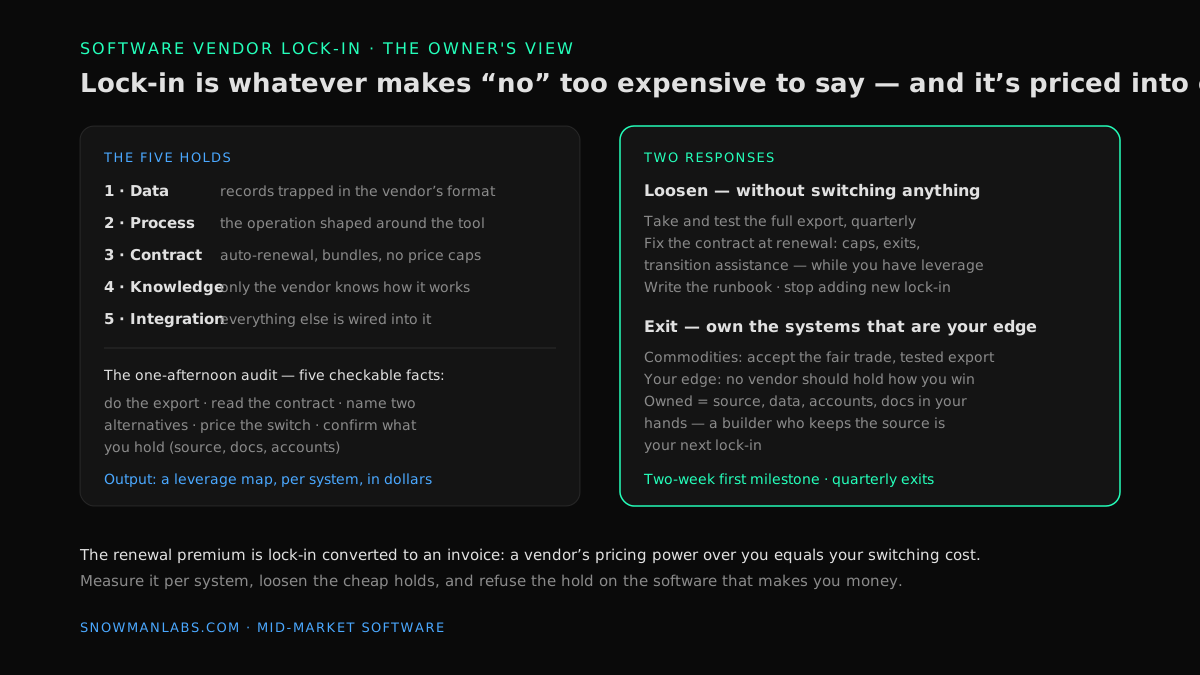
The textbook definition: vendor lock-in makes a customer dependent on one vendor's product, unable to move to an alternative without substantial switching costs. The owner's definition is sharper: lock-in is whatever makes "no" too expensive to say. Every negotiation you'll ever have with a software vendor — renewal price, support terms, that feature you've requested three times — is decided before anyone speaks, by what walking away would actually cost you.
That cost is rarely the software's price. It's the data trapped in the system, the ten years of habits your team built around it, the other systems wired into it, and the things about it nobody in your building understands. Vendors know this arithmetic better than their customers do, because they run it across their whole customer base.
If the consequences seem abstract, one recent example makes them concrete. After Broadcom acquired VMware — infrastructure software that thousands of businesses run on — customers saw subscription bundles replace the licenses they'd bought, and European customer associations reported price increases of up to 1,500%. The customers who paid weren't careless buyers. They were locked in: migrating off would cost more than the increase, the vendor knew it, and the invoice said so. The same mechanism operates at every scale — the ERP that runs your operation, the niche scheduling tool your industry uses, the "custom" system whose source code you've never seen.
One clarification of scope. If your vendor has already disappeared — the company dissolved, the product was sunset, support emails bounce — that's a different emergency with its own playbook, covered in our owner's guide to a software vendor going out of business. This guide is about the vendor who is very much alive and holding you; the goal is to loosen the hold before either the renewal letter or the shutdown notice arrives.
The Five Holds: How a Vendor Keeps You
Lock-in isn't one thing. It's five separate holds, and each of your critical systems has its own mix. Naming them matters because each hold has a different loosening move.
| The hold | What it looks like | The tell |
|---|---|---|
| Data | Your records live in the vendor's system, in the vendor's format. Exports are partial, manual, or missing history. | Nobody has ever actually exported everything and opened it. |
| Process | Your operation is shaped around the tool — workflows, training, muscle memory, reports people depend on. | "Switching would kill us for six months" — said without a number behind it. |
| Contract | Auto-renewal, multi-year terms, bundles that die together, penalties, no price caps. | You'd have to go find the contract to answer basic questions about it. |
| Knowledge | Only the vendor — or one veteran employee — knows how the system really works. No documentation, no source code. | Change requests go through exactly one person or one company, always. |
| Integration | Everything else is wired into it. Replacing one system means touching five. | Every improvement project anywhere gets scoped as "well, first we'd have to deal with X." |
Two of these holds have deep-dive guides of their own in this series: the knowledge hold is the one-person system problem when the single point of failure is an employee rather than a vendor, and the integration hold is what our guide to systems that don't talk to each other untangles. Worth knowing: researchers who study this distinguish lock-in that's deliberate — designed into the product with proprietary formats and bundle pricing — from lock-in that's accidental, accumulated through your own customizations and habits. In practice most mid-market lock-in is both at once, which is also the good news: the accidental half is yours to undo without the vendor's permission.
What Lock-In Costs You — Even If You Never Leave
The standard framing treats lock-in as a risk that materializes only if you switch. Wrong. Lock-in bills you continuously, in four ways:
- The renewal premium. A vendor's pricing power over you equals your switching cost. The clearest case in this series is the aging system whose support contract climbs every year while the product stands still — what our guide to software maintenance costs that are too high calls the maintenance ransom. That ransom is simply lock-in converted to an invoice, one year at a time.
- Paying for what you can't drop. Bundles and platform pricing mean you keep paying for modules and seats nobody uses, because unbundling threatens the part you actually need. Zylo's SaaS data shows organizations actively use only about half the licenses they pay for — and lock-in is a large part of why the unused half survives every budget review.
- A roadmap you don't control. Your feature request competes with ten thousand other customers'. The workarounds your team builds while waiting — the export massaged in Excel, the process bent to fit the tool — are payroll quietly absorbing the vendor's product decisions.
- The exit meter runs anyway. Every year adds data, integrations, and habits, so the cost of the switch you're deferring grows while you defer it. When the forcing event finally arrives — an acquisition like VMware's, a price shock, a sunset notice — you make the move at the worst possible moment, at the highest accumulated price, on the vendor's timeline instead of yours.
The number an owner should want is not "are we locked in?" — almost every company is, somewhere — but "what does saying no cost us, per system, in dollars?" That number is checkable, and checking it takes an afternoon.
The One-Afternoon Lock-In Audit
For each of the systems your business genuinely depends on — the list is usually five to ten, not fifty — establish five facts. Every one is verifiable by a non-technical person; most are verifiable this week.
- Do the export — actually do it. Not "does the vendor offer export"; run it. Does everything come out: records, history, attachments, relationships between records? Can another program open the result? An export nobody has ever tested is a hold, not an exit.
- Read the contract and write down four things. Renewal date, notice window for non-renewal, what limits price increases (usually: nothing), and what the vendor owes you on the way out — data handover, transition help, or nothing. If finding the contract itself takes a day, that's finding number one.
- Name two real alternatives. Not researched deeply — named, with rough pricing. A vendor who knows you've priced alternatives negotiates differently than one who knows you haven't. If no credible alternative exists, that's not a reason to skip the question; it's the most important fact on the sheet.
- Price the switch honestly. Data migration, retraining, the integrations that would need rebuilding, the parallel-running months. A rough, written estimate beats the vague dread that currently occupies this slot — vague dread always negotiates worse than a number.
- For custom-built systems: confirm what you hold. Source code in an account you control, documentation, admin credentials, and the data — or, at minimum, a source code escrow agreement naming you. If a development firm built "your" system but keeps the source, you don't own software; you rent it with extra steps, and the vanished-vendor guide shows exactly how that ends.
Score each system red, yellow, or green on each fact and you have something most mid-market companies have never possessed: a leverage map. It tells you which renewal negotiations you can actually win, which systems need loosening work before their renewal, and which one or two are genuine strategic problems.
How to Loosen the Hold Without Switching Anything
Escaping a system is expensive. Loosening a vendor's hold on it mostly isn't — these five moves are cheap, and none requires changing software:
- Take the export now, and take it quarterly. A current, tested copy of your data in usable form is the single largest transfer of leverage from vendor to customer available at zero cost. It converts "we could never leave" into "leaving would be a project" — a different negotiating position entirely.
- Fix the contract at renewal, not at crisis. Legal advisors who work vendor agreements for a living recommend negotiating the exit while you still have leverage: caps on annual increases, termination rights that don't mirror the vendor's, and transition-assistance obligations priced now — because at contract end, all leverage sits with the vendor. You will not get everything; every clause you do get is renewal-premium insurance.
- Time the negotiation and arrive with alternatives. Calendar every renewal 90 days out and walk in with the audit sheet: tested export, named alternatives, priced switch. Step five of our SaaS spend playbook covers the mechanics; the short version is that vendors reserve their real discounts for customers who demonstrably could leave.
- Document how the system is actually used. A plain-English runbook — what the system does, who touches it, what the twelve custom reports mean — attacks the knowledge hold directly. It's an afternoon per system, and it's also the first thing any future migration, insurer, or acquirer will ask for.
- Stop adding new lock-in. From today, anything new you buy must pass a standing test: data exportable in standard formats, connections through standard interfaces, contract with an exit. You can't retrofit yesterday's decisions, but the estate stops getting worse immediately.
When Lock-In Is a Fair Trade — and When It Isn't
Honesty requires saying this plainly: some lock-in is a reasonable price for a great product, and chasing zero lock-in everywhere is its own mistake. The sorting question is the same one that governs every build-vs-buy decision — commodity or edge — and our owner's decision guide to build vs buy software develops it in full.
- On commodity functions — accounting, payroll, email, documents — accept measured lock-in. These categories have mature products, real competition, and standardized data; the holds stay shallow because alternatives genuinely exist and vendors know it. Take the fair trade: excellent product, modest switching cost, market-disciplined pricing. Your accounting platform holds your ledger, and that's fine — as long as the export works and you've tested it.
- On edge functions — pricing, scheduling, dispatch, the customer portal, whatever encodes how you win — lock-in is never a fair trade. Here the vendor doesn't just hold your data; it holds the process that makes you better than competitors, and rents it back to you with a meter attached. Every hold runs deepest exactly here: the customizations are thickest, the integrations densest, the alternatives fewest. A vendor with a hold on your edge sets the pace of your growth and takes a percentage of it.
That asymmetry — tolerate shallow lock-in on commodities, refuse it on the edge — is the whole strategy. It also points at the structural exit.
The Ownership Exit — and Its Own Lock-In Test
For edge systems, there is exactly one arrangement with no vendor on the other side of the table: software you own — source code, data, accounts, and documentation in your hands. No renewal letter, no per-seat meter, no roadmap committee. This is the "own, don't rent" argument at the center of our mid-market software modernization guide, and lock-in is the risk-side case for it, just as SaaS spend is the money-side case. What made it practical at mid-market budgets is AI-assisted delivery — the model our legacy software rescue practice runs, with a first production milestone in about two weeks and quarterly exits instead of multi-year commitments.
But apply the same skepticism to this exit that you apply to vendors, because custom software has a lock-in failure mode of its own: the builder who keeps the source. A firm that builds "your" system but retains the code, the accounts, or the only working knowledge of it hasn't freed you from lock-in — it has become your smallest, riskiest vendor. So put owned systems through the audit too, and hold any development partner to terms a non-technical owner can verify: everything in your repositories and accounts from day one, documentation current enough that another firm could take over in a week, and contract exits every quarter. A partner who resists any of that is telling you what they're planning to be.
FAQ
What is vendor lock-in, with an example?
Vendor lock-in is dependence on one software vendor that makes switching prohibitively expensive in money, time, or risk — which then shows up as pricing power over you. A current example: after Broadcom acquired VMware, locked-in customers reported renewal increases of several hundred to 1,500% and largely paid, because migrating would have cost even more. The same mechanism operates on a mid-market ERP or industry tool at smaller numbers.
Is vendor lock-in always bad?
No. On commodity functions with mature competition — accounting, payroll, email — modest lock-in is a fair price for an excellent product, provided your data exports cleanly and you've tested it. Lock-in becomes dangerous in proportion to how strategic the system is: on the software that encodes how your business competes, a vendor's hold means someone else controls your pace and taxes your growth.
How do you get out of vendor lock-in?
In order: take and test a full data export; fix the contract at renewal (price caps, termination rights, transition assistance); document how the system is used; then decide per system whether to stay on better terms, switch to a competitor, or replace the system with software you own. Most companies need the full exit only for one or two systems — the leverage moves cover the rest.
What causes vendor lock-in?
Four accumulating causes: proprietary data formats that resist export, contracts built around auto-renewal and bundling, years of process and training shaped around the tool, and integrations that wire the system into everything else. Vendors design some of it deliberately; customers build the rest by customizing and connecting without an exit in mind.
Does custom software eliminate vendor lock-in?
Only if you actually own it. A system built for you with source code, documentation, accounts, and data in your hands has no vendor to lock you in — you can change operators without changing systems. A system built for you where the firm keeps the source is lock-in in custom clothing, and often deeper than SaaS, because there's exactly one company on earth that can maintain it.
What is source code escrow, and do I need it?
Escrow places a copy of a vendor's source code with a neutral third party, released to you if the vendor fails or breaches — a reasonable backstop for critical software from small vendors when direct ownership isn't on offer. It's second-best: escrow tends to be tested only in a crisis. For systems built specifically for you, skip the backstop and require the code itself, continuously, in your own accounts.
The Decision You Can Now Make
Stop treating lock-in as an IT abstraction and start treating it as what it is: a per-system number that sets the price of every renewal. Run the five-fact audit on your critical systems this month. Loosen the holds that are cheap to loosen — the tested export, the renewal-window calendar, the runbook. Accept the fair trades on commodities, and refuse the unfair one on the systems that make you money. Where the audit turns up a vendor holding your edge — or a "custom" system you don't actually hold — the exit is owning it, in steps small enough to stop.
The audit starts with a number most owners have never totaled: what the current setup really costs, holds included. Find out what your software really costs you →
Find your highest-value path to agentic delivery.
Map your readiness, delivery constraints, and first 90-day opportunity with the Snowman Labs AI Readiness Diagnostic.