Devin Enterprise Pricing Explained: ACUs, Plans, Costs
Devin enterprise pricing explained: ACU billing, order-form rates, plan quotas, seat mechanics, and the cost controls to negotiate — verified October 2026.
 By Danilo Brizola
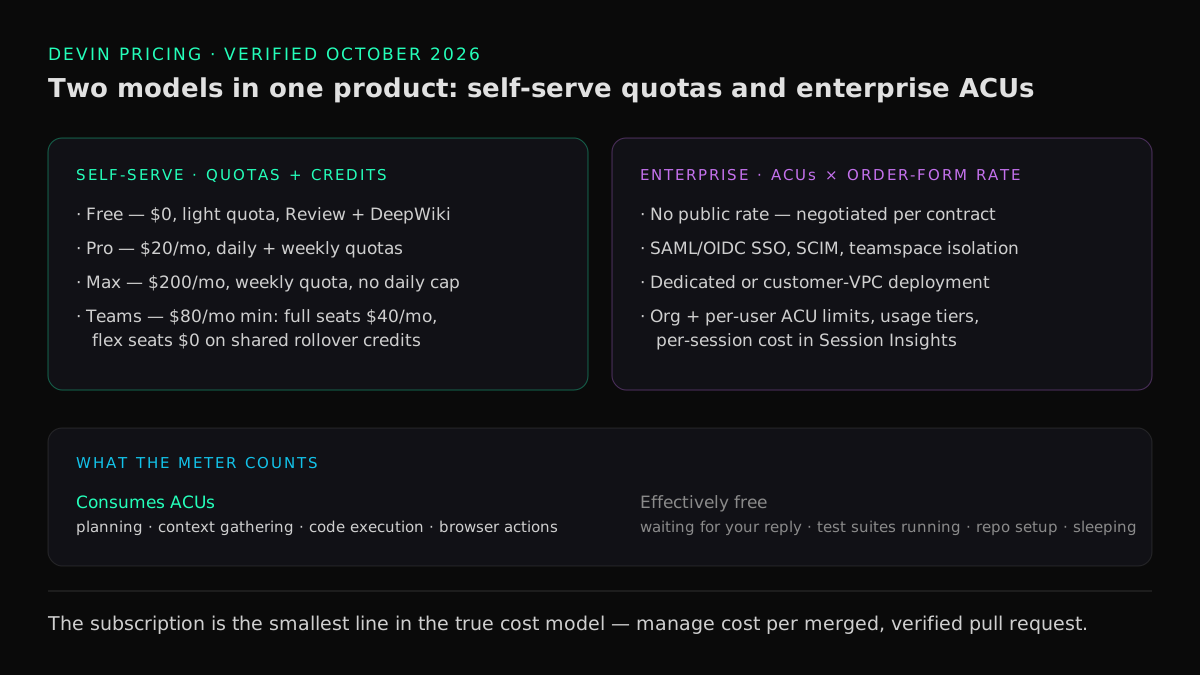
Devin enterprise pricing is custom-quoted: Enterprise customers are billed in Agent Compute Units (ACUs) at the rate set in their order form, on top of a self-serve ladder that runs Free, Pro at $20/month, Max at $200/month, and Teams at $80/month plus $40 per full seat. This guide is for the engineering leader or procurement owner budgeting a Devin deployment: it decodes every plan, explains what actually consumes ACUs, walks the cost-governance controls your CFO will ask about, and lists the questions to settle on the order form before you sign. We write it as an official Cognition partner and enablement partner — a bias disclosed up front — and every number below was verified against Cognition's own pricing and billing documentation in October 2026, because most ranking pricing content still describes plans Cognition retired.
Devin pricing at a glance in 2026
Five tiers, per Cognition's self-serve billing documentation and devin.ai/pricing, verified October 2026:
| Plan | Price | Who it's for | What it includes |
|---|---|---|---|
| Free | $0 | Individual trial | Light usage quota, Devin Review, DeepWiki, unlimited inline edits and Tab completions in Devin Desktop |
| Pro | $20/month | One developer | Daily + weekly quotas, full frontier-model access, Devin Cloud sessions, CLI and Desktop, on-demand credits, Slack/Linear/MCP integrations |
| Max | $200/month | One heavy user | Everything in Pro with a much larger weekly quota and no daily cap |
| Teams | $80/month minimum | Up to 200 users | Full seats at $40/month (Pro-equivalent quota + Desktop) and free flex seats drawing on a shared credit pool; admin dashboard, centralized billing |
| Enterprise | Custom (ACU-billed) | Organizations | SAML/OIDC SSO, enterprise admin controls and usage policies, dedicated account team, teamspace isolation, dedicated or customer-VPC deployment |
Two corrections to what you may have read elsewhere. The "$500 per month" figure still cited across most pricing articles is obsolete — Cognition retired that plan in 2025, and legacy Core customers were migrated to the Free tier with their remaining credits intact. And the pay-as-you-go "$2.25 per ACU" self-serve rate belongs to the same retired structure: self-serve plans now meter usage through subscription quotas plus on-demand credits, while ACU billing survives as the enterprise unit, priced per contract.
How self-serve Devin pricing works: quotas, seats, credits
Self-serve pricing has three moving parts — quotas, seat types, and credits — and the budget behavior of a deployment follows from how they interact.
Quotas: daily and weekly allowances
Pro and Teams full seats carry both a daily and a weekly usage allowance (the daily allowance is deliberately more than one-seventh of the weekly, so a heavy day doesn't end the week). Max carries a weekly allowance only, with no daily cap — which is why it suits a developer running long parallel sessions. Quotas cover Devin Cloud sessions, the CLI, and Devin Desktop from one pool, refresh on a calendar basis, and spill over into on-demand credits when exhausted. One quota quirk worth knowing: users with an eligible ChatGPT subscription can link it so GPT-model usage bills there instead of against the Devin allowance.
Teams seats and the $80 minimum
Teams introduces two seat types, and the distinction matters for rollout design:
- Full seats — $40/month. Pro-equivalent daily and weekly quotas plus Devin Desktop. These are your developers who delegate work every day.
- Flex seats — $0/month. No quota of their own; they draw from the team's shared on-demand credit pool and don't include Desktop. These are occasional users — a PM filing a scoped ticket, a support engineer running a reproduction — who shouldn't cost a license to include.
The $80 minimum works like a floor, not a fee: with two or more full seats the minimum is simply covered ($80 at two seats, then $40 per additional seat); with fewer, the shortfall is automatically prepaid as shared on-demand credits. Flex seats are the underused lever here — they let you widen who can assign work to the agent without widening the license bill, which is exactly the delegation pattern that organization-level agentic engineering is about.
On-demand credits
Credits purchased beyond quota roll over month to month and never expire. Admins can set auto-reload thresholds and — importantly — default per-session spending limits under Settings > Usage & limits, which turns a runaway session from a billing surprise into a blocked session. On Teams, credits form one shared pool that funds flex-seat usage, full-seat overage, and Automations and Devin Review runs.
How Devin Enterprise pricing is billed: ACUs and the order form
The Enterprise tier abandons public pricing entirely. Per Cognition's enterprise billing documentation, Enterprise customers are billed in ACUs "at the rate set in their order form" — there is no standard published ACU price, and your rate, commitment structure, overage terms, and payment schedule are all contract terms. Enterprise ACUs are metered separately from self-serve quotas and credits, and Cognition notes that enterprise sessions adhere more strictly to task planning and end-to-end testing.
What the Enterprise tier buys, beyond the meter:
- Deployment options: multi-tenant enterprise cloud, customer-dedicated infrastructure with private networking, or deployment into your own VPC with customer-managed encryption keys — plus a FedRAMP High authorization in process, announced July 2026.
- Identity and isolation: SAML/OIDC SSO, SCIM, IP access lists, teamspace isolation, role-based access control.
- Organizational metering: consumption dashboards per organization and per user, per-session ACU cost in Session Insights, and the usage-policy machinery covered below.
- A dedicated account team — which matters more than it sounds, because several metering parameters (sleep timeouts, per-user limit enablement) are account-team settings, not self-service toggles.
An ACU, historically, was Cognition's normalized unit of agent compute — earlier public documentation described one ACU as roughly fifteen minutes of active work. Current enterprise metering is defined by what the agent does, not by wall-clock time, which is why the next section is the one to read before estimating a budget.
What consumes ACUs — and what doesn't
Per Cognition's usage documentation, consumption is driven by the number and complexity of actions Devin takes — planning, context gathering, task execution, browser actions, code execution — plus a typically small fraction for VM time and bandwidth. The billable/free split is unusually favorable to supervised workflows:
| Consumes ACUs | Effectively free |
|---|---|
| Planning and context gathering | Waiting for your response |
| Writing and executing code | Waiting for a test suite to run |
| Browser and computer-use actions | Repository setup and cloning |
| Long, meandering conversations | Sleeping (default after 30 minutes idle) |
Three metering details that belong in an enterprise estimate:
- OS surcharge. Windows sessions consume roughly 9% more than equivalent Linux sessions; macOS sessions currently meter the same as Linux under promotional launch pricing that Cognition flags may change.
- Idle behavior is negotiable. Sessions sleep after 30 minutes of inactivity by default; Enterprise customers can have their account team set the timeout anywhere from 5 to 120 minutes. Shorter timeouts save money on interactive workflows.
- Scoping is the biggest cost lever. Consumption tracks task complexity, codebase context, files touched, and conversational back-and-forth. A clearly scoped ticket with a defined end state is cheaper than the same work assigned vaguely — the same discipline that determines whether Devin is worth buying at all also determines what each outcome costs.
The cost controls your CFO will ask about
This is the section no ranking pricing article covers, and for an enterprise buyer it is the difference between a metered platform and an uncapped liability. Devin's enterprise tier ships a full usage-governance layer, per Cognition's usage-policies documentation:
- Organization-level ACU limits. Enterprise admins cap each organization's monthly consumption across cloud sessions, Devin Review, Desktop, and CLI; at the cap, new work billed to that organization is blocked until an admin raises the limit or the billing window resets.
- Per-user limits via usage tiers. Named tiers assign each member a monthly ACU allocation (per member, not pooled), mappable to identity-provider groups, with per-member overrides — temporary or permanent — on top. A guided setup analyzes the last three billing cycles and proposes tiers with a simulation of who would be blocked. (Per-user limits are beta and enabled by your account team.)
- Additional-usage requests with approval policies. Members who hit their cap request more ACUs in-product; per-tier policies route requests to manual approval, auto-approve up to a ceiling, or auto-approve based on an efficiency score graded from recent session behavior. Requests are never auto-denied — denial stays a human decision.
- Efficiency coaching. Devin Coach flags inefficient prompts before they spend ACUs, and per-session costs are visible to every user in Session Insights.
For a CIO building the governance case alongside the budget case, these controls slot into the procurement checklist in our enterprise deployment guide for AI coding agents — budget caps are a governance control, not just a finance one.
Budgeting a Devin rollout: from pilot to program
Three budget shapes, in the order a deployment actually grows:
- Pilot (self-serve, tens of dollars). A meaningful 30-day pilot — one team, 15–25 real backlog tickets, measured outcomes — runs on Pro or a small Teams plan. The subscription is not the real cost; senior review time is. The pilot design we recommend is in Is Devin worth it?.
- Team deployment (hundreds per month). Ten developers on Teams cost $480/month ($80 + 10 × $40) plus usage. At loaded senior-engineer costs of $100–$150/hour, the subscription clears if delegation displaces about ten engineer-hours a month across the group.
- Enterprise program (order-form ACUs). Here the metric to negotiate around and manage to is cost per merged, verified pull request — ACU consumption divided by accepted outcomes, benchmarked against what the same work costs in engineer-hours. That is the same per-license audit discipline we apply to the whole category in AI coding tools ROI.
Cognition's published customer results suggest what the upper bound looks like when the operating model is right — per Cognition's published case studies at devin.ai/customers: Finch Legal reports 3,000 merged PRs, estimated at 20 months of engineering time saved; Odyssey Logistics, deploying with Cognizant, reports a 37% net cost saving; Mercedes-Benz reports a COBOL migration cut from 8 months to 8 days. Those are vendor-published, strongest-foot-forward numbers — but they are also numbered and attributable, which no competing coding-agent vendor currently matches, and they are all delegation-shaped work: exactly the kind whose cost per outcome you can measure.
Devin pricing vs. other enterprise coding agents
Seat-price comparisons mislead here, because the products meter different things. Verified October 2026 against each vendor's published pricing:
| Platform | Published team-tier price | Metering model |
|---|---|---|
| Devin (Teams) | $80/mo + $40/full seat; Enterprise custom | Quotas + credits; enterprise ACUs per order form |
| Cursor (Teams) | From $40/user/mo (Standard seats; a pricier Premium seat tier exists) | Per-user allowance, then token-rate billing |
| GitHub Copilot | Business $19/user · Enterprise $39/user | Seat + monthly GitHub AI Credits allowance |
| Claude Code | Via Claude plans, ~$17–$200/user | Plan usage windows + API consumption |
The structural difference: editor-centric tools price a developer's productivity (per seat, per month, whoever uses it), while Devin's enterprise tier prices delegated work (per unit of agent compute, whoever assigned it). If your goal is organization- level delegation — tickets in, reviewed PRs out, metered and audited per session — the ACU model maps cost to output in a way per-seat pricing cannot, which is the operating- model distinction at the center of our Devin vs Cursor decision guide. If your goal is making individual developers faster, compare seat prices and stop reading vendor pricing pages.
Questions to settle on the enterprise order form
The published documentation deliberately leaves rates and terms to the contract. As a partner that sits on the customer's side of these deployments, these are the questions we make sure are answered before signature:
- The ACU rate and volume breaks. There is no public list price; your rate is negotiable, and volume commitments should buy a visibly better one.
- Commitment structure and rollover. Prepaid ACU volume, true-up cadence, and whether unused committed ACUs expire at term.
- Overage terms. The rate beyond commitment, and whether overage requires approval or flows automatically.
- Deployment tier pricing. Dedicated and customer-VPC deployments price differently from multi-tenant cloud — get the delta in writing, with the FedRAMP timeline if it matters to you.
- Metering parameters. Sleep-timeout configuration (5–120 minutes), the Windows surcharge if your estate is Windows-heavy, and confirmation that Devin Review is excluded from per-user limits.
- Usage-policy enablement. Per-user limits are account-team-enabled beta; make enablement, and the IdP-group mapping you need, an onboarding deliverable rather than a later request.
- Consumption reporting. API access to per-organization and per-user ACU data, so your cost-per-merged-PR dashboard runs on exports, not screenshots.
FAQ
How much does Devin cost in 2026?
Self-serve: Free at $0, Pro at $20/month, Max at $200/month, and Teams at $80/month plus $40 per full developer seat. Enterprise pricing is custom, billed in ACUs at the rate in your order form. The "$500 per month" figure in older articles was retired in 2025.
What is an ACU and how much does one cost?
An Agent Compute Unit is Cognition's normalized unit of the compute Devin consumes while actively working — planning, gathering context, executing code, using the browser. There is no public per-ACU price in 2026: self-serve plans meter through quotas and credits instead, and enterprise ACU rates are set per contract in the order form.
Is Devin free to try?
Yes — the Free tier includes a light usage quota plus Devin Review, DeepWiki, and unlimited inline edits and Tab completions in Devin Desktop at $0. Paid-plan trials are promotional rather than guaranteed, and reviewing a public GitHub PR at devinreview.com is free without an account.
How does Devin Enterprise billing differ from the Teams plan?
Teams is self-serve: published prices, quota-based metering, shared credits, up to 200 users. Enterprise is contractual: ACU-based billing at a negotiated rate, SSO and SCIM, dedicated or customer-VPC deployment, teamspace isolation, organization- and user-level ACU limits, and a dedicated account team.
Why can Devin get expensive, and how do you control it?
Cost tracks task complexity and conversational churn — vague tickets, huge contexts, and long back-and-forth sessions burn compute without shipping outcomes. The controls: scoped tickets, short sessions, per-session spending limits, organization and per-user ACU caps, efficiency-based approval policies, and tracking cost per merged PR from day one.
Does Devin charge for time spent waiting on tests or on my reply?
Effectively no. Waiting for your response, waiting for a test suite, repository setup, and sleeping consume only the few units needed to keep the VM alive, and sessions sleep after 30 minutes of inactivity by default — enterprise customers can tune that from 5 to 120 minutes.
Is the Teams plan worth it over individual Pro seats?
At two or more developers, usually yes: $80 covers the first two full seats, flex seats let non-developers assign work for free from shared credits, and you get centralized billing, admin controls, and usage analytics that individual Pro accounts can't provide.
The bottom line — and how to budget it right
Devin's 2026 pricing is two models in one product: a cheap, quota-metered self-serve ladder that makes piloting nearly free, and a contract-priced enterprise tier whose real cost is set by your order form and your operating model — scoping discipline, review capacity, and the governance controls you actually turn on. The sticker is the smallest line in the model; cost per merged, verified PR is the number that decides whether the program pays. If you want that number grounded in your own delivery baseline before you negotiate, start with our AI readiness assessment — it maps which parts of your backlog are delegation-ready and what they cost you today — or see what a partner-led deployment includes on our Cognition Devin partner page.
Find your highest-value path to agentic delivery.
Map your readiness, delivery constraints, and first 90-day opportunity with the Snowman Labs AI Readiness Diagnostic.