AI Coding Tools ROI: Audit What Each License Returns
How to measure AI coding tools ROI tool by tool: real seat and usage costs, license utilization audits, and expand, hold, or cut thresholds per tool.
 By Danilo Brizola
AI coding tools ROI is measured per tool, not per program: for each tool, divide the value of outcomes attributable to that tool by its fully loaded cost — licenses plus metered usage, enablement, and review overhead — computed on active users, not purchased seats. Most organizations that "can't prove ROI" have never run this audit; they have a single line item called "AI tools" and no idea which licenses inside it are earning and which are shelfware.
This guide is for engineering leaders who already own the licenses — Copilot, Cursor, Claude Code, an agent platform, often all four — and now have to defend the renewal. It gives you the real 2026 cost picture, a tool-level ROI formula, a five-step audit you can run in 30 days, and decision thresholds for expanding, holding, or cutting each tool. For the program-level measurement methodology underneath all of this — baselines, outcome definitions, the CFO formula — start with our pillar guide on how to measure ROI of AI in software engineering; this article is the tool-by-tool audit that plugs into it.
What AI coding tools actually cost in 2026
The published seat price is the smallest number on the invoice. Benchmarks across enterprise deployments put the real total at $200–$600 per engineer per month for teams mixing inline assistants and agentic tools — DX's 2026 pricing analysis — and mid-sized technology companies now spend $100,000–$250,000 per year on AI tooling, with large enterprises above $2 million.
Published team-tier pricing for the tools most audits cover:
| Tool | Team/Business list price | Billing model | Pricing source |
|---|---|---|---|
| GitHub Copilot | $19/user/mo (Business), $39/user/mo (Enterprise) | Seat + metered premium requests | GitHub pricing |
| Cursor | $40/user/mo (Teams); Enterprise custom | Seat + usage credit pool | Cursor pricing |
| Claude Code | ~$100/seat/mo team tiers; usage-billed via API | Subscription or metered tokens | DX pricing guide |
| Devin (Cognition) | Platform fee + metered agent work | Billed in Agent Compute Units (ACUs) | Devin billing docs |
Three cost dynamics matter more than the list price:
- Metered components dominate at the top of the usage curve. Agentic workloads bill by consumption — ACUs, tokens, premium requests — so your heaviest (usually best) users cost multiples of the seat price. Anthropic's enterprise deployment data, cited in the DX analysis, puts average Claude Code spend around $13 per developer per active day.
- Total cost of ownership runs 30–40% above initial projections once enablement, administration, security review, and integration work are counted, per DX's TCO breakdown. Our pillar's full cost-accounting section lists the categories a defensible number must include.
- The denominator problem: you pay per seat but earn per active user. Every unused license inflates cost with zero value attached — which is why the audit below starts with utilization, not with productivity.
The tool-level ROI formula
For each tool in the portfolio, compute:
Tool ROI = (value of outcomes attributable to the tool − fully loaded tool cost) ÷ fully loaded tool cost
Both terms need tool-level discipline:
- Fully loaded tool cost = seats actually provisioned + metered usage + that tool's share of enablement and admin time, for the measurement period. Divide by weekly active users to get effective cost per active user — the honest unit price. A $19 seat with 40% weekly utilization is a $47.50 effective seat.
- Attributable value = the change in delivered outcomes (production changes, resolved defects, completed roadmap items) in work where that tool was used, valued at your baseline cost per outcome. This requires attribution — tagging AI-assisted PRs by tool via telemetry or provider APIs — and a frozen baseline. The measurement mechanics live in the pillar; the important tool-level rule is: if you can't segment an outcome by tool, don't credit it to any tool.
Two derived metrics make tool comparisons concrete: cost per AI-assisted merged PR (fully loaded tool cost ÷ merged PRs where the tool assisted) and, for autonomous agents, human verification hours per merged agent PR. When a board asks "which of these tools is worth it," those two numbers — trended per tool — are the answer.
Why vendor ROI claims don't survive measurement
Vendor numbers and measured organizational results differ by roughly an order of magnitude, and an audit that starts from vendor claims will end in a credibility fight. The reference points:
- GitHub's controlled study showed developers completing a benchmark task 55% faster with Copilot — real, but a lab task, not an organization.
- METR's randomized trial found experienced developers in mature codebases were 19% slower with AI tools while believing they were 20% faster — the definitive warning against self-reported savings.
- Jellyfish's telemetry across 500+ engineering organizations measures ~25% cycle-time improvement and ~12% PR-throughput gains, with AI-assisted work now roughly half of merged PRs.
- DX's cross-company data puts the median PR-throughput gain at 7.76%, with typical results of 5–15% — while top-decile organizations reach ~44%, showing the spread is organizational, not tool-driven.
The structural reason the gains are smaller than the demos: writing code is a minority of an engineer's day — Microsoft research cited in the DX analysis puts it around 14–16% — so even a large speedup on coding compresses a small slice of total delivery time. The rest of the pipeline (review, testing, deployment, coordination) doesn't accelerate because a license was purchased. That's also why the 2025 DORA report frames AI as an amplifier of the delivery system around it rather than an independent source of speed.
For your audit, the practical takeaway: benchmark each tool against the measured field (5–15% throughput, ~25% cycle time), not against marketing (2–10x). A tool showing an honest 8% gain on a large payroll is usually a strong renewal; a tool "showing" 60% from a survey is usually an unmeasured one.
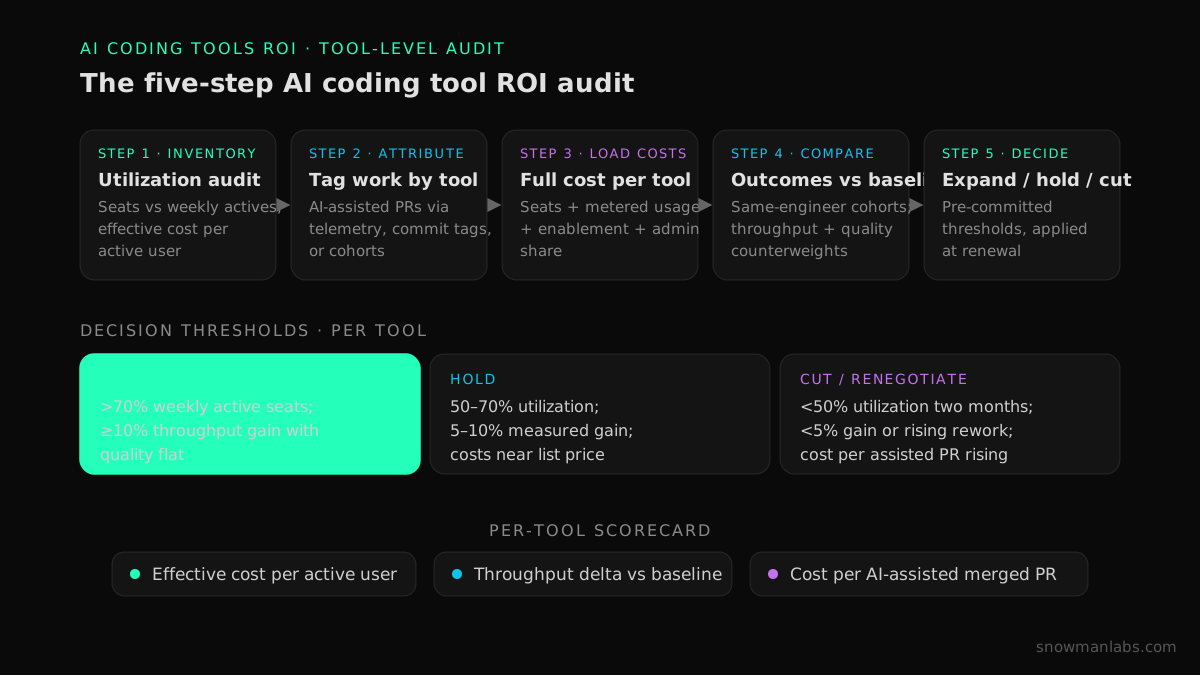
The five-step AI coding tool ROI audit
You can run this audit in about 30 days on data you already have. It answers, per tool: who uses it, what it produces, what it truly costs, and what to do at renewal.
- Inventory every license and measure real utilization. Pull provisioned seats, weekly active users (WAU), and depth of use (suggestions, agent sessions, assisted PRs) from each vendor's admin dashboard. Expect a gap: even top-performing organizations see only 60–70% of developers using AI tools daily or weekly — below that, you are funding shelfware. Compute effective cost per active user for every tool. Include shadow spend: individual subscriptions expensed outside procurement belong in the inventory.
- Attribute work to tools. Turn on AI-assistance telemetry (provider APIs, commit trailers, IDE plugins) so merged PRs are tagged by tool. Where telemetry is partial, use cohort attribution — teams standardized on tool A vs. tool B — rather than guessing. Attribution is the step most organizations skip, and without it the audit collapses back into one undifferentiated "AI" line.
- Load the full cost per tool. Seats + metered usage + enablement hours + admin/governance share, per the TCO categories. Watch the metered lines: agent platforms and usage-billed assistants can double a tool's monthly cost without a single new seat.
- Compare outcomes against the baseline, per tool. Using your frozen baseline and same-engineer comparisons, measure throughput and quality (change failure rate, defect escape, rework) for work assisted by each tool. The metric portfolio and collection methods are covered in our field guide to measuring AI developer productivity, and the quality counterweights in our guide to DORA metrics for AI-assisted teams — both apply here, segmented by tool.
- Decide per tool: expand, hold, or cut. Pre-commit thresholds before you see results, so the renewal decision is mechanical rather than political.
A defensible starting rulebook — tune the numbers to your baseline, but keep the structure:
| Signal | Expand | Hold | Cut or renegotiate |
|---|---|---|---|
| Weekly active users ÷ paid seats | >70% | 50–70% | <50% for two consecutive months |
| Measured throughput gain (assisted vs. baseline) | ≥10% with quality flat | 5–10% | <5%, or any gain with rising failure/rework |
| Effective cost per active user vs. list | Near list | <1.5× list | ≥2× list |
| Cost per AI-assisted merged PR (trend) | Falling | Flat | Rising two quarters |
"Cut" rarely means eliminating the category; it usually means reclaiming unused seats, downgrading tiers, or consolidating overlapping tools — which is where the next section goes.
Per-seat vs. metered: how agents change the ROI math
Autonomous agents make tool ROI easier to measure and easier to overspend. Seat-priced assistants amortize one fee across everything a developer does, so attribution is statistical. Metered agents — Devin billing in Agent Compute Units, usage-billed Claude Code — attach a cost to each unit of work, so cost per delivered task is directly observable: this migration PR cost $31 of agent compute plus 40 minutes of senior review. No survey required.
The discipline that keeps metered spend honest has three parts:
- Measure cost per merged agent PR, not per attempted task. Abandoned runs and rejected PRs are real costs with zero value; a falling merge rate is the earliest signal of misuse or poor task selection.
- Track human verification hours per agent outcome. Agent economics fail quietly when review time balloons; the unit of capacity is the engineer-plus-agents delivery cell, not the agent alone. Verification tooling and runtime evidence — the subject of our guide to production-safe AI-generated code — is what keeps that number down.
- Match the billing model to the workload. Steady inline assistance across a large team favors seats; bursty, well-scoped delegated work (migrations, test backfills, backlog defects) favors metered agents you can point at a queue and stop paying when the queue is empty. Most enterprises land on a deliberate mix — our comparison of Devin and Cursor's enterprise roles walks through when each model earns its spend.
Rationalizing the portfolio: overlap, consolidation, negotiation
After the audit, most portfolios show the same three findings — and each has a standard move:
- Category overlap. Two-plus tools doing inline completion, or an IDE agent and an autonomous agent both pointed at feature work. Keep one tool per category per team unless the audit shows disjoint strengths (for example, one tool measurably better in the legacy codebase, another in greenfield services). Overlap is the cheapest cut in the portfolio because usage migrates rather than disappears.
- Utilization spread. Power users at 5×–10× median usage alongside licensed non-users. Reclaim inactive seats at renewal, and consider shifting heavy users to metered or premium tiers where their consumption is priced honestly instead of throttled.
- List-price renewals. Enterprise agreements move: negotiate pooled usage rather than per-seat quotas, secure active-user true-downs, and use your audit data at the table — a vendor facing documented 45% utilization prices differently than one facing enthusiasm. The audit pays for itself here even before any productivity effect.
Fold the surviving portfolio into a one-page, per-tool scorecard — effective cost per active user, throughput delta, quality counterweights, cost per assisted PR — and attach it to the budget line. That artifact is the difference between "we spend $400K on AI tools" and "these three tools return, this one doesn't"; it is also exactly the evidence layer a CFO-grade AI business case needs.
When the tools aren't the problem
Sometimes the audit returns an uncomfortable result: utilization is healthy, per-task gains are real, and delivery metrics are still flat. That is not a tool failure — it is a system bottleneck. Individual speedups pool at the next constraint, usually code review or testing, and the 2025 DORA data is blunt about AI amplifying whatever delivery system it lands in. Buying more or different licenses at that point burns money; the fix is operational — verification capacity, batch sizes, feedback loops, and in the strongest cases a redesign of the delivery model itself around supervised agent capacity.
That system-level work — deciding where AI investment will and won't produce measurable returns, and re-architecting delivery so it does — is the core of our AI software engineering ROI services. The tool audit tells you which licenses to keep; the delivery system determines what they can return.
FAQ
Are AI coding tools worth the cost for enterprise teams?
Measured honestly, usually yes — but by less than vendors claim. Field data puts typical throughput gains at 5–15% and cycle-time improvements near 25%, which on an enterprise payroll comfortably clears a $19–$40 seat. The exceptions are low-utilization deployments: at under 50% weekly active use, effective seat cost doubles and ROI frequently goes negative.
How much do AI coding tools cost per developer per month?
List prices run $19–$40 per user per month for team tiers of the major assistants, but the fully loaded figure — metered usage, enablement, administration — typically lands at $200–$600 per engineer per month for teams mixing inline and agentic tools. Budget from the loaded number, not the seat price.
What is a good license utilization rate for AI coding tools?
Top-performing organizations see 60–70% of developers using the tools daily or weekly; below roughly 50% weekly active use for two consecutive months, reclaim seats or fix enablement before evaluating productivity at all. Utilization is a gate, not a goal — 100% adoption with no outcome change still returns nothing.
How do you prove ROI of AI coding tools to a CFO?
Show tool-level evidence against a frozen baseline: effective cost per active user, measured throughput delta with quality held flat, and cost per AI-assisted merged PR, each trended over at least 90 days. CFOs accept modest measured numbers with stated counterweights far more readily than large surveyed ones — METR's finding that developers overestimated their own speedup by 39 points is the standing reason surveys can't headline the case.
Should we standardize on one AI coding tool or run several?
Run one tool per category (inline assistant, IDE agent, autonomous agent) per team, and keep a second tool in a category only when the audit shows disjoint, measurable strengths. Uncontrolled multi-tool sprawl splits usage data, doubles enablement cost, and makes attribution — the foundation of any ROI claim — nearly impossible.
How do usage-billed coding agents change the ROI calculation?
Metered agents make cost per task directly observable, so ROI shifts from statistical attribution to unit economics: cost per merged agent PR and human verification hours per outcome. They also introduce elastic spend — budget for variance, watch the merge rate, and stop feeding the queue when the ROI per task degrades.
Why is our AI tool spend rising while delivery metrics stay flat?
Because individual coding speedups pool at the next system constraint — usually review or testing — and coding is only about 14–16% of an engineer's day to begin with. Check utilization and per-task gains first; if both are healthy, the bottleneck is the delivery system, and the remedy is operational change rather than more licenses.
Conclusion: audit the tools, then fix the system
An AI tool budget defends itself when every line item carries three numbers: effective cost per active user, measured outcome delta against baseline, and cost per assisted PR. Run the five-step audit, apply the expand/hold/cut thresholds, consolidate the overlap, and price the metered work honestly — and the renewal conversation becomes arithmetic instead of anecdotes. Then take the harder half seriously: tools amplify the delivery system they land in, so the ceiling on their ROI is set by yours.
If you want an evidence-based read on where your organization's delivery system will — and won't — convert AI tool spend into measurable returns, start with our AI Readiness Diagnostic.
Find your highest-value path to agentic delivery.
Map your readiness, delivery constraints, and first 90-day opportunity with the Snowman Labs AI Readiness Diagnostic.