How to Improve Developer Productivity with AI
How to improve developer productivity with AI: what the evidence supports, six levers that move delivery metrics, and the traps that erase the gains.
 By Danilo Brizola
To improve developer productivity with AI, point the tools at well-scoped, high-volume work, fix the downstream constraints that individual speed exposes, and measure the result against a pre-AI baseline — because the evidence says gains are real but conditional, not automatic. This guide is for CIOs, CTOs, and VPs of Engineering who have already bought the licenses and now need the delivery metrics to move. It covers what credible research actually shows, the six levers that convert AI assistance into shipped outcomes, and the traps that quietly erase the gains.
What the evidence says about AI and developer productivity
The honest summary: AI produces large gains on well-scoped tasks, small-to-negative results on complex work in mature codebases, and a measurable gap between how much faster developers feel and how much faster they are. Any improvement plan that ignores one of those three findings will overpromise.
The studies worth anchoring to:
| Study | Design | Finding |
|---|---|---|
| GitHub's controlled experiment | Timed task, greenfield code | 55% faster on a well-scoped task with Copilot |
| McKinsey's lab study | Controlled task comparison | ~45–50% savings on documentation, ~35–45% on code generation, under 10% on high-complexity work |
| METR's randomized controlled trial | RCT, 16 experienced maintainers, 246 real tasks in mature repositories | 19% slower with AI — while participants believed they were 20% faster |
| DORA 2024 | Survey, ~39,000 professionals | AI adoption correlated with a 1.5% drop in delivery throughput and 7.2% drop in delivery stability |
| DORA 2025 | Survey, ~5,000 professionals | 90% of developers now use AI; the throughput correlation turned positive, but instability remains elevated |
| DX cross-company research | Telemetry + surveys, 38,880 developers at 184 companies | Median time savings ~3h45m per developer per week; realized productivity gains of 5–15% |
Three conclusions follow. First, task type dominates tool choice: the same assistant that delivers 55% on scoped greenfield work can deliver negative returns on novel work in a fifteen-year-old monolith. Second, perception is not measurement: METR's participants were confidently wrong about their own speed, which is why self-reported gains cannot be your evidence base. Third, the 2024-to-2025 reversal in DORA's throughput data is the playbook working: organizations spent a year fixing the systems around AI — smaller batches, faster review, better platforms — and the correlation flipped. DORA's own framing is that AI is an amplifier: it magnifies the strengths of well-run delivery organizations and the dysfunctions of struggling ones.
That last point reframes the whole question. Improving developer productivity with AI is mostly not an AI project — it is a delivery-system project with AI as the force multiplier.
Why individual speed doesn't become team throughput
AI accelerates the typing; delivery is constrained by everything after the typing. When assistants make code cheap to produce, the constraint moves downstream — to code review, CI capacity, integration, and deployment — and a system that doesn't widen those stages converts AI speed into work-in-progress, not into shipped features.
This is the mechanism behind DORA's instability finding, and it shows up in predictable places:
- Review queues lengthen. More code per engineer-hour lands on the same senior reviewers. Review turnaround, not authoring time, becomes the cycle-time driver.
- Batch sizes creep up. AI makes big changes easy to generate, and big changes are precisely what DORA metrics for AI-assisted software teams show failing more often — change failure rate is the early-warning metric for AI-accelerated teams.
- Verification debt accumulates. Code that was faster to write but wasn't proportionally tested and reviewed ships defects that consume next quarter's capacity.
The practical redefinition for leadership: developer productivity under AI is the rate at which your system converts engineering effort into production outcomes at held or improved quality — not the rate at which individuals produce code. Every lever below is aimed at that definition.
Where AI genuinely helps: match the work to the tool
Gains concentrate where work is high-volume, well-specified, and easy to verify. The task-level hierarchy — consistent across the McKinsey, GitHub, and METR results, and covered in depth in our pillar on how to measure ROI from AI in software engineering — runs roughly:
- Documentation and code explanation (~45–50% time savings) — low risk, easy to verify, and it compounds: better-documented code makes every later AI interaction more effective.
- Test generation and boilerplate (~35–45%) — high-volume pattern work where AI's strengths dominate.
- Well-scoped feature work in modern codebases (~35–45%) — GitHub's 55% territory, discounted for real-world friction.
- Refactoring and structured migration (~20–30%) — real gains, but they demand stronger verification.
- Novel, high-complexity work in mature systems (under 10%, sometimes negative) — METR's territory. Don't build the business case here.
Beyond authoring, two use cases consistently pay off because they attack waiting rather than typing: AI-assisted code review (first-pass review on routine changes, freeing senior reviewers for architectural judgment) and codebase Q&A for onboarding — new engineers asking the repository questions instead of interrupting the two people who understand it.
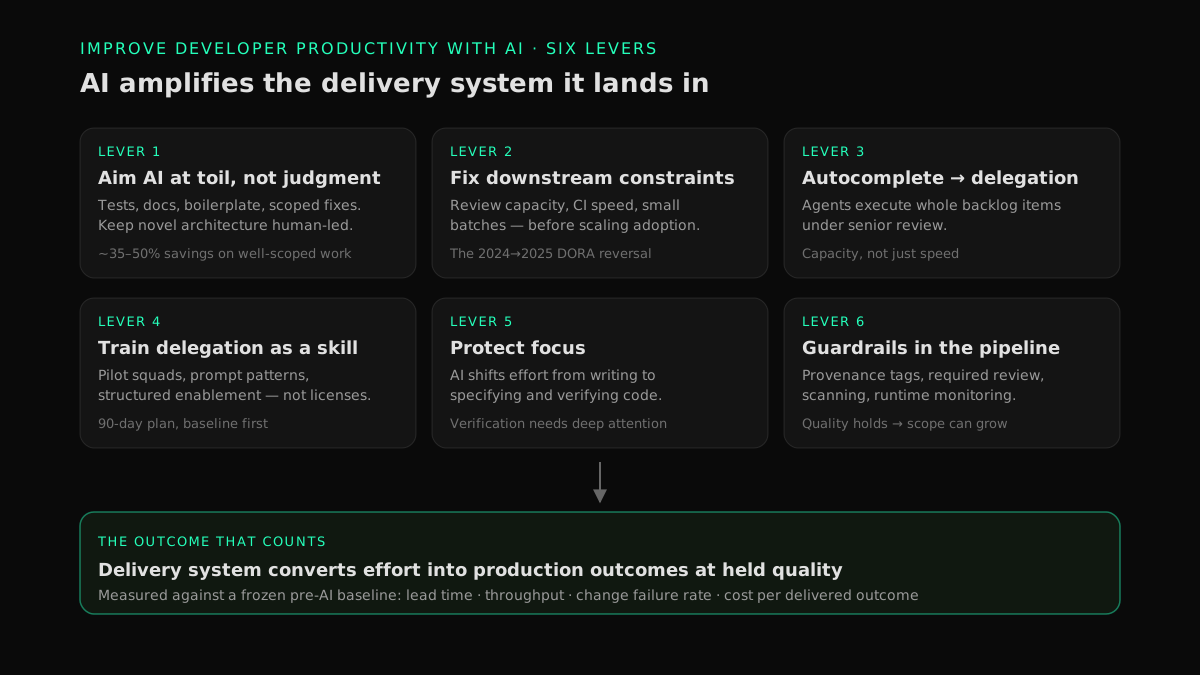
Six levers to improve developer productivity with AI
Ranked by how reliably they move delivery metrics, not by how easy they are to buy.
1. Aim AI at toil, not at judgment
Route AI work toward the top of the hierarchy above: tests, documentation, boilerplate, scoped bug fixes, well-specified features. Keep novel architecture and security-critical logic human-led with AI as a reference, not a ghostwriter. Teams that formalize this routing — even as a one-page "green/yellow/red" task guide — avoid the METR failure mode of experienced engineers babysitting AI through work they'd finish faster alone.
2. Fix the downstream constraints before scaling the upstream speed
Before expanding AI usage, widen the stages that AI-generated volume will hit: enforce small batch sizes, staff or automate first-pass review, and get CI feedback under ten minutes. This is unglamorous, and it is the single most evidence-backed lever — the difference between DORA's 2024 cohort (throughput down) and its 2025 cohort (throughput up) is largely organizations doing exactly this work on the delivery system around the tools.
3. Move from autocomplete to delegation
Assistants accelerate a person; agents add capacity to a team. The step change comes when senior engineers stop accepting suggestions line by line and start delegating whole, well-specified backlog items — a bug fix with a reproduction case, a test-coverage gap, a scoped migration — to coding agents, then reviewing finished work. That operating model is what agentic engineering means in practice, and its most immediate application for most organizations is burning down an engineering backlog without growing headcount: the backlog is full of exactly the well-specified, verifiable items agents handle best.
4. Train delegation as a skill, not a perk
The gap between your best and median AI-assisted engineer is a skills gap, not a talent gap: task decomposition, context provision, prompt specificity, and knowing when to take the wheel back are learnable. Structured enablement — pilot squads, shared prompt patterns, weekly working sessions where engineers demo real wins and real failures — consistently outperforms handing out licenses. Our 90-day AI engineering enablement plan sequences this: baseline first, pilot squads on genuine backlog items, then scale with governance. This is also the work Snowman Labs does jointly with Cognition's Forward Deployed Engineers as an official Cognition enablement partner — training enterprise teams to direct agents, not just accept suggestions.
5. Protect focus, and budget for the new cognitive load
AI shifts developer effort from writing code to specifying and verifying it — work that demands more sustained attention, not less. The pre-AI productivity fundamentals therefore matter more: blocks of uninterrupted time, a meeting budget, fast local tooling, and priorities clear enough that engineers aren't context-switching between five initiatives. An organization that fragments its engineers' attention will find AI amplifies the fragmentation — more threads in flight, each shallowly supervised.
6. Put the guardrails in the pipeline, not in a PDF
Quality regressions are how AI productivity gains get repaid with interest. Make the guardrails structural: provenance tagging so AI-attributed changes are identifiable, required review on AI-authored diffs, secret and dependency scanning in CI, and runtime monitoring on services receiving AI-generated changes — static checks alone miss failure modes that only appear under production traffic, which is why production-safe AI-generated code requires runtime context. Governance done this way is not a tax on productivity; it is what lets you keep expanding AI scope without the change-failure spike that forces a retreat.
Prove it: measure the gains like money
A productivity improvement you can't demonstrate against a baseline is an opinion, and the perception gap says opinions run ~39 points optimistic. The measurement discipline is its own topic — freeze a pre-AI baseline, track a layered portfolio rather than one number, and segment AI-attributed work — and we cover it fully in how to measure AI developer productivity and the companion guide to engineering productivity metrics worth tracking. Two rules matter even if you read nothing else: never use suggestion-acceptance rate or self-reported speed as headline numbers, and review tool-level returns quarterly — the same discipline as an AI coding tools ROI audit — so spend follows evidence rather than enthusiasm.
The traps that erase the gains
Each of these is common, and each has a specific antidote:
- Trusting self-report. Developers in METR's trial were 39 points wrong about their own speed. Antidote: telemetry-based measurement against a frozen baseline; surveys for experience, not for speed claims.
- Pilot on the hardest subsystem. A pilot in your gnarliest legacy code produces a false negative and discredits the program. Antidote: pilot where evidence says the signal is strongest — documentation, tests, scoped features — then expand.
- Scaling adoption faster than review capacity. The instability data is unambiguous. Antidote: lever 2 before lever 3; watch change failure rate weekly during rollout.
- Measuring activity instead of outcomes. Lines generated, suggestions accepted, and prompts sent all rise while delivery stands still. Antidote: judge the program on lead time, throughput, change failure rate, and cost per delivered outcome.
- Treating AI as a headcount substitute. Framing the program as replacement suppresses adoption and drives your best engineers out. Antidote: frame and staff it as capacity expansion — the backlog that never gets scheduled is the target.
- Tool sprawl. Three overlapping assistants with 40% utilization each cost more than one well-adopted platform. Antidote: quarterly utilization audit; consolidate ruthlessly.
FAQ
Does AI actually improve developer productivity?
Yes, conditionally. Real-world measurements across 184 companies put typical gains at 5–15% — meaningful, but far below vendor headlines — with much larger gains on well-scoped tasks like tests and documentation, and small or negative results on complex work in mature codebases. The outcome depends more on task routing, review capacity, and enablement than on which tool you buy.
How much faster do developers get with AI coding tools?
It ranges from 55% faster on well-scoped greenfield tasks (GitHub's controlled experiment) to 19% slower for experienced developers on complex tasks in mature repositories (METR's randomized trial). Median realized savings across large-scale telemetry studies are roughly 3–4 hours per developer per week. Your number depends on your task mix, codebase age, and engineer seniority — measure it rather than borrowing a benchmark.
Why did AI make experienced developers slower in the METR study?
The developers were experts working in mature, million-line codebases they knew deeply, where most of the work is understanding constraints rather than typing. AI suggestions missed implicit context, and the cost of reviewing, correcting, and re-prompting exceeded the time saved on generation. The study's second finding matters just as much: participants still believed AI had made them 20% faster.
What is the best way to start improving developer productivity with AI?
Start with a four-week delivery baseline (lead time, deployment frequency, change failure rate, review turnaround), then run pilot squads on genuine backlog items in AI-favorable task types — tests, documentation, scoped fixes. Expand only when the pilot beats the baseline at held quality. A sequenced rollout with governance gates is exactly what a 90-day enablement plan provides.
How do you know whether AI is actually improving your team's productivity?
Compare system-level delivery metrics against a pre-AI baseline, with AI-attributed work tagged so its effect is isolated rather than inferred. Distrust suggestion-acceptance rates and self-reported speed — both correlate with perceived productivity, which the evidence shows can be inverted from reality.
Do AI coding tools reduce code quality?
They can. DORA's research associates AI adoption with elevated delivery instability, and unreviewed AI code ships subtle defects that surface as rework. Teams that hold quality do so structurally: required review on AI-authored changes, small batches, provenance tagging, and runtime monitoring — not by trusting the model.
Should we use coding agents or coding assistants to improve productivity?
Both, for different work. Assistants (autocomplete, chat) accelerate individual engineers inside the editor; agents execute whole, well-specified tasks — scoped fixes, test coverage, migrations — under human review, adding capacity rather than just speed. Most enterprises get assistant fluency first, then graduate high-volume backlog work to agents as governance matures.
Conclusion: the system is the multiplier
Improving developer productivity with AI comes down to one strategic insight and six operational levers. The insight: AI amplifies the delivery system it lands in, so the organizations seeing compounding gains are the ones that fixed review capacity, batch size, enablement, and governance — then let AI push volume through a system built to absorb it. The levers: route AI to toil, widen the downstream constraints, graduate from autocomplete to delegation, train the skill, protect focus, and enforce guardrails in the pipeline. Do that against an honest baseline and the gains stop being a debate and start being a line item.
If you want to know which lever is your constraint before spending another dollar on licenses, start with the AI Readiness Assessment — it baselines your delivery system, task mix, and governance posture, and returns a prioritized plan for where AI capacity will actually show up in your metrics.
Find your highest-value path to agentic delivery.
Map your readiness, delivery constraints, and first 90-day opportunity with the Snowman Labs AI Readiness Diagnostic.